Understanding APT Defense
This section describes the implementation mechanism and procedure of APT defense through interworking between the FW and sandbox.
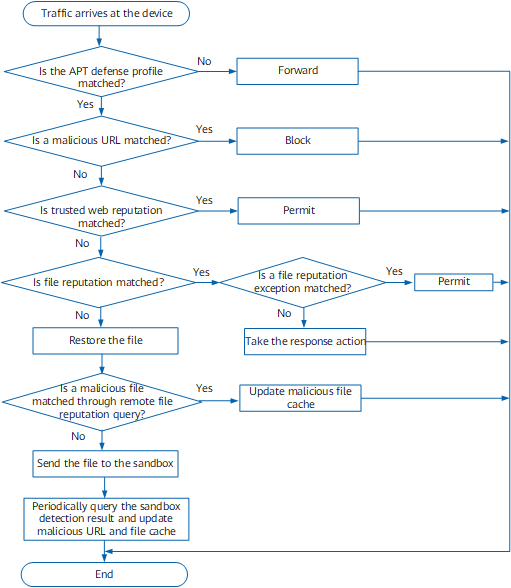
The FW provides the professional IAE and APT defense function and interworks with the sandbox to detect network traffic. The FW updates the cached malicious file and malicious URL lists based on the detection result. If subsequent traffic matches the malicious file or malicious URL list, the block or alert action is performed. Figure 1 shows the procedure of the APT defense.
Whether the APT defense profile is matched
After network traffic enters the FW and goes through security policy detection, traffic is sent to the IAE for detection. The IAE identifies such information as the application protocol used by the traffic and performs APT detection actions based on the actual configuration.
If the traffic matches an APT defense profile, the subsequent inspection is performed. If the traffic does not match an APT defense profile, the traffic is forwarded.
Whether a malicious URL is matched
If malicious URL detection is enabled in the APT defense profile, the device matches the URL of the file to be inspected against the malicious URLs cached in the device. If the URL matches a malicious URL, the device blocks the URL, and no further inspection is required. The malicious URLs cached in the device are generated based on the inspection results of the sandbox.
-
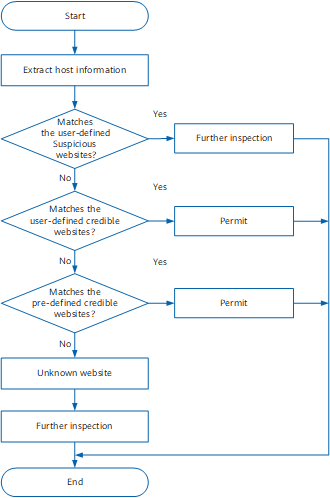
The web reputation describes to what level a website is trusted. The FW extracts the host field information from the URL of an accessed website and matches the string with web reputation website categories. The reputation determines whether to extract files from network traffic and sends the files to the sandbox for detection. The detailed query procedure is as follows:
Whether file reputation is matched
If the file reputation detection function is enabled in the APT defense profile, the device matches the file to be inspected against the malicious file entries cached in the device. If the file matches a malicious file, the device checks whether the malicious file matches a file reputation exception. If yes, the device permits the file. If no, the device takes the corresponding action on the file, and the file does not need to be restored. Otherwise, the file needs to be restored. The malicious files cached in the device may come from the following sources:-
Before restored files are submitted to the sandbox, the device performs file reputation remote query for the files to determine whether they are malicious. If a file is determined as a malicious file, the device updates the cached malicious file list, and the file does not need to be sent to the sandbox for inspection. If subsequent traffic arriving on the FW matches a malicious file, the specified action is performed.
Files submitted to the sandbox for detection
Sandboxes fall into local and cloud ones. The local sandbox saves the efforts of transmitting files to the extranet and guarantees file security. The cloud sandbox delivers a more comprehensive detection capability, more timely threat information update, and better protection over the enterprise network.
The administrator shall select the application and file types and sandbox type in the APT defense profile based on the actual requirements and networking. Restored files are sent to the sandbox specified in the APT defense profile. All files contained in a flow must be sent to the sandbox of only one type for detection. After obtaining the files, the sandbox runs the files and compares their behavior signatures with the behavior signature database to determine whether the file is a malicious file or whether the URL for transferring the file is a malicious URL.

For the local and cloud sandboxes, the procedures are the same before files are sent to the desired sandbox according to the configuration.
The FW obtains the IP address and port number of the cloud sandbox server by connecting to sec.huawei.com for regional scheduling. Currently, the port number of the cloud sandbox is 12443, and the FW associates with the cloud sandbox server based on the IP address and port number of the cloud sandbox server. There are two regional scheduling modes:If the country of the device has been configured, sec.huawei.com automatically locates the deployment region of the cloud sandbox according to the configuration and sends the IP address and port number of the cloud sandbox server to the FW.
If the country of the device is not configured, sec.huawei.com sends the list of deployment regions of schedulable cloud sandboxes to the FW. You need to specify a deployment region to obtain the IP address and port number of the cloud sandbox server in this region.
Subsequent traffic block based on the sandbox detection result
The FW periodically reads file detection results from the sandbox. After malicious URL detection and file reputation detection are enabled, the IAE updates the cached malicious file and malicious URL lists based on the sandbox inspection results. If subsequent traffic arriving on the FW matches a malicious file or URL, the specified action is performed. If the traffic matches a malicious URL, the device blocks the traffic. If the traffic matches a malicious file, the specified action is performed.
If you only need to determine whether threats exist in the traffic without performing any preventive action, enabling malicious URL detection or malicious file detection is not mandatory.