CLI Example: Configuring Non-Shortcut Scenario of DSVPN (Static Route)
Networking Requirements
A small enterprise has a central office (Hub) and two branches (Spoke1 and Spoke2) which are located in different areas. The network between the Hub and Spokes is stable. The Spokes use dynamic addresses to connect to the public network.
The enterprise wants to establish a VPN between the Spokes.
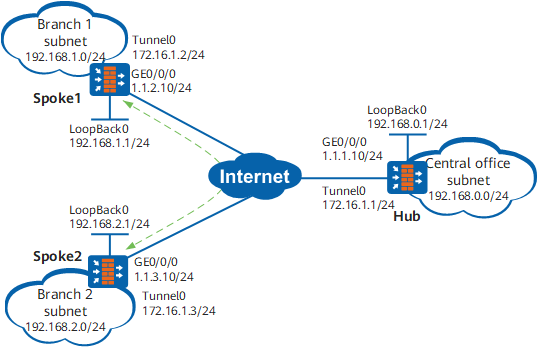
Configuration Roadmap
Because a Spoke uses a dynamic address to connect to the public network, it does not know the public IP address of the other Spoke. DSVPN is implemented to establish a VPN between the Spokes.
Non-Shortcut Scenario of DSVPN is implemented because the enterprise has a small number of branches.
Static routes can be configured to realize communication between the Hub and Spokes because the network is stable.
Procedure
- Assign an IP address to each interface.
Configure IP addresses for the interfaces of each FW.
# Configure IP addresses for interfaces of Hub.
<sysname> system-view
[sysname] sysname Hub
[Hub] interface GigabitEthernet 0/0/0
[Hub-GigabitEthernet0/0/0] ip address 1.1.1.10 255.255.255.0
[Hub-GigabitEthernet0/0/0] quit
[Hub] interface tunnel 0
[Hub-Tunnel0] ip address 172.16.1.1 255.255.255.0
[Hub-Tunnel0] quit
[Hub] interface loopback 0
[Hub-LoopBack0] ip address 192.168.0.1 255.255.255.0
[Hub-LoopBack0] quit
Configure IP addresses for interfaces of Spoke1 and Spoke2 as shown in Figure 1. The specific configuration is not mentioned here.
- Configure security zones and security policies.
# Configure security zones on each device. The configuration commands are the same, and the Hub is used as an example.
[Hub] firewall zone untrust
[Hub-zone-untrust] add interface GigabitEthernet 0/0/0
[Hub-zone-untrust] add interface tunnel 0
[Hub-zone-untrust] quit
# Configure security policies on each device. The configuration commands are the same, and the Hub is used as an example.
In this example, loopback interfaces in the Local zone are used to simulate subnet users. Therefore, the interzone policy between the Local zone and security zone where the tunnel interface resides needs to be configured (in this example, policy rule1 is configured). Actually, the interzone policy between the security zones where subnets reside needs to be configured. For example, if the subnet of the enterprise resides in the Trust zone, configure the interzone policy between the Trust zone and security zone where the tunnel interface resides.
[Hub] security-policy
[Hub-policy-security] rule name rule1
[Hub-policy-security-rule-rule1] source-zone untrust local
[Hub-policy-security-rule-rule1] destination-zone untrust local
[Hub-policy-security-rule-rule1] sourse-address 192.168.0.0 mask 255.255.0.0
[Hub-policy-security-rule-rule1] action permit
[Hub-policy-security-rule-rule1] quit
[Hub-policy-security] rule name rule2
[Hub-policy-security-rule-rule2] source-zone untrust local
[Hub-policy-security-rule-rule2] destination-zone untrust local
[Hub-policy-security-rule-rule2] service gre ospf
[Hub-policy-security-rule-rule2] action permit
[Hub-policy-security-rule-rule2] quit
[Hub-policy-security] quit
- Configure routes between the FWs.
Configure OSPF on each FW to provide reachable routes to the public network.
# Configure OSPF on Hub.
[Hub] ospf 2 router-id 1.1.1.10
[Hub-ospf-2] area 0.0.0.1
[Hub-ospf-2-area-0.0.0.1] network 1.1.1.0 0.0.0.255
[Hub-ospf-2-area-0.0.0.1] quit
[Hub-ospf-2] quit
# Configure OSPF on Spoke1.
[Spoke1] ospf 2 router-id 1.1.2.10
[Spoke1-ospf-2] area 0.0.0.1
[Spoke1-ospf-2-area-0.0.0.1] network 1.1.2.0 0.0.0.255
[Spoke1-ospf-2-area-0.0.0.1] quit
[Spoke1-ospf-2] quit
# Configure OSPF on Spoke2.
[Spoke2] ospf 2 router-id 1.1.3.10
[Spoke2-ospf-2] area 0.0.0.1
[Spoke2-ospf-2-area-0.0.0.1] network 1.1.3.0 0.0.0.255
[Spoke2-ospf-2-area-0.0.0.1] quit
[Spoke2-ospf-2] quit
- Configure static routes.
# Configure Hub.
[Hub] ip route-static 192.168.1.0 255.255.255.0 172.16.1.2
[Hub] ip route-static 192.168.2.0 255.255.255.0 172.16.1.3
# Configure Spoke1.
[Spoke1] ip route-static 192.168.0.0 255.255.255.0 172.16.1.1
[Spoke1] ip route-static 192.168.2.0 255.255.255.0 172.16.1.3
# Configure Spoke2.
[Spoke2] ip route-static 192.168.0.0 255.255.255.0 172.16.1.1
[Spoke2] ip route-static 192.168.1.0 255.255.255.0 172.16.1.2
- Configure tunnel interfaces.
Configure tunnel interfaces on Hub and Spokes and configure static NHRP peer entries of Spoke1 and Spoke2.
# Configure a tunnel interface on Hub.[Hub] interface tunnel 0 [Hub-Tunnel0] tunnel-protocol gre p2mp [Hub-Tunnel0] source GigabitEthernet 0/0/0 [Hub-Tunnel0] quit# Configure a tunnel interface and a static NHRP peer entry of Hub on Spoke1.[Spoke1] interface tunnel 0 [Spoke1-Tunnel0] tunnel-protocol gre p2mp [Spoke1-Tunnel0] source GigabitEthernet 0/0/0 [Spoke1-Tunnel0] nhrp entry 172.16.1.1 1.1.1.10 register [Spoke1-Tunnel0] quit# Configure a tunnel interface and a static NHRP mapping entry of Hub on Spoke2.[Spoke2] interface tunnel 0 [Spoke2-Tunnel0] tunnel-protocol gre p2mp [Spoke2-Tunnel0] source GigabitEthernet 0/0/0 [Spoke2-Tunnel0] nhrp entry 172.16.1.1 1.1.1.10 register [Spoke2-Tunnel0] quit - Verify the configuration.
After the preceding configurations are complete, check the NHRP mapping entries of Spoke1 and Spoke2.
# Run the display nhrp peer all command on Spoke1. The command output is as follows:
[Spoke1] display nhrp peer all
-------------------------------------------------------------------------------
Protocol-addr   Mask  NBMA-addr       NextHop-addr    Type         Flag
-------------------------------------------------------------------------------
172.16.1.1      32    1.1.1.10        172.16.1.1       hub          up
-------------------------------------------------------------------------------
Tunnel interface: Tunnel0
Created time    : 00:10:58
Expire time     : -- HostName        : Hub HostEsn         : 210235G7G610F1000002

Number of nhrp peers: 1
# Run the display nhrp peer all command on Spoke2. The command output is as follows:
[Spoke2] display nhrp peer all
-------------------------------------------------------------------------------
Protocol-addr   Mask  NBMA-addr       NextHop-addr    Type         Flag
-------------------------------------------------------------------------------
172.16.1.1      32    1.1.1.10        172.16.1.1       hub          up
-------------------------------------------------------------------------------
Tunnel interface: Tunnel0
Created time    : 00:07:55
Expire time     : -- HostName        : Hub HostEsn         : 210235G7G610F1000002

Number of nhrp peers: 1
If you run the display nhrp peer all command on Spoke1 and Spoke2, you can view only the static NHRP mapping entry of Hub.
On Hub, check the NHRP mapping entries of Spoke1 and Spoke2.
# Run the display nhrp peer all command on Hub. The command output is as follows:
[Hub] display nhrp peer all
-------------------------------------------------------------------------------
Protocol-addr   Mask  NBMA-addr       NextHop-addr    Type         Flag
-------------------------------------------------------------------------------
172.16.1.2      32    1.1.2.10        172.16.1.2      registered   up|unique
-------------------------------------------------------------------------------
Tunnel interface: Tunnel0
Created time    : 00:02:02
Expire time     : 01:57:58 HostName        : Spoke1 HostEsn         : 210235G7G610F1000013
-------------------------------------------------------------------------------
Protocol-addr   Mask  NBMA-addr       NextHop-addr    Type         Flag
-------------------------------------------------------------------------------
172.16.1.3      32    1.1.3.10        172.16.1.3      registered   up|unique
-------------------------------------------------------------------------------
Tunnel interface: Tunnel0
Created time    : 00:01:53
Expire time     : 01:59:35 HostName        : Spoke2 HostEsn         : 210235G7G610F3000017

Number of nhrp peers: 2
- Check the static routes.
Check the static routes on Hub.
# Run the display ip routing-table protocol static command on Hub. The command output is as follows:
[Hub] display ip routing-table protocol static
Route Flags: R - relay, D - download to fib
------------------------------------------------------------------------------
Public routing table : Static
         Destinations : 2        Routes : 2        Configured Routes : 2

Static routing table status : <Active>
         Destinations : 2        Routes : 2

Destination/Mask    Proto   Pre  Cost      Flags NextHop         Interface

    192.168.1.0/24  Static  60   0          RD   172.16.1.2      Tunnel0
    192.168.2.0/24  Static  60   0          RD   172.16.1.3      Tunnel0

Static routing table status : <Inactive>
         Destinations : 0        Routes : 0
Check the static routes on the Spokes.
# Run the display ip routing-table protocol static command on Spoke1. The command output is as follows:
[Spoke1] display ip routing-table protocol static
Route Flags: R - relay, D - download to fib
------------------------------------------------------------------------------
Public routing table : Static
         Destinations : 2        Routes : 2        Configured Routes : 2

Static routing table status : <Active>
         Destinations : 2        Routes : 2

Destination/Mask    Proto   Pre  Cost      Flags NextHop         Interface

    192.168.0.0/24  Static  60   0          RD   172.16.1.1      Tunnel0
    192.168.2.0/24  Static  60   0          RD   172.16.1.3      Tunnel0

Static routing table status : <Inactive>
         Destinations : 0        Routes : 0
# Run the display ip routing-table protocol static command on Spoke2. The command output is as follows:
[Spoke2] display ip routing-table protocol static Route Flags: R - relay, D - download to fib ------------------------------------------------------------------------------ Public routing table : Static Destinations : 2 Routes : 2 Configured Routes : 2 Static routing table status : <Active> Destinations : 2 Routes : 2 Destination/Mask Proto Pre Cost Flags NextHop Interface 192.168.0.0/24 Static 60 0 RD 172.16.1.1 Tunnel0 192.168.1.0/24 Static 60 0 RD 172.16.1.2 Tunnel0 Static routing table status : <Inactive> Destinations : 0 Routes : 0 - Run the ping command to check the configuration result.
To use the ping command for link detection, run the service-manage ping permit command in the interface view to set the ping service of all firewall interfaces on the link to permit.
Ping 192.168.2.1 on Spoke1. You can see that Spoke1 and Spoke2 have learned dynamic NHRP mapping entries from each other.
# Run the ping -a 192.168.1.1 192.168.2.1 command on Spoke1. The command output is as follows:
[Spoke1] ping -a 192.168.1.1 192.168.2.1
  PING 192.168.2.1: 56  data bytes, press CTRL_C to break
    Reply from 192.168.2.1: bytes=56 Sequence=1 ttl=254 time=3 ms
    Reply from 192.168.2.1: bytes=56 Sequence=2 ttl=255 time=2 ms
    Reply from 192.168.2.1: bytes=56 Sequence=3 ttl=255 time=2 ms
    Reply from 192.168.2.1: bytes=56 Sequence=4 ttl=255 time=2 ms
    Reply from 192.168.2.1: bytes=56 Sequence=5 ttl=255 time=2 ms

  --- 192.168.2.1 ping statistics ---
    5 packet(s) transmitted
    5 packet(s) received
    0.00% packet loss
    round-trip min/avg/max = 2/2/3 ms
# Run the display nhrp peer all command on Spoke1. The command output is as follows:
[Spoke1] display nhrp peer all
-------------------------------------------------------------------------------
Protocol-addr   Mask  NBMA-addr       NextHop-addr    Type            Flag
-------------------------------------------------------------------------------
172.16.1.1      32    1.1.1.10        172.16.1.1      hub              up
-------------------------------------------------------------------------------
Tunnel interface: Tunnel0
Created time    : 00:46:35
Expire time     : -- HostName        : Hub HostEsn         : 210235G7G610F1000002
-------------------------------------------------------------------------------
Protocol-addr   Mask  NBMA-addr       NextHop-addr    Type            Flag
-------------------------------------------------------------------------------
172.16.1.3      32    1.1.3.10        172.16.1.3      remote          up
-------------------------------------------------------------------------------
Tunnel interface: Tunnel0
Created time    : 00:00:28
Expire time     : 01:59:32 HostName        : Spoke2 HostEsn         : 210235G7G610F3000017
-------------------------------------------------------------------------------
Protocol-addr   Mask  NBMA-addr       NextHop-addr    Type            Flag
-------------------------------------------------------------------------------
172.16.1.2      32    1.1.2.10        172.16.1.2      local           up
-------------------------------------------------------------------------------
Tunnel interface: Tunnel0
Created time    : 00:00:28
Expire time     : 01:59:32 HostName        : Spoke1 HostEsn         : 210235G7G610F1000013

Number of nhrp peers: 3
# Run the display nhrp peer all command on Spoke2. The command output is as follows:
[Spoke2] display nhrp peer all
-------------------------------------------------------------------------------
Protocol-addr   Mask  NBMA-addr       NextHop-addr    Type         Flag
-------------------------------------------------------------------------------
172.16.1.1      32    1.1.1.10        172.16.1.1      hub           up
-------------------------------------------------------------------------------
Tunnel interface: Tunnel0
Created time    : 00:43:32
Expire time     : -- HostName        : Hub HostEsn         : 210235G7G610F1000002
-------------------------------------------------------------------------------
Protocol-addr   Mask  NBMA-addr       NextHop-addr    Type         Flag
-------------------------------------------------------------------------------
172.16.1.2      32    1.1.2.10        172.16.1.2      remote       up
-------------------------------------------------------------------------------
Tunnel interface: Tunnel0
Created time    : 00:00:47
Expire time     : 01:59:13 HostName        : Spoke1 HostEsn         : 210235G7G610F1000013
-------------------------------------------------------------------------------
Protocol-addr   Mask  NBMA-addr       NextHop-addr    Type         Flag
-------------------------------------------------------------------------------
172.16.1.3      32    1.1.3.10        172.16.1.3      local        up
-------------------------------------------------------------------------------
Tunnel interface: Tunnel0
Created time    : 00:00:47
Expire time     : 01:59:13 HostName        : Spoke2 HostEsn         : 210235G7G610F3000017

Number of nhrp peers: 3
Configuration Files
-
#
sysname Hub
#
interface GigabitEthernet0/0/0
 ip address 1.1.1.10 255.255.255.0
#
interface LoopBack0
 ip address 192.168.0.1 255.255.255.0
#
interface Tunnel0
 ip address 172.16.1.1 255.255.255.0
 tunnel-protocol gre p2mp
 source GigabitEthernet0/0/0
#
ospf 2 router-id 1.1.1.10
 area 0.0.0.1
  network 1.1.1.0 0.0.0.255
#
ip route-static 192.168.1.0 255.255.255.0 172.16.1.2
ip route-static 192.168.2.0 255.255.255.0 172.16.1.3
# firewall zone untrust
 add interface GigabitEthernet0/0/0
 add interface Tunnel0
#
security-policy
 rule name rule1
  source-zone local
  source-zone untrust
  destination-zone local
  destination-zone untrust
  source-address 192.168.0.0 mask 255.255.0.0
  action permit
 rule name rule2
  source-zone local
  source-zone untrust
  destination-zone local
  destination-zone untrust
  service gre
  service ospf
  action permit
#
return
-
#
sysname Spoke1
#
interface GigabitEthernet0/0/0
 ip address 1.1.2.10 255.255.255.0
#
interface LoopBack0
 ip address 192.168.1.1 255.255.255.0
#
interface Tunnel0
 ip address 172.16.1.2 255.255.255.0
 tunnel-protocol gre p2mp
 source GigabitEthernet0/0/0
 nhrp entry 172.16.1.1 1.1.1.10 register
#
ospf 2 router-id 1.1.2.10
 area 0.0.0.1
  network 1.1.2.0 0.0.0.255
#
ip route-static 192.168.0.0 255.255.255.0 172.16.1.1
ip route-static 192.168.2.0 255.255.255.0 172.16.1.3
#
firewall zone untrust
 add interface GigabitEthernet0/0/0
 add interface Tunnel0
#
 security-policy
  rule name rule1
   source-zone local
   source-zone untrust
   destination-zone local
   destination-zone untrust
   source-address 192.168.0.0 mask 255.255.0.0
   action permit
  rule name rule2
   source-zone local
   source-zone untrust
   destination-zone local
   destination-zone untrust
   service gre
   service ospf
   action permit
#
return
-
#
sysname Spoke2
#
interface GigabitEthernet0/0/0
 ip address 1.1.3.10 255.255.255.0
#
interface LoopBack0
 ip address 192.168.2.1 255.255.255.0
#
interface Tunnel0
 ip address 172.16.1.3 255.255.255.0
 tunnel-protocol gre p2mp
 source GigabitEthernet0/0/0
 nhrp entry 172.16.1.1 1.1.1.10 register
#
ospf 2 router-id 1.1.3.10
 area 0.0.0.1
  network 1.1.3.0 0.0.0.255
#
ip route-static 192.168.0.0 255.255.255.0 172.16.1.1
ip route-static 192.168.1.0 255.255.255.0 172.16.1.2
#
firewall zone untrust
 add interface GigabitEthernet0/0/0
 add interface Tunnel0
#
 security-policy
  rule name rule1
   source-zone local
   source-zone untrust
   destination-zone local
   destination-zone untrust
   source-address 192.168.0.0 mask 255.255.0.0
   action permit
  rule name rule2
   source-zone local
   source-zone untrust
   destination-zone local
   destination-zone untrust
   service gre
   service ospf
   action permit
#
return