< Home

CLI: Example for Configuring IPSec in the Same VPN Instance

Networking Requirements

As shown in Figure 1, FW_A connects the headquarters to the Internet, and FW_B connects the branch to the Internet. FW_A and FW_B establish an IPSec tunnel in between. To prevent the IPSec service on FW_A from being affected by other services on the firewall, it is required that a VPN instance be created on FW_A and an IPSec tunnel be configured in this VPN instance to isolate the IPSec service.
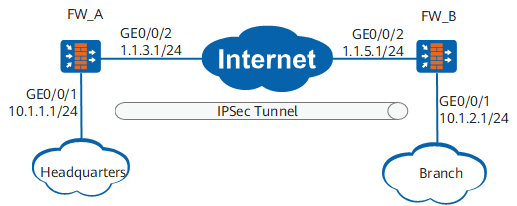
Figure 1 Configuring IPSec tunnels in the same VPN instance

Data Plan

Item

FW_A

FW_B

Interface

GigabitEthernet 0/0/1

IP address: 10.1.1.1/24

VPN instance: vpn1

Security zone: Trust

GigabitEthernet 0/0/2

IP address: 1.1.3.1/24

VPN instance: vpn1

Security zone: Untrust

GigabitEthernet 0/0/1

IP address: 10.1.2.1/24

Security zone: Trust

GigabitEthernet 0/0/2

IP address: 1.1.5.1/24

Security zone: Untrust

IPSec policy type

Non-template

Non-template

IPSec proposal

Encapsulation mode

Tunnel mode

Tunnel mode

Security protocol

ESP

ESP

ESP authentication algorithm

SHA2-256

SHA2-256

ESP encryption algorithm

AES-256

AES-256

IKE peer

Negotiation mode

Main mode

Main mode

Pre-shared key

Key123

Key123

Identity type

IP address

IP address

Version

IKEv1 and IKEv2

IKEv1 and IKEv2

Configuration Roadmap

The configuration roadmap is as follows:

  1. Create a VPN instance (vpn1) on FW_A.
  2. Configure routes in the VPN instance.
  3. Set IPSec policy parameters in the VPN instance.

    When you configure IKE peers, you need to specify the mapping between the IPSec tunnel and VPN instance. For details, see 1.e.iv for configuring FW_A.

Procedure

  1. Configure FW_A (headquarters).
    1. Configure VPN instance vpn1.

      <sysname> system-view
      [sysname] sysname FW_A
      [FW_A] ip vpn-instance vpn1
      [FW_A-vpn-instance-vpn1] route-distinguisher 100:1
      [FW_A-vpn-instance-vpn1] quit

    2. Set interface IP addresses and add the interfaces to security zones.

      1. Set the IP address of GigabitEthernet 0/0/1.

        [FW_A] interface GigabitEthernet 0/0/1
        [FW_A-GigabitEthernet0/0/1] ip binding vpn-instance vpn1
        [FW_A-GigabitEthernet0/0/1] ip address 10.1.1.1 24
        [FW_A-GigabitEthernet0/0/1] quit
      2. Set the IP address of GigabitEthernet 0/0/2.

        [FW_A] interface GigabitEthernet 0/0/2
        [FW_A-GigabitEthernet0/0/2] ip binding vpn-instance vpn1
        [FW_A-GigabitEthernet0/0/2] ip address 1.1.3.1 24
        [FW_A-GigabitEthernet0/0/2] quit
      3. Add GigabitEthernet 0/0/1 to the Trust zone.

        [FW_A] firewall zone trust
        [FW_A-zone-trust] add interface GigabitEthernet 0/0/1
        [FW_A-zone-trust] quit
      4. Add GigabitEthernet 0/0/2 to the Untrust zone.

        [FW_A] firewall zone untrust
        [FW_A-zone-untrust] add interface GigabitEthernet 0/0/2
        [FW_A-zone-untrust] quit

    3. Configure a static route to FW_B. Assume that the next hop of the route is 1.1.3.2. This route is configured for FW_A to forward packets from the headquarters to the branch.

      [FW_A] ip route-static vpn-instance vpn1 1.1.5.0 24 1.1.3.2
      [FW_A] ip route-static vpn-instance vpn1 10.1.2.0 24 1.1.3.2

    4. Configure interzone security policies.

      1. Configure the security policies between the Trust and Untrust zones to allow original and decapsulated packets to pass through FW_A.
        [FW_A] security-policy
        [FW_A-policy-security] rule name 1
        [FW_A-policy-security-rule-1] source-zone untrust
        [FW_A-policy-security-rule-1] destination-zone trust
        [FW_A-policy-security-rule-1] source-address 10.1.2.0 24
        [FW_A-policy-security-rule-1] destination-address 10.1.1.0 24
        [FW_A-policy-security-rule-1] action permit
        [FW_A-policy-security-rule-1] quit
        [FW_A-policy-security] rule name 2
        [FW_A-policy-security-rule-2] source-zone trust
        [FW_A-policy-security-rule-2] destination-zone untrust
        [FW_A-policy-security-rule-2] source-address 10.1.1.0 24
        [FW_A-policy-security-rule-2] destination-address 10.1.2.0 24
        [FW_A-policy-security-rule-2] action permit
        [FW_A-policy-security-rule-2] quit
      2. Configure the security policies between the Local and Untrust zones to allow IKE negotiation packets to pass through FW_A.

        The Local-Untrust interzone policy controls whether IKE negotiation packets can pass through the FW. This policy can use the source and destination addresses, protocol, or port as the matching condition. In this example, the source and destination addresses are used as the matching condition. To use the protocol or port as the matching condition, you need to enable ESP and port 500 for UDP (port 4500 also in NAT traversal scenarios).

        [FW_A-policy-security] rule name 3
        [FW_A-policy-security-rule-3] source-zone local
        [FW_A-policy-security-rule-3] destination-zone untrust
        [FW_A-policy-security-rule-3] source-address 1.1.3.1 32
        [FW_A-policy-security-rule-3] destination-address 1.1.5.1 32
        [FW_A-policy-security-rule-3] action permit
        [FW_A-policy-security-rule-3] quit
        [FW_A-policy-security] rule name 4
        [FW_A-policy-security-rule-4] source-zone untrust
        [FW_A-policy-security-rule-4] destination-zone local
        [FW_A-policy-security-rule-4] source-address 1.1.5.1 32
        [FW_A-policy-security-rule-4] destination-address 1.1.3.1 32
        [FW_A-policy-security-rule-4] action permit
        [FW_A-policy-security-rule-4] quit
        [FW_A-policy-security] quit

    5. Configure IPSec.

      1. Create an ACL to define the data flow to be protected and bind the ACL to the VPN instance.

        [FW_A] acl 3000 vpn-instance vpn1
        [FW_A-acl-adv-3000] rule 5 permit ip source 10.1.1.0 0.0.0.255 destination 10.1.2.0 0.0.0.255
        [FW_A-acl-adv-3000] quit
      2. Configure an IPSec proposal.

        [FW_A] ipsec proposal tran1
        [FW_A-ipsec-proposal-tran1] transform esp
        [FW_A-ipsec-proposal-tran1] encapsulation-mode tunnel
        [FW_A-ipsec-proposal-tran1] esp authentication-algorithm sha2-256
        [FW_A-ipsec-proposal-tran1] esp encryption-algorithm aes-256
        [FW_A-ipsec-proposal-tran1] quit
      3. Configure an IKE proposal. The default parameters may not be configured.

        [FW_A] ike proposal 1
        [FW_A-ike-proposal-1] dh group14
        [FW_A-ike-proposal-1] quit
      4. Configure an IKE peer.

        [FW_A] ike peer b
        [FW_A-ike-peer-b] ike-proposal 1
        [FW_A-ike-peer-b] pre-shared-key Key123
        [FW_A-ike-peer-b] remote-address vpn-instance vpn1 1.1.5.1
        [FW_A-ike-peer-b] sa binding vpn-instance vpn1
        [FW_A-ike-peer-b] quit
      5. Configure an IPSec policy in non-template mode.

        [FW_A] ipsec policy map1 1 isakmp
        [FW_A-ipsec-policy-isakmp-map1-1] ike-peer b
        [FW_A-ipsec-policy-isakmp-map1-1] proposal tran1
        [FW_A-ipsec-policy-isakmp-map1-1] security acl 3000
        [FW_A-ipsec-policy-isakmp-map1-1] quit
      6. Apply the IPSec policy to GigabitEthernet 0/0/2.

        [FW_A] interface GigabitEthernet 0/0/2
        [FW_A-GigabitEthernet0/0/2] ipsec policy map1
        [FW_A-GigabitEthernet0/0/2] quit
        

  2. Configure FW_B (branch).
    1. Set interface IP addresses and add the interfaces to security zones.

      1. Set the IP address of GigabitEthernet 0/0/1.

        <sysname> system-view
        [sysname] sysname FW_B
        [FW_B] interface GigabitEthernet 0/0/1
        [FW_B-GigabitEthernet0/0/1] ip address 10.1.2.1 24
        [FW_B-GigabitEthernet0/0/1] quit
      2. Set the IP address of GigabitEthernet 0/0/2.

        [FW_B] interface GigabitEthernet 0/0/2
        [FW_B-GigabitEthernet0/0/2] ip address 1.1.5.1 24
        [FW_B-GigabitEthernet0/0/2] quit
      3. Add GigabitEthernet 0/0/1 to the Trust zone.

        [FW_B] firewall zone trust
        [FW_B-zone-trust] add interface GigabitEthernet 0/0/1
        [FW_B-zone-trust] quit
      4. Add GigabitEthernet 0/0/2 to the Untrust zone.

        [FW_B] firewall zone untrust
        [FW_B-zone-untrust] add interface GigabitEthernet 0/0/2
        [FW_B-zone-untrust] quit

    2. Configure a static route to FW_A. Assume that the next hop of the route is 1.1.5.2. This route is configured for FW_B to forward packets from the branch to the headquarters.

      [FW_B] ip route-static 10.1.1.0 24 1.1.5.2
      [FW_B] ip route-static 1.1.3.0 24 1.1.5.2

    3. Configure interzone security policies.

      1. Configure the security policies between the Trust and Untrust zones to allow original and decapsulated packets to pass through FW_B.
        [FW_B] security-policy
        [FW_B-policy-security] rule name 1
        [FW_B-policy-security-rule-1] source-zone untrust
        [FW_B-policy-security-rule-1] destination-zone trust
        [FW_B-policy-security-rule-1] source-address 10.1.1.0 24
        [FW_B-policy-security-rule-1] destination-address 10.1.2.0 24
        [FW_B-policy-security-rule-1] action permit
        [FW_B-policy-security-rule-1] quit
        [FW_B-policy-security] rule name 2
        [FW_B-policy-security-rule-2] source-zone trust
        [FW_B-policy-security-rule-2] destination-zone untrust
        [FW_B-policy-security-rule-2] source-address 10.1.2.0 24
        [FW_B-policy-security-rule-2] destination-address 10.1.1.0 24
        [FW_B-policy-security-rule-2] action permit
        [FW_B-policy-security-rule-2] quit
      2. Configure the security policies between the Local and Untrust zones to allow IKE negotiation packets to pass through FW_B.

        The Local-Untrust interzone policy controls whether IKE negotiation packets can pass through the FW. This policy can use the source and destination addresses, protocol, or port as the matching condition. In this example, the source and destination addresses are used as the matching condition. To use the protocol or port as the matching condition, you need to enable ESP and port 500 for UDP (port 4500 also in NAT traversal scenarios).

        [FW_B-policy-security] rule name 3
        [FW_B-policy-security-rule-3] source-zone local
        [FW_B-policy-security-rule-3] destination-zone untrust
        [FW_B-policy-security-rule-3] source-address 1.1.5.1 32
        [FW_B-policy-security-rule-3] destination-address 1.1.3.1 32
        [FW_B-policy-security-rule-3] action permit
        [FW_B-policy-security-rule-3] quit
        [FW_B-policy-security] rule name 4
        [FW_B-policy-security-rule-4] source-zone untrust
        [FW_B-policy-security-rule-4] destination-zone local
        [FW_B-policy-security-rule-4] source-address 1.1.3.1 32
        [FW_B-policy-security-rule-4] destination-address 1.1.5.1 32
        [FW_B-policy-security-rule-4] action permit
        [FW_B-policy-security-rule-4] quit
        [FW_B-policy-security] quit

    4. Configure IPSec.

      1. Configure an ACL to define the data flow to be protected.

        [FW_B] acl 3000
        [FW_B-acl-adv-3000] rule 5 permit ip source 10.1.2.0 0.0.0.255 destination 10.1.1.0 0.0.0.255
        [FW_B-acl-adv-3000] quit
      2. Configure an IPSec proposal.

        [FW_B] ipsec proposal tran1
        [FW_B-ipsec-proposal-tran1] transform esp
        [FW_B-ipsec-proposal-tran1] encapsulation-mode tunnel
        [FW_B-ipsec-proposal-tran1] esp authentication-algorithm sha2-256
        [FW_B-ipsec-proposal-tran1] esp encryption-algorithm aes-256
        [FW_B-ipsec-proposal-tran1] quit
      3. Configure an IKE proposal. The default parameters may not be configured.

        [FW_B] ike proposal 1
        [FW_B-ike-proposal-1] dh group14
        [FW_B-ike-proposal-1] quit
      4. Configure an IKE peer.

        [FW_B] ike peer a
        [FW_B-ike-peer-a] ike-proposal 1
        [FW_B-ike-peer-a] pre-shared-key Key123
        [FW_B-ike-peer-a] remote-address 1.1.3.1
        [FW_B-ike-peer-a] quit
      5. Configure an IPSec policy in non-template mode.

        [FW_B] ipsec policy map1 1 isakmp
        [FW_B-ipsec-policy-isakmp-map1-1] ike-peer a
        [FW_B-ipsec-policy-isakmp-map1-1] proposal tran1
        [FW_B-ipsec-policy-isakmp-map1-1] security acl 3000
        [FW_B-ipsec-policy-isakmp-map1-1] quit
      6. Apply the IPSec policy to GigabitEthernet 0/0/2.

        [FW_B] interface GigabitEthernet 0/0/2
        [FW_B-GigabitEthernet0/0/2] ipsec policy map1
        [FW_B-GigabitEthernet0/0/2] quit
        

Verification

  1. After the configuration is complete, users in the headquarters and branch can communicate. On FW_A and FW_B, run the display ike sa and display ipsec sa commands respectively to display the established SAs. Take FW_A as an example. If the following information is displayed, the IKE and IPSec SAs are successfully established.
    <FW_A> display ike sa
    IKE SA information :   
        Conn-ID     Peer            VPN   Flag(s)  Phase  RemoteType  RemoteID
      -----------------------------------------------------------------------------
        10          1.1.5.1:500     vpn1  RD|ST|A  V2:2   IP          1.1.5.1
        9           1.1.5.1:500     vpn1  RD|ST|A  V2:1   IP          1.1.5.1
    
      Number of IKE SA : 2 
      -------------------------------------------------------------------------------
                                                                                    
      Flag Description:                                                             
      RD--READY   ST--STAYALIVE   RL--REPLACED   FD--FADING   TO--TIMEOUT           
      HRT--HEARTBEAT   LKG--LAST KNOWN GOOD SEQ NO.   BCK--BACKED UP                
      M--ACTIVE   S--STANDBY   A--ALONE  NEG--NEGOTIATING 
    <FW_A> display ipsec sa brief
    Current ipsec sa num:2
    
    Spu board slot 1, cpu 0 ipsec sa information:                                   
    Number of SAs:4                                                              
        Src address   Dst address      SPI        VPN   Protocol     Algorithm       
    ------------------------------------------------------------------------------- 
        1.1.5.1         1.1.3.1       4001819557  vpn1    ESP      E:AES-256 A:SHA2-256-128
        1.1.3.1         1.1.5.1       3923280450  vpn1    ESP      E:AES-256 A:SHA2-256-128

Configuration Files

  • FW_A (headquarters) configuration file

    #
     sysname FW_A
    #                                                                               
    ip vpn-instance vpn1                                                            
     route-distinguisher 100:1                                                      
    #                                                                               
    acl number 3000 vpn-instance vpn1                                               
     rule 5 permit ip source 10.1.1.0 0.0.0.255 destination 10.1.2.0 0.0.0.255      
    #                                                                               
    ipsec proposal tran1
     esp authentication-algorithm sha2-256                                          
     esp encryption-algorithm aes-256                                               
    #                                                                               
    ike proposal 1
     encryption-algorithm aes-256                                                   
     dh group14                                                                      
     authentication-algorithm sha2-256                                              
     authentication-method pre-share                                                
     integrity-algorithm hmac-sha2-256                                              
     prf hmac-sha2-256
    #                                                                               
    ike peer b                                                                   
     pre-shared-key %^%#cnEDZkL3}#J"qG/2iTb&P9q/%^%#                               
     ike-proposal 1                                                                 
     remote-address vpn-instance vpn1 1.1.5.1                                     
     sa binding vpn-instance vpn1
    #                                                                               
    ipsec policy map1 1 isakmp                                                      
     security acl 3000                                                              
     ike-peer b                                                                  
     proposal tran1                                                                  
    #                                                                               
    interface GigabitEthernet0/0/1
     undo shutdown
     ip binding vpn-instance vpn1                                                   
     ip address 10.1.1.1 24
    #
    interface GigabitEthernet0/0/2      
     undo shutdown
     ip binding vpn-instance vpn1                                                   
     ip address 1.1.3.1 255.255.255.0                                             
     ipsec policy map1                                                              
    #                                                                               
    firewall zone trust                                           
     add interface GigabitEthernet0/0/1
    #                                                                               
    firewall zone untrust                                         
     add interface GigabitEthernet0/0/2
    #                                                                               
    ip route-static vpn-instance vpn1 1.1.5.0 255.255.255.0 1.1.3.2
    ip route-static vpn-instance vpn1 10.1.2.0 255.255.255.0 1.1.3.2
    #                                                                               
    security-policy
     rule name 1
      source-zone untrust
      destination-zone trust
      source-address 10.1.2.0 24
      destination-address 10.1.1.0 24
      action permit
     rule name 2
      source-zone trust
      destination-zone untrust
      source-address 10.1.1.0 24
      destination-address 10.1.2.0 24
      action permit
     rule name 3
      source-zone local
      destination-zone untrust
      source-address 1.1.3.1 32
      destination-address 1.1.5.1 32
      action permit
     rule name 4
      source-zone untrust
      destination-zone local
      source-address 1.1.5.1 32
      destination-address 1.1.3.1 32
      action permit
    #                                                                               
    return
  • FW_B (branch) configuration file

    #
     sysname FW_B
    #                                                                               
    acl number 3000                                                        
     rule 5 permit ip source 10.1.2.0 0.0.0.255 destination 10.1.1.0 0.0.0.255      
    #                                                                               
    ipsec proposal tran1                                                             
     esp authentication-algorithm sha2-256                                          
     esp encryption-algorithm aes-256                                               
    #                                                                               
    ike proposal 1
     encryption-algorithm aes-256                                                   
     dh group14                                                                      
     authentication-algorithm sha2-256                                              
     authentication-method pre-share                                                
     integrity-algorithm hmac-sha2-256                                              
     prf hmac-sha2-256
    #                                                                               
    ike peer a                                                                   
     pre-shared-key %^%#1tx/S9a;iF[L)QFz!$p;y]Lg%^%#                                                          
     ike-proposal 1                                                                 
     remote-address 1.1.3.1                                                       
    #                                                                               
    ipsec policy map1 1 isakmp                                                      
     security acl 3000                                                              
     ike-peer a                                                                  
     proposal tran1                                                                  
    #                                                                               
    interface GigabitEthernet0/0/1
     undo shutdown
     ip address 10.1.2.1 24
    interface GigabitEthernet0/0/2      
     undo shutdown
     ip address 1.1.5.1 255.255.255.0                                             
    #                                                                               
    firewall zone trust                                           
     add interface GigabitEthernet0/0/1 
    #                                                                               
    firewall zone untrust                                         
     add interface GigabitEthernet0/0/2
    #                                                                               
     ip route-static 10.1.1.0 255.255.255.0 1.1.5.2
     ip route-static 1.1.3.0 255.255.255.0 1.1.5.2                       
    #                                                                               
    security-policy
     rule name 1
      source-zone untrust
      destination-zone trust
      source-address 10.1.1.0 24
      destination-address 10.1.2.0 24
      action permit
     rule name 2
      source-zone trust
      destination-zone untrust
      source-address 10.1.2.0 24
      destination-address 10.1.1.0 24
      action permit
     rule name 3
      source-zone local
      destination-zone untrust
      source-address 1.1.5.1 32
      destination-address 1.1.3.1 32
      action permit
     rule name 4
      source-zone untrust
      destination-zone local
      source-address 1.1.3.1 32
      destination-address 1.1.5.1 32
      action permit
    #                                                                               
    return
Copyright © Huawei Technologies Co., Ltd.
< Previous topic Next topic >