Web: Example for Configuring Application Behavior Control
Application behavior control manages the HTTP and FTP behavior of intranet users.
Networking Requirements
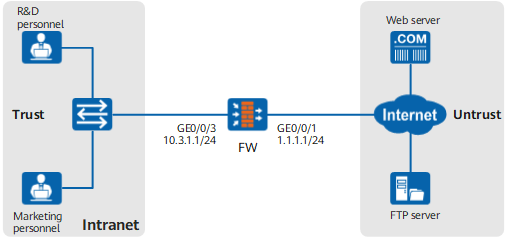
As shown in Figure 1, the FW is deployed at the intranet egress as the enterprise egress gateway. Employees of the enterprise are classified into R&D personnel and marketing personnel. User groups research and marketing are created, and the related configuration of authentication is complete. It is required to configure application behavior control on the FW to control the HTTP and FTP Internet access behavior of R&D personnel and marketing personnel.
All HTTP and FTP behavior of the R&D personnel are denied during working hours (09:00:00 to 17:00:00 on workdays) to avoid degrading the working efficiency.
R&D personnel can browse web pages and download files through HTTP during non-working hours (including weekends and the non-working hours on workdays), but other HTTP and FTP behavior is denied.
Due to the need for information security and communicating with customers, the marketing personnel can upload files not larger than 100M through HTTP or FTP. In addition, the size of the content to be posted each time on the Internet is limited within 2000 bytes.
Data Planning
Item |
Data |
Description |
|---|---|---|
Application behavior control profile |
Controls the HTTP and FTP behavior of R&D personnel during working hours. |
|
Controls the HTTP and FTP behavior of R&D personnel during non-working hours. |
||
Controls the HTTP and FTP behavior of the marketing personnel. |
||
Security policy |
R&D personnel are allowed to access the Internet. Schedule working_hours and application behavior control profile profile_app_research_work are referenced to control the application behavior of R&D personnel during working hours. |
|
R&D personnel are allowed to access the Internet. Schedule off_hours and application behavior control profile profile_app_research_rest are referenced to control the application behavior of R&D personnel during non-working hours. |
||
Marketing personnel are allowed to access the Internet. Application behavior control profile profile_app_marketing is referenced to control the application behavior of the marketing personnel. |
Procedure
- Set the IP address and security zone of the interface.
- Create three application behavior control profiles: profile_app_research_work for R&D personnel during working
hours, profile_app_research_rest for R&D personnel during
non-working hours, and profile_app_marketing for marketing
personnel.
- Choose .
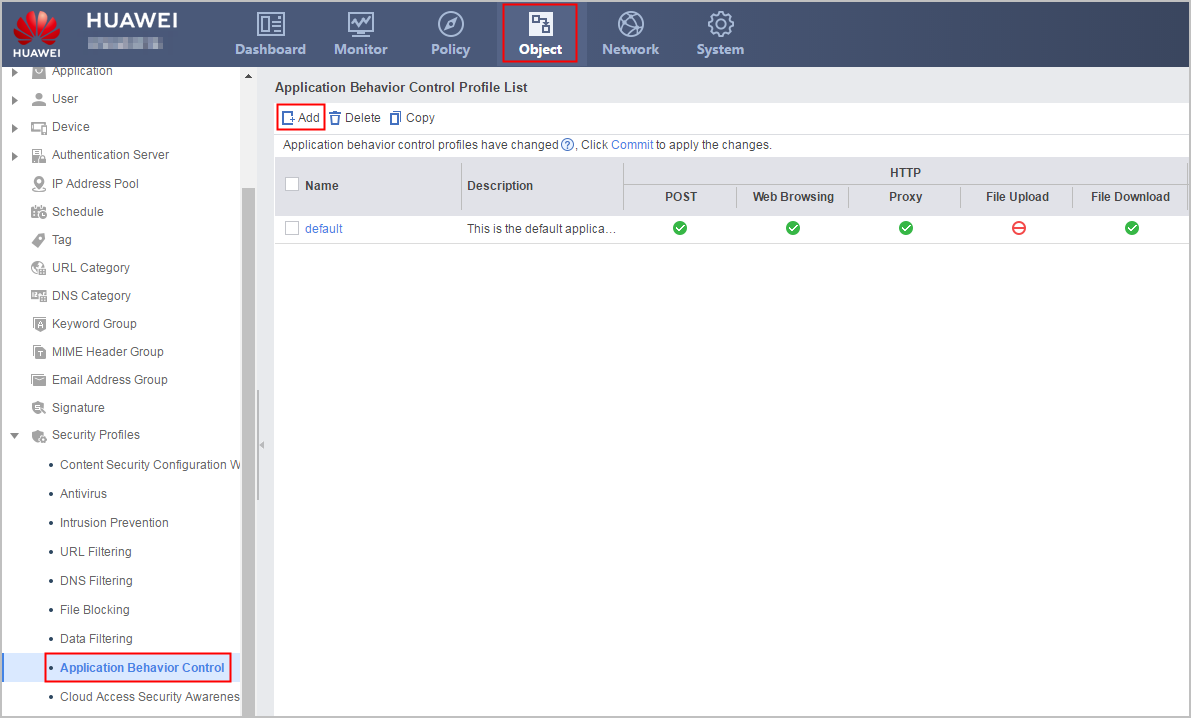
- Choose .
- Create schedule working_hours covering 09:00:00
to 17:00:00 on workdays.
- Create schedule off_hours, covering weekends and
00:00:00 to 08:59:59 and 17:01:00 to 23:59:59 on workdays.
- Create security policy.
- Click Save on the upper right of the web interface, and click OK in the dialog box that is displayed.
- Click Commit on the upper right of the web page to commit the security profile.
Configuration Verification
After the configuration is complete, verify the HTTP and FTP permissions on the PCs of the R&D personnel and marketing personnel. If the result meets the requirement, applying the application behavior control profile and security policy succeeds. Otherwise, check and correct the configuration of the application behavior control profile and security policy.
Configuration Scripts
The following lists related scripts of this configuration example.
#
 sysname FW
#
 time-range off_hours
  period-range 00:00:00 to 23:59:59 off-day
  period-range 00:00:00 to 08:59:59 working-day
  period-range 17:01:00 to 23:59:59 working-day
 time-range working_hours
  period-range 09:00:00 to 17:00:00 working-day
#
interface GigabitEthernet0/0/1
 undo shutdown
 ip address 1.1.1.1 255.255.255.0
#
interface GigabitEthernet0/0/3
 undo shutdown
 ip address 10.3.1.1 255.255.255.0
#
firewall zone trust
 set priority 85
 add interface GigabitEthernet0/0/3
#
firewall zone untrust
 set priority 5
 add interface GigabitEthernet0/0/1
#
profile type app-control name profile_app_research_work
 http-control web-browse action deny
 http-control proxy action deny
 http-control post action deny
 http-control file direction upload action deny
 http-control file direction download action deny
 ftp-control file delete action deny
 ftp-control file direction upload action deny
 ftp-control file direction download action deny
#
profile type app-control name profile_app_research_rest
 http-control post action deny
 http-control file direction upload action deny
 ftp-control file delete action deny
 ftp-control file direction upload action deny
 ftp-control file direction download action deny
#
profile type app-control name profile_app_marketing
 http-control post block-size 2000
 http-control file direction upload block-size 102400
 ftp-control file direction upload block-size 102400
#
security-policy
 rule name policy_sec_research_work
  source-zone trust
  destination-zone untrust
  user user-group /default/research
  time-range working_hours
  profile app-control profile_app_research_work
  action permit
 rule name policy_sec_research_rest
  source-zone trust
  destination-zone untrust
  user user-group /default/research
  time-range off_hours
  profile app-control profile_app_research_rest
  action permit
 rule name policy_sec_marketing
  source-zone untrust
  destination-zone trust
  user user-group /default/marketing
  profile app-control profile_app_marketing
  action permit
#
return