Disabling Users from Using the Web Mailbox to Upload Attachments
The application behavior control function is enabled on the FW to disable users from using the web mailbox to upload attachments.
Faced Problems
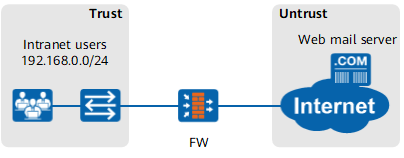
As shown in Figure 1, an enterprise deploys the FW as a gateway to connect the intranet to the Internet. Intranet users use the web mailbox of the Internet to send and receive emails.
Intranet users usually upload important files as attachments to the web mailbox to send them, causing information leaks.
Solution
With the application behavior control function, the FW controls HTTP-based file upload and disables users from using the web mailbox to upload attachments.
Reference the application behavior control profile in the security policy that permits Internet users to use the web mailbox to disable the users from using the web mailbox to upload attachments.

This example applies only when the web mailbox uses standard HTTP. To implement application behavior control for the web mailbox that uses HTTPS, configure SSL-encrypted traffic detection.
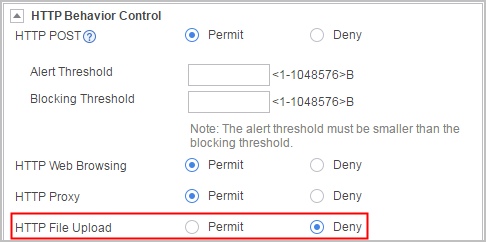
Click Add to create application behavior control profile profile_appc. In HTTP Behavior Control, set HTTP File Upload to Deny.
- Click OK.
Click Add Security Policy. Configure matching conditions for the security policy as required and reference application behavior control profile profile_appc in the security policy.
Set security policy parameters as follows:
Name policy1 Source Zone trust Destination Zone untrust Source Address/Region 192.168.0.0/255.255.255.0 Application Email Action Permit Content Security Application Behavior Control profile_appc - Click OK.
Verification
When intranet users attempt to use the web mailbox to send an email, they cannot upload attachments. That is, the users cannot send important files as attachments through the web mailbox.
Choose . You can view the application behavior control logs generated by the FW.
Configuration Scripts
The configuration script related to the example is as follows:
#
profile type app-control name profile_appc
 http-control file direction upload action deny
#
security-policy
 rule name policy1
  source-zone trust
  destination-zone untrust
  source-address 192.168.0.0 mask 255.255.255.0
  application category Business_Systems sub-category Email
  profile app-control profile_appc
  action permit
#