Auditing Search KeyWords
The audit function is enabled on the FW to audit users' search keywords.
Faced Problems
As shown in Figure 1, an enterprise deploys the FW as a gateway to connect the intranet to the Internet.
Intranet users often search the keywords of interested information. Viewing the information with these keywords affects the working efficiency and even brings about legal risks. In case of a security event, the owner cannot be located or traced.
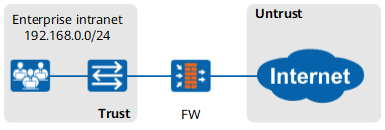
Solution
With the audit function, the FW audits users' search keywords (currently, Google, Yahoo, Baidu, 360, and Bing search engines are supported), facilitating the locating and tracing of users and providing the basis for tuning security policies in the future.
Configure an audit policy based on the traffic sent from intranet users to access the Internet and reference the audit profile in the audit policy to audit users' search keywords.
Click Add to create audit profile profile_audit and select Audit HTTP Behavior to audit Search Engine Keyword.

- Click OK.
Click Add to create an audit policy. Configure matching conditions for the audit policy as required and reference the audit profile in the audit policy.
Set audit policy parameters. The referenced user group named users has been created.
Name
policy1
Source zone
trust
Destination zone
untrust
Source Address/Region
192.168.0.0/255.255.255.0
User
/default/users
Action
Audit
Audit Configuration
profile_audit
- Click OK.
Verification
Choose . You can find the logs generated when the FW audits users' search keywords.
Configuration Scripts
The configuration script related to the example is as follows:
#
profile type audit name profile_audit
 http-audit search-keyword
#
audit-policy
 rule name policy1
  source-zone trust
  destination-zone untrust
  source-address 192.168.0.0 mask 255.255.255.0
  user user-group /default/users
  action audit profile profile_audit
#