Web: Example for Configuring the Audit Function
This section provides the networking requirements and a step-by-step procedure for configuring the audit function. After the audit function is enabled, Internet access activities are logged for future audits and analysis.
Networking Requirements
As shown in Figure 1, the FW serves as the gateway at the border of an enterprise network. Log the Internet access behavior of employees by configuring the audit function.
The employees of the enterprise are either R&D personnel or marketing personnel. The requirements are as follows:
- Logs non-work-related Internet access behavior of R&D personnel during working hours (09:00:00 to 17:00:00). The behavior includes URL accessing, BBS posting, microblogging, and file upload and download through HTTP and FTP.
- Logs email transmission and file upload activities as well as HTTP or FTP upload and download activities of marketing personnel.
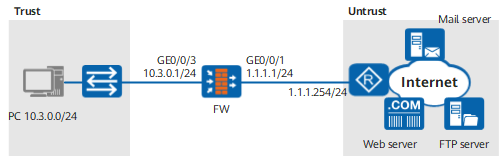
Configuration Roadmap
- Set the interface IP address and add the interface to a security zone.
- Configure one audit profile specific to R&D personnel and another specific to marketing personnel. Audit HTTP, FTP, and mail behavior.
- Configure two audit policies, reference the preceding profiles in the policies, and apply the policies to the trust -> untrust interzone.
Procedure
- Set the interface IP address and add the interface to a security zone.
- Configure the schedule.
- Configure the audit profile.

After you specified the interface IP address, security zone, and schedule, use the audit administrator account to log in to the FW and complete the configurations related to the audit function.
- Choose .
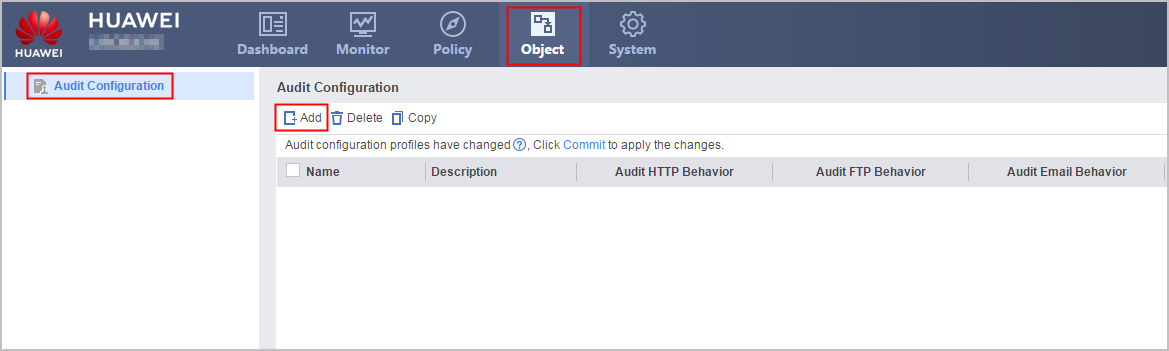
Click Add in Audit Configuration and set the parameters as follows:
Name
profile_audit_1
Description
Profile of auditing for research.
Audit HTTP behavior
URL Access
Select All.
Web Page Title
Select Keep records.
BBS Post
Select Keep records.
Microblog
Select Keep records.
HTTP File Download
Select Keep records.
Audit FTP Behavior
FTP File Download
Select Keep records.
- Click OK.
Click Add in Audit Configuration and set the parameters as follows:
Name
profile_audit_2
Description
Profile of auditing for marketing.
Audit HTTP Behavior
HTTP File Upload
Select Keep records.
HTTP File Download
Select Keep records.
Audit FTP Behavior
FTP File Upload
Select Keep records.
FTP File Download
Select Keep records.
Audit Email-Related Behavior
Sending
Select Keep records.
Receiving
Select Keep records.
- Click OK.
- Choose .
- Reference the profile in the security policy.
- Choose .
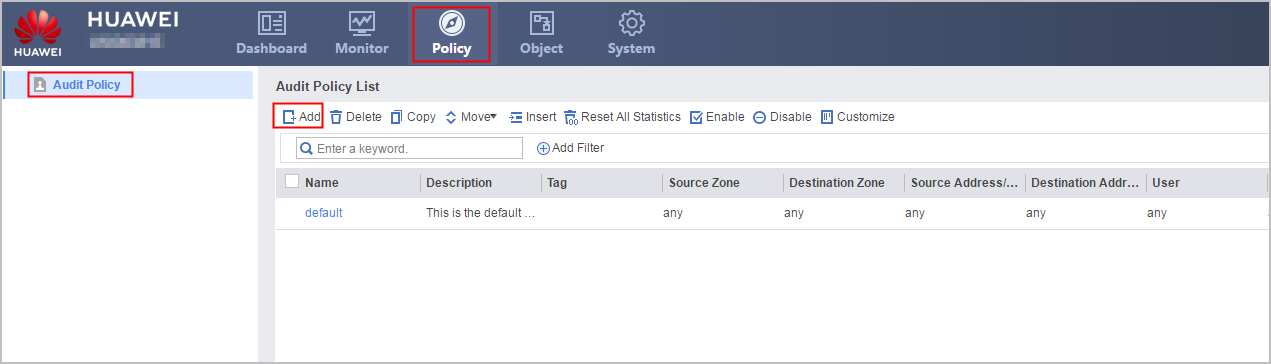
Click Add in Audit Policy List and set the parameters as follows:
In this example, user groups for research (R&D personnel) and marketing (marketing personnel) to be referenced have been created.
Name
policy_audit_1
Description
Policy of auditing for research.
Source zone
trust
Destination zone
untrust
User
/default/research
Service
any
Schedule
time_range
Action
Audit
Audit Configuration
profile_audit_1
- Click OK.
Click Add in Audit Policy List and set the parameters as follows:
Name
policy_audit_2
Description
Policy of auditing for marketing.
Source zone
trust
Destination zone
untrust
User
/default/marketing
Service
any
Schedule
any
Action
Audit
Audit Configuration
profile_audit_2
- Click OK.
- Choose .
- Click Commit on the upper-right corner and click OK on the dialog box that is displayed.

Follow-up Procedure
After the configuration is complete, you can view various reports, audit logs, and user activity logs to identify the users and user behavior that leads to low productivity. You can also use this information to fine-tune security policies in the future.
Configuration Scripts
This section provides only the script related to the example.
#
sysname FW
#
 time-range time_range
  period-range 09:00:00 to 17:00:00 daily
#
interface GigabitEthernet0/0/1
 undo shutdown
 ip address 1.1.1.1 255.255.255.0
#
interface GigabitEthernet0/0/3
 undo shutdown
 ip address 10.3.0.1 255.255.255.0
#
firewall zone trust
 set priority 85
 add interface GigabitEthernet0/0/3
#
firewall zone untrust
 set priority 5
 add interface GigabitEthernet0/0/1
#
profile type audit name profile_audit_1
 description Profile of auditing for research.
 http-audit url all
 http-audit url recorded-title
 http-audit bbs-content
 http-audit micro-blog
 http-audit file direction download
 ftp-audit file direction download
#
profile type audit name profile_audit_2
 description Profile of auditing for marketing.
 http-audit url all
 http-audit file direction upload
 http-audit file direction download
 ftp-audit file direction upload
 ftp-audit file direction download
 mail-audit send
 mail-audit receive
#
audit-policy
 rule name policy_audit_1
  description Policy of auditing for research.
  source-zone trust
  destination-zone untrust
  user user-group /default/research
  time-range time_range
  action audit profile profile_audit_1
 rule name policy_audit_2
  description Policy of auditing for marketing.
  source-zone trust
  destination-zone untrust
  user user-group /default/marketing
  action audit profile profile_audit_2