Understanding DNS Filtering
This section describes the DNS filtering mechanism.
DNS Filtering Process
If traffic matches a security policy that has a DNS filtering profile configured, the device extracts the domain name from the DNS request packet and sends the domain name to the DNS filtering process. Figure 1 displays the detailed DNS filtering process.
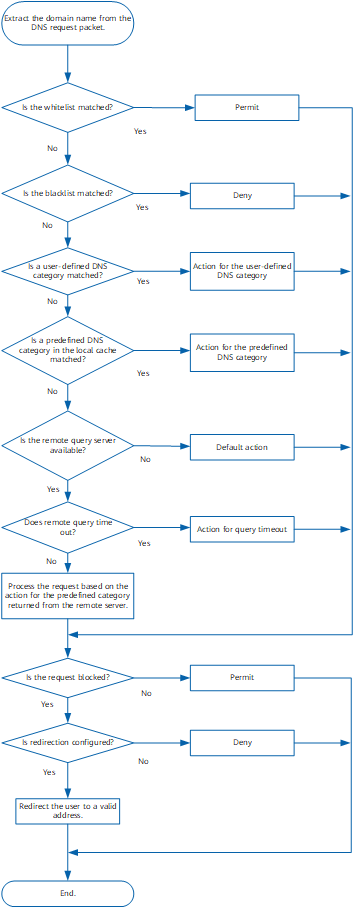
- Checks whether the domain name matches the whitelist.
- If yes, the device permits the traffic.
- If no, the device proceeds to the next step.
- Checks whether the domain name matches the blacklist.
- If yes, the device blocks the traffic.
- If no, the device proceeds to the next step.
- Checks whether the domain name matches a user-defined category.
- If yes, the device processes the traffic according to the action for this user-defined DNS category.
- If no, the device proceeds to the next step.
- Checks whether the domain name matches a predefined category in the local cache.
- If yes, the device processes the traffic according to the control action for this predefined category.
- If no, the device performs remote query.
- If the remote query server is available, the device continues with the remote query.
- If the remote query server is unavailable, the device processes the request based on the default action.
- Enable remote query.
- If the remote query server does not respond within a specific period, the device will take the action configured for query timeout.
- If a match of this domain name is found in predefined categories on the remote query server, the device processes the packet according to the control action for this category.

If no match of this domain name is found on the remote query server, the device processes the packet according to the control action for the "Other" category.
- If the packet matches a category for which the action is block, the device checks whether redirection is configured in the DNS filtering profile.
- If redirection is configured, the packet blocked by DNS filtering is redirected to a valid address, and a response packet is constructed.
- If redirection is not configured, the device blocks the packet.
Processing Flow of DNS Filtering-based Safe Search
After being processed by the DNS filtering-based safe search function, search requests of users are directed to a search engine server that filters search results. The search engine server filters out pornographic and potentially risky content and returns search results to users, thereby regulating Internet access behavior of users.
The DNS filtering-based safe search function can be configured in pre-defined or user-defined mode. The pre-defined DNS safe search function can only be implemented for three search engines: Bing, Google, and YouTube. In addition, parameters such as the IP address of the safe search server, CNAME, and TTL in DNS response packets cannot be configured. To address these issues, implement the user-defined DNS safe search function to configure a rule of constructing DNS response packets. The pre-defined and user-defined DNS safe search functions are independent of each other, and the user-defined DNS safe search function takes precedence over the pre-defined DNS safe search function.
The DNS filtering-based safe search function is implemented after the DNS filtering process. After DNS filtering is complete, all DNS request packets excluding whitelisted or blocked packets are processed based on the safe search process. Figure 2 shows the safe search process.
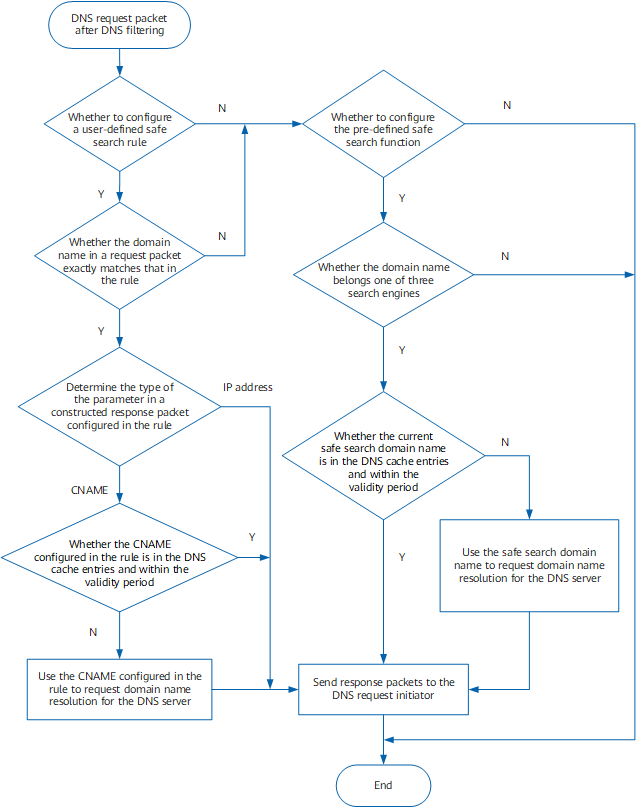
- The FW checks whether a user-defined safe search rule is configured.
- If not, the device checks whether the pre-defined safe search function is enabled according to 5.
- If so, the device proceeds to the next step.
- The FW checks whether the domain name in a request packet exactly matches the domain name in the rule.
- If not, the device checks whether the pre-defined safe search function is enabled according to 5.
- If so, the device proceeds to the next step.
- The FW determines the type of the parameter in a constructed response packet configured in the rule.
- If an IP address is used to construct the response packet, the device uses the IP address and TTL configured in the rule and sends the response packet to the DNS request initiator.
- If a CNAME is used to construct the response packet, the device proceeds to the next step.
- The FW checks whether the CNAME configured in the rule is in the DNS cache entries and within the validity period.
- If so, the device uses the CNAME, IP address, and TTL in the DNS cache entries to construct a response packet and sends the response packet to the DNS request initiator.
- If not, the device uses the CNAME configured in the rule to send a domain name resolution request to the DNS server. After receiving the response packet from the DNS server, the device caches the resolved information such as the IP address and TTL in the DNS cache entries. In addition, the device constructs a response packet, sets the NAME field in Queries of the response packet to the NAME field in the original request packet, the CNAME field in Answers to the CNAME configured in the rule, the cache time to the TTL configured in the rule, and the IP address to the resolved IP address, and returns a response packet to the DNS request initiator.
The FW checks whether the pre-defined safe search function is enabled.
- If not, the action of a matching DNS filtering rule is taken on packets.
- If so, the device performs further detection.
The FW checks whether the domain name is the domain name of Bing, Google, or YouTube.
The FW checks whether the current safe search domain name is in the DNS cache entries and within the validity period.
- If so, the device uses the IP address in the DNS cache entries to construct a response packet and sends the response packet to the DNS request initiator.
- If not, the device uses the current safe search domain name to request the DNS server to resolve the domain name. After receiving the response packet from the DNS server, the device caches the resolved IP address and TTL in the DNS cache entries, constructs a response packet based on the resolved IP address and TTL, and returns the response packet to the DNS request initiator.
Comparison Between DNS Filtering and URL Filtering
| Comparison Item | URL Filtering | DNS Filtering |
|---|---|---|
| Access control phase | Control the access when HTTP/HTTPS URL requests are initiated. | Control the access when domain names are resolved. |
| Control granularity | The control granularity is fine, to the directory and file levels. | The control granularity is coarse, to the domain name level. |
| Impact on performance | Great | Slight |
| Control scope | Only HTTP/HTTPS access is controlled. | All services corresponding to the domain name can be controlled. |
To sum up, DNS filtering is implemented for access control at an earlier stage than URL filtering and can effectively reduce HTTP packet traffic on the entire network. URL filtering, however, can control users' access to network resources in a more refined manner.
Comparison Between DNS Filtering-based and URL Filtering-based Safe Search Functions
The FW provides DNS filtering- and URL filtering-based safe search functions. The comparison between the safe search functions is as follows:
-
The DNS fileting-based pre-defined safe search function can be implemented for Google, Bing, and YouTube. The DNS fileting-based user-defined safe search function can be implemented for user-defined search of website domain names and DNS response packets. The URL filtering-based safe search function can be implemented only for Bing, Google, Yahoo, Yandex, and YouTube.
-
To enable the DNS filtering-based pre-defined safe search function, you need to enable the safe search function in the DNS filtering profile. To enable the DNS filtering-based user-defined safe search function, you need to configure a rule for constructing DNS response packets in the DNS filtering profile. To enable the URL-based safe search function, you need to enable the safe search function in the URL filtering profile and configure the TCP proxy and SSL encrypted traffic detection.