Configuring Remote Query Service
Scheduling center (sec.huawei.com) provides multiple remote services, such as URL category query and file reputation query services. To successfully obtain the remote query service, you shall correctly set parameters on the FW.
Prerequisites
To use remote query services, ensure that:
The DNS server address is set, and the DNS server can correctly resolve domain name sec.huawei.com.
The FW is routable to the security service center sec.huawei.com.
A security policy has been configured to permit the following user-defined service traffic to pass through the FW:
- TCP: The destination port number is 443 (for interaction with scheduling center).
- TCP: The destination port number is 12612 (for interaction with a dispatch server).
- UDP: The destination port number is 12600 (for interaction with a query server).
If the remote query service is in local query mode, the ports of the dispatch and query servers may be manually changed. You shall adjust corresponding configurations in security policies.
Context
The FW has multiple features supporting the remote query service, such as URL remote query and file reputation remote query. They are similar in the mechanism and configuration but independent in the function.
Generally, the remote query service is completed by security center, dispatch server and query server. The functions of the devices are as follows:
Scheduling center: The domain name of the scheduling center is sec.huawei.com. The scheduling center authenticates the FW. If the authentication succeeds, the scheduling center provides the FW with the address and port of the dispatch server address in the country or region where the FW resides.
To enable the FW to interact with the scheduling center, configure the security policy to permit related traffic and set the protocol to TCP and the destination port number to 443 on the FW.
Dispatch server: provides the FW with the addresses and ports of query servers in the region where the FW resides. Dispatch servers are deployed by region. Therefore, you need to correctly configure country information on the FW. Otherwise, the addresses and port numbers of dispatch servers cannot be obtained.
To enable the FW to interact with a dispatch server, configure the security policy to permit related traffic and set the protocol to TCP and the destination port number to 12612 on the FW.
Query server: processes query requests and sends the query results to the FW. Query servers are also deployed by region and are mapped with dispatch servers. A dispatch server provides the FW with the address and port number of the query server in the same region.
To enable the FW to interact with a query server, configure the security policy to permit related traffic and set the protocol to UDP and the destination port number to 12600 on the FW.
Based on the preceding content, it can be concluded that the FW can communicate with the scheduling center only when it is connected to the Internet. However, the FW of certain users cannot connect to the Internet. If these users need to use the remote query service, they can purchase Huawei SecoCenter and deploy it on the local network. The SecoCenter has the dispatch and query servers integrated. For details, see its product manual.
Based on the server deployment location, the FW supports two remote query modes, namely, the remote and local modes.
In remote mode, the FW communicates with the scheduling center. The dispatch server forwards query request to the query server in the corresponding country or region based on the country information configured on the FW.
In local mode, the FW communicates with the SecoCenter but not the security center.
Procedure
- Choose .
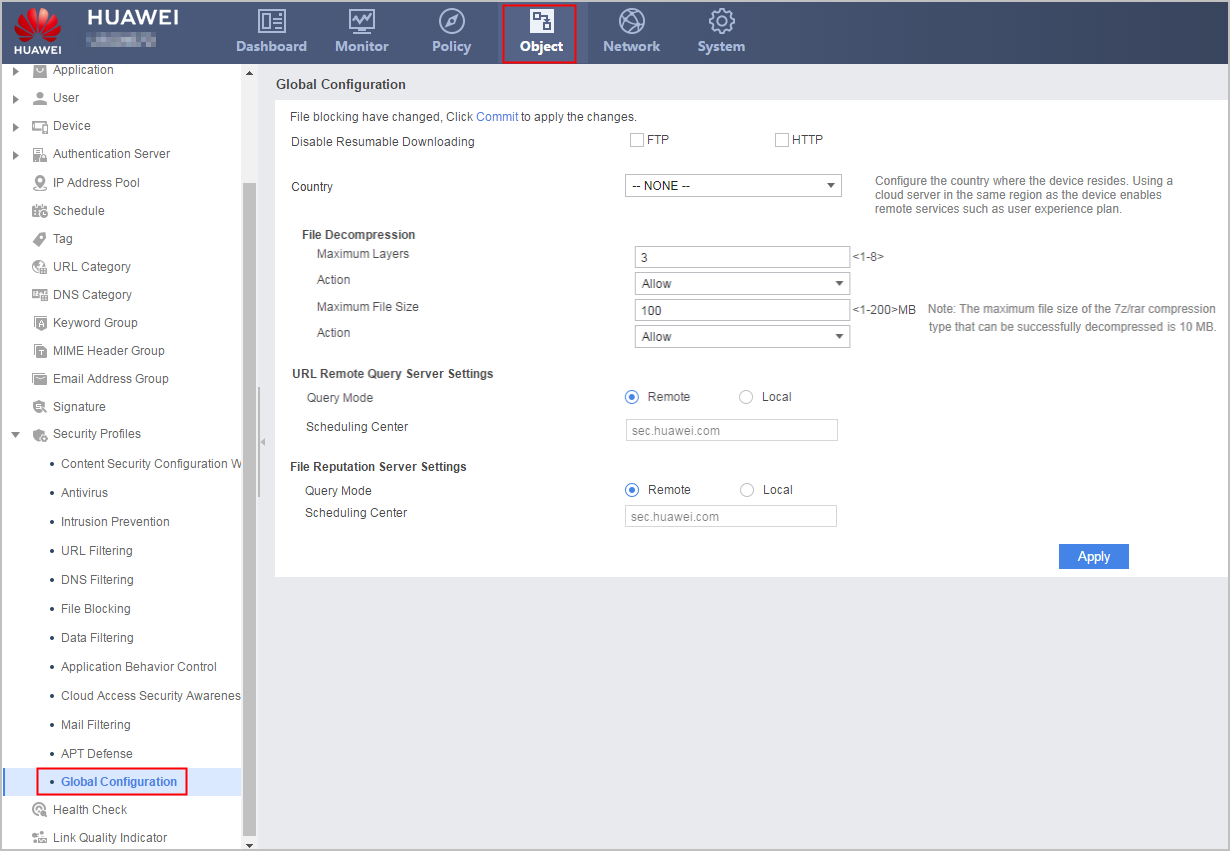
- Select Country where the FW resides.
By default, the country where the FW resides is not set.
This item must be set when Query Mode of the URL remote query service is set to Remote. If the country information is not configured or the configuration information is inconsistent with the actual location of the FW, the URL remote query service is unavailable. In addition, this item must be configured when the user experience plan or cloud sandbox function are configured.
- In the URL Remote Query Server Settings area, set parameters relevant to the URL remote query service.
Parameter
Description
Query Mode
Query mode, which is determined by the deployment location of the server:
Scheduling Center
Domain name of the scheduling center, namely, sec.huawei.com
This item is displayed when Query Mode is Remote. It does not require manual configuration and cannot be changed.
Local Server Address
IP address of the dispatch server
When Query Mode is Local, the parameter is mandatory. Otherwise, the remote query service is unavailable.
Port
Port of the dispatch server
When Query Mode is Local, the parameter is displayed. The default value is 12612.
- In the File Reputation Server Settings area, set parameters relevant to the file reputation remote query service.
Parameter
Description
Query Mode
Query mode, which is determined by the deployment location of the server:
Scheduling Center
Domain name of the scheduling center, namely, sec.huawei.com
This item is displayed when Query Mode is Remote. It does not require manual configuration and cannot be changed.
Local Server Address
IP address of the dispatch server
When Query Mode is Local, the parameter is mandatory. Otherwise, the remote query service is unavailable.
Port
Port of the dispatch server
When Query Mode is Local, the parameter is displayed. The default value is 12612.
- Click Apply.