Understanding Intrusion Prevention
The intrusion prevention function detects and analyzes all packets and allows or blocks the packets accordingly. This section describes how the FW processes intrusions, the basic concepts for intrusion prevention, and the signature matching order and actions.
Mechanism
The intrusion prevention mechanism is as follows:
-
Some attacks attempt to evade intrusion prevention by fragmenting packets. To prevent such attacks, a FW reassembles IP fragments and TCP flows before inspecting.
Protocol identification and analysis
The FW identifies multiple types of application-layer protocols based on packet contents.
The FW implements refined analysis and extracts packet features based on the identified protocol.
Compared with the traditional FW that identifies protocols only by IP address and port, the FW increases the detection ratio of application-layer attacks.
-
The FW compares the extracted features with the intrusion prevention signatures. If a match is found, the packets are processed according to the configured action.
For the matching order of signatures, see Traffic Processing Flow.
-
After the detection, the FW processes the packets that match the signature based on the configured action.
Figure 2 illustrates the flow for processing packets.
Signature
Signatures describe the features of attacks on the network. The FW detects and prevents attacks by comparing data flow contents with intrusion prevention signatures.
The intrusion prevention signatures of the FW fall into two types:
-
Predefined signatures are those in the IPS signature database. To obtain the IPS signature database, you must purchase a license. Within the validity period of the purchased license, you can update your local IPS signature database from the security platform of Huawei's security competence center. Predefined signatures cannot be created, modified, or deleted.
A predefined signature has a default action, and the action can be:
- Allow: The FW permits the packet matching the signature without a log.
- Alert: The FW permits the packet matching the signature and generates a log.
- Block: The FW discards the packet matching the signature, blocks the data flow to which the packet belongs, and generates a log.
-

You are advised to configure user-defined signatures only when you understand the attack features. Incorrect signatures may be useless, cause packet loss, or interrupt services.
User-defined signatures refer to those that are created by administrators. The signature database may not have a signature for a new type of attack. If you understand the attack, you can create a user-defined signature for the attack. You can also create user-defined signature for any other purpose if the predefined signatures cannot meet your needs. After user-defined signatures are created, the system automatically checks the regular expressions and the validity of the rules to prevent inefficient signatures from wasting resources.
The action of a user-defined signature can be Block and Alert, which can be configured when you create a user-defined signature.
Signature Filter
A large number of signatures flood the signature database after updates. By analyzing the features of common threats, you can summarize signatures that contain these features and add these signatures to a signature filter.
A signature filter is a set of signatures matching the specified filtering conditions, including the type of signatures, object, protocol, severity, and operating system. Only signatures that match all the filtering conditions can be added to a signature filter. If a condition has multiple values and the values are logically ORed, a packet matches the condition if the packet matches any value of the condition.
The action of a signature filter can be Block, Alert, or Default (use the default actions of signatures). If no action is configured for the signature filter, the default action of the signature filter is used by default. If an action has been configured for the signature filter, the action configured for the signature filter takes effect.
Signature filters configured earlier have higher priorities. If two signature filters in one security profile contain the same signature, packets matching the signature are processed according to the signature filter configured earlier.
Signature Exception
All signatures in a signature filter have the same action. However, you can add a signature as an exception and configure a different action for the exception signature.
The action of a signature exception can be Block, Alert, Allow, Blacklist (Source IP), or Blacklist (Destination IP). Blacklisting refers to discarding the packet that matches a signature, blocking the data flow to which the packet belongs, generating a log, and blacklisting the source or destination IP address of the packet.
The action of a signature exception has a higher priority than that of a signature filter. If a signature matches a signature exception and a signature filter, the action of the signature exception takes effect.
For example, the actions for a batch of signatures in the signature filter are block. Then the FW blocks an R&D software requested by an employee. The log indicates that the R&D software matches a signature in the signature filter and is blocked because of false positive. In such cases, add the signature as an exception and set the action to Allow.
Traffic Processing Flow
An intrusion prevention profile contains multiple signature filters and exception signatures.
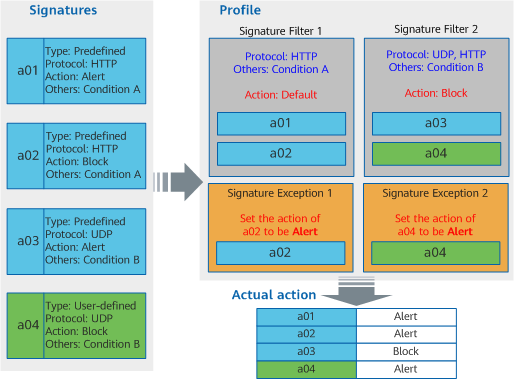
Figure 1 shows the relationship between signatures, signature filters, and exception signatures. In this example, a01, a02, and a03 are predefined signatures. a04 is a user-defined signature. Two signature filters are configured in the profile. Signature filter 1 filters signatures a01 and a02 whose protocol set is set to HTTP and other filtering conditions are set to condition A. The action for signature filter 1 is set to the default action for signatures. Signature filter 2 filters a03 and a04 whose protocol set is set to HTTP or UDP and other filtering conditions are set to condition B. The action for signature filter 2 is set to block. Besides, two exception signatures are configured in the profile. In exception signature 1, set the action for a02 to alert. In exception signature 2, set the action for a04 to alert.
The actual action for a signature is jointly determined by the default action for the signature, action for the signature filter, and action for the exception signature. For details, see Actual action in Figure 1.
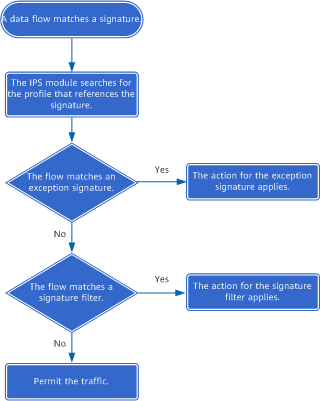
When a data flow matches the intrusion prevention profile, the FW sends the data flow to the intrusion prevention module to match the signatures referenced by the profile one by one. Figure 2 shows the traffic processing flow.

When a packet matches multiple signatures, the actual action for the packet is as follows:
- If the actions for all the matched signatures are Alert, the action for the packet is Alert.
- If the action for any matched signature is Block, the action for the packet is Block.
When a data flow matches multiple signature filters, the action for the signature filter with the highest priority is performed on the data flow.
Detection Directions
If a security policy references an intrusion prevention profile, the direction in the security policy is determined by the node that initiates a session, not the node that sends attack packets.
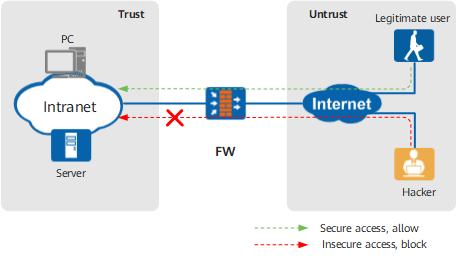
As shown in Figure 3, when an Internet user accesses an intranet, the intranet PC or server runs the risk of attacks launched by Internet devices. Internet user access traffic destined for the intranet is sent from the Untrust zone to the Trust zone. The security policy takes effect on Internet-to-intranet traffic, which means that the source zone is the Untrust zone, and the destination zone is the Trust zone. In this scenario, the session initiation direction is the same as the attack traffic direction.
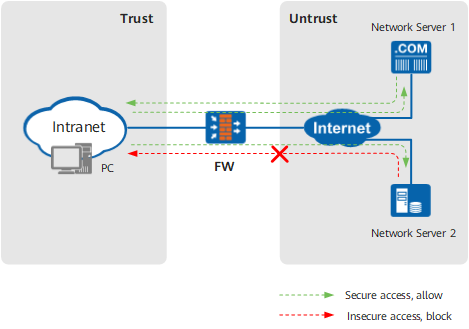
As shown in Figure 4, when a PC accesses an Internet server, the intranet PC runs the risk of attacks launched by Internet devices. The PC sends traffic to the Internet server, and the traffic travels from the Trust zone to the Untrust zone. Attack traffic originates from the Internet, and the traffic travels from the Untrust zone to the Trust zone. The security policy takes effect on PC-to-Internet traffic, which means that the source zone is the Trust zone, and the destination zone is the Untrust zone. The direction defined in the security policy is different from the attack traffic direction. In this scenario, the session initiation direction is different from the attack traffic direction.
Threat Intelligence Linkage
The device supports threat intelligence linkage. With this function enabled, the device can use the threat intelligence obtained from the cloud to re-determine the risk of the threat event whose processing action is alert and change the processing action to block if the risk level exceeds the threshold. Figure Figure 5 shows the detailed processing flow of IPS threat intelligence linkage.
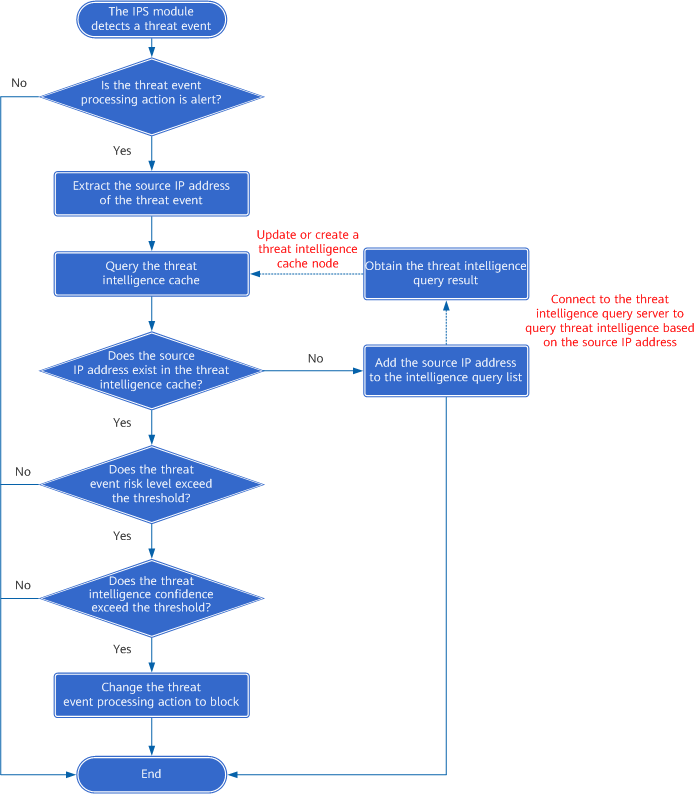
After IPS threat intelligence linkage is enabled, if the IPS module detects a threat event and determines that the final processing action is alert, the threat intelligence query module extracts the source IP address of the threat event and sends it to the threat intelligence query server to query the threat event intelligence. By default, the threat intelligence query module uses TLS to connect to the Huawei Security Center (sec.huawei.com), from which it obtains IP address of the threat intelligence query server.
After obtaining the threat event intelligence, the device determines whether the threat event risk level and intelligence confidence in the threat intelligence reach the preset linkage triggering threshold. If both reach the threshold, the device changes the processing action of the threat event from alert to block, improves the blocking rate of the IPS service against high-risk threats.