Intrusion Prevention Is Configured but Fails to Block Attacks
This section describes how to troubleshoot the fault that intrusion prevention is configured but fails to block attacks. Intrusion prevention against a specific type of attack from the Internet is configured. However, when such attacks occur on the intranet, the FW fails to block them.
Symptom
As shown in Figure 1, an enterprise has deployed a FW as a security gateway at the intranet border. Intrusion prevention configured on the FW protects intranet servers from attacks launched by both Internet and intranet users and protects intranet users against websites embedded with malicious codes.
At a specific time point, an FTP server suffers attacks from the Internet and works improperly. The administrator of the FTP server checks the attack details recorded by imbedded software from a host and reports to the administrator of the FW.
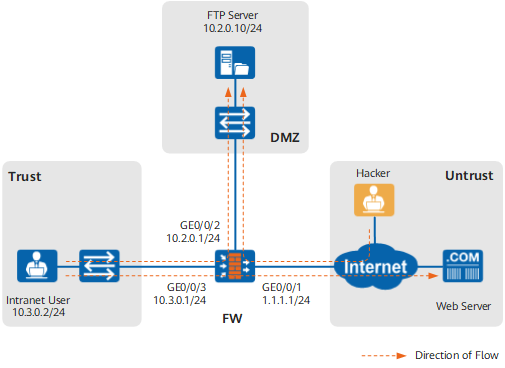
Fault Diagnosis
Procedure
- In Threat Log, find the log that records
this attack event and click
 for the log.
 - In Threat, Action is displayed as alert.
- The signature is added to a signature filter, and the action for this signature filter is alert.
- The signature is added to an exception signature, and the action for this exception signature is alert.
- In Threat, view and record the ID of the threat.
- In Threat, click the name of Profile. Modify Intrusion Prevention Profile is displayed.
- In Signature Exception, check for the signature ID. If the signature ID can be found, change the action to Block for the signature.
If the signature is added as an exception signature, the signature is added to a signature filter.
In Signature Exception, enter the signature ID and set the action to Block.
- Click OK to exit the interface of the intrusion prevention profile.
- Click Commit at the upper right corner
of the page.
 Committing profiles consumes system resources and may take a long period of time. Therefore, do not frequently commit the profile.
 The intrusion prevention profile referenced in the security policy does not contain the signature matching the attack.
- Choose .
- Click the security policy in which the source security zone is Untrust and the destination security zone is DMZ to display the Modify Security Policy page.
- In Content Security, click Config for Intrusion Prevention to access the interface of the intrusion prevention profile.
- In Signature and Signature Exception, check whether the signature matching the attack is added to a signature filter or signature exception.
If signature is not added to either of them, enter the signature ID in Signature Exception, click Add, and set the action to Block.
- Click OK to exit the interface of the intrusion prevention profile.
- Click Commit at the upper right corner
of the page. Committing profiles consumes system resources. To save time, you can commit the configuration after all the operations on the profile are complete.
The security policy does not reference the intrusion prevention profile.
- Choose .
- Click the security policy in which the source security zone is Untrust and the destination security zone is DMZ to display the Modify Security Policy page.
- In Content Security, check whether Intrusion Prevention references the intrusion prevention profile.
If the interzone security policy does not reference any intrusion prevention profile, select a profile from the drop-down list. Click OK to apply the intrusion prevention profile to the policy.
Before selecting an intrusion prevention profile, ensure that the profile contains the required signature. For details, see Configuring Intrusion Prevention.
- Click Commit at the upper right corner
of the page. Committing profiles consumes system resources. To save time, you can commit the configuration after all the operations on the profile are complete.
Configuration changes are not committed.
If preceding operations are complete, but the fault persists, click Commit after changing configurations.
If the system displays a message indicating no committable content after you click Commit, the fault is not resulted from uncommitted changes.
Committing profiles consumes system resources and may take a long period of time. Therefore, do not frequently commit the profile.The latest intrusion prevention signature database is not loaded.
Choose . Check whether the current version of Intrusion Prevention Signature Database is the latest one.
If the current version is not the latest one, update the version. For information about how to update the version, see Updating the Signature Database.
If the fault persists, contact Huawei technical support personnel.
The attack event is logged, but the action for the corresponding signature is alert.
Possible causes are as follows:
Troubleshooting procedure is as follows:
The attack event is not logged, which means that the attack does not match any signature.
Possible causes and troubleshooting procedure are as follows: