< Home

Preparation

This section describes preparations for signature database updates.

Checking the License Status

Before updating a signature database, ensure that the license for the update service has been purchased and activated.

To check the license status, perform the following operation:

  1. Choose System > License Management.
  2. In License Resource, search for the signature database to be updated. Check whether the license is activated or expired in Status.
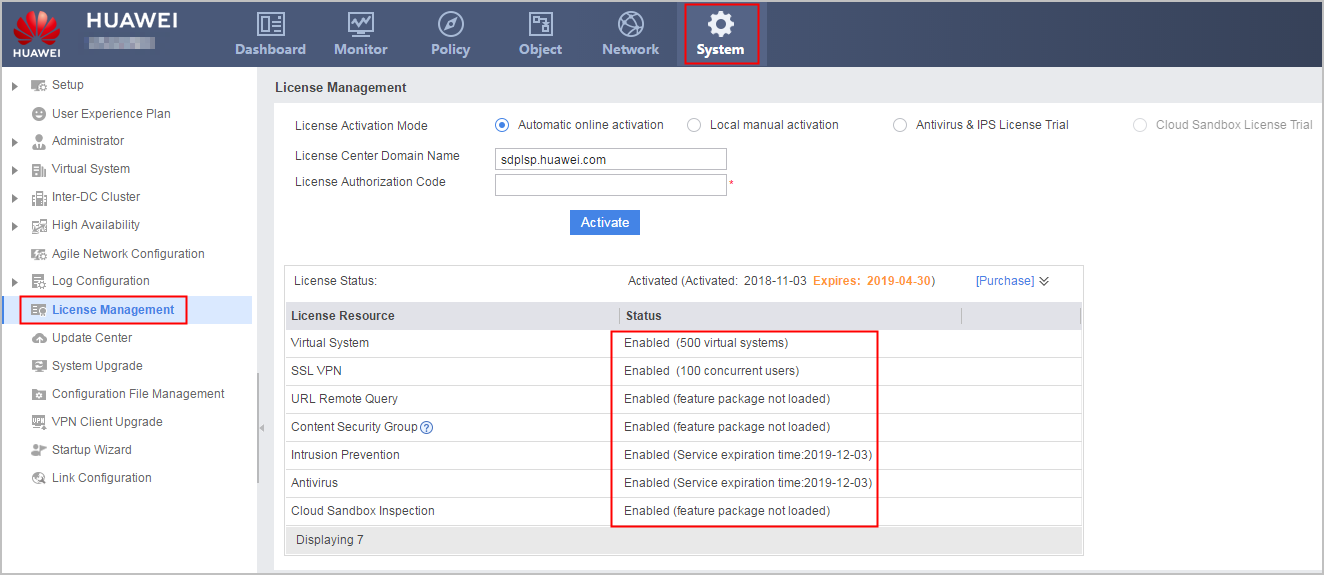
    • If Status is Disable, activate the license. For operations, see License Management.
    • If Status indicates that the service has expired, renew the corresponding license.

Checking the Free Space of the CF Card and Memory

Before updating a signature database, check whether the free space in the device CF card and memory is sufficient. The following table lists the CF card and memory space required for updating various signature databases.

Signature Database

CF Card Space

Memory Space

Antivirus signature database (AV-SDB)

USG6510E/6510E-POE: 10 MB or higher

USG6530E: 50 MB or higher

Other models: 240 MB or higher

  • USG6510E/6510E-POE: 36 MB or higher
  • USG6530E: 72 MB or higher
  • USG6515E: 360 MB or higher
  • USG6525E: 360 MB or higher
  • USG6550E/6560E/6580E: 400 MB or higher
  • USG6555E/6565E/6575E-B/6585E/6605E-B: 400 MB or higher
  • USG6615E/6625E: 420 MB or higher
  • USG6610E/6620E: 420 MB or higher
  • USG6635E/6655E: 440 MB or higher
  • USG6630E: 620 MB or higher
  • USG6650E: 620 MB or higher
  • USG6680E: 620 MB or higher
  • USG6712E/6716E: 820 MB or higher

Malicious domain name database

10 MB or higher

  • USG6510E/6510E-POE: 30 MB or higher
  • USG6530E: 50 MB or higher
  • USG6515E: 50 MB or higher
  • USG6525E: 50 MB or higher
  • USG6550E/6560E/6580E: 90 MB or higher
  • USG6555E/6565E/6575E-B/6585E/6605E-B: 90 MB or higher
  • USG6615E/6625E: 110 MB or higher
  • USG6610E/6620E: 110 MB or higher
  • USG6635E/6655E: 130 MB or higher
  • USG6630E: 310 MB or higher
  • USG6650E: 310 MB or higher
  • USG6680E: 310 MB or higher
  • USG6712E/6716E: 510 MB or higher

IP reputation database

80 MB or higher

NOTE:

The USG6510E/6510E-POE and USG6530E do not support the IP reputation database.

8 MB or higher

IPS signature database (IPS-SDB)

30 MB or higher

  • USG6510E/6510E-POE: 52 MB or higher
  • USG6530E: 100 MB or higher
  • USG6515E: 440 MB or higher
  • USG6525E: 440 MB or higher
  • USG6550E/6560E/6580E: 480 MB or higher
  • USG6555E/6565E/6575E-B/6585E/6605E-B: 480 MB or higher
  • USG6615E/6625E: 500 MB or higher
  • USG6610E/6620E: 500 MB or higher
  • USG6635E/6655E: 520 MB or higher
  • USG6630E: 700 MB or higher
  • USG6650E: 700 MB or higher
  • USG6680E: 700 MB or higher
  • USG6712E/6716E: 900 MB or higher

Service awareness signature database (SA-SDB)

10 MB or higher

  • USG6510E/6510E-POE: 45 MB or higher
  • USG6530E: 140 MB or higher
  • USG6515E: 440 MB or higher
  • USG6525E: 440 MB or higher
  • USG6550E/6560E/6580E: 480 MB or higher
  • USG6555E/6565E/6575E-B/6585E/6605E-B: 480 MB or higher
  • USG6615E/6625E: 500 MB or higher
  • USG6610E/6620E: 500 MB or higher
  • USG6635E/6655E: 520 MB or higher
  • USG6630E: 700 MB or higher
  • USG6650E: 700 MB or higher
  • USG6680E: 700 MB or higher
  • USG6712E/6716E: 900 MB or higher

File reputation signature database

USG6530E: 10 MB or higher

Other models: 190 MB or higher

  • USG6510E/6510E-POE: 30 MB or higher
  • USG6530E: 50 MB or higher
  • USG6515E: 80 MB or higher
  • USG6525E: 80 MB or higher
  • USG6550E/6560E/6580E: 120 MB or higher
  • USG6555E/6565E/6575E-B/6585E/6605E-B: 120 MB or higher
  • USG6615E/6625E: 140 MB or higher
  • USG6610E/6620E: 140 MB or higher
  • USG6635E/6655E: 160 MB or higher
  • USG6630E: 340 MB or higher
  • USG6650E: 340 MB or higher
  • USG6680E: 340 MB or higher
  • USG6712E/6716E: 540 MB or higher

Region identification signature database

10 MB or higher

6 MB or higher

Asset identification signature database

5 MB or higher

NOTE:

Only the USG6510E/6510E-POE does not support the asset identification signature database.

20 MB or higher

Perform the following operation:

  1. Select Dashboard.
  2. In Device Information, check the available space of the CF card and memory.

Checking the Signature Database Version

Check the signature database version to determine whether the signature database needs to be updated.

Perform the following operation:

  1. Choose System > Update Center.
  2. In Signature Database Update, view Current Version of the signature database to be updated and determine whether it requires an update.
Copyright © Huawei Technologies Co., Ltd.
Next topic >