URL Filtering Overview
This section describes the URL filtering feature and the relationship between URL filtering and DNS filtering.
Overview
With the rapid development of Internet applications and the popularity of computer networks, information acquisition, sharing, and dissemination have become more widespread than ever, which brings unprecedented threats to enterprises.
- Visiting non-work-related websites during working hours reduces work efficiency.
- Visiting illegitimate or malicious websites may result in information leaks and threats such as worms, viruses, and Trojan horses.
- When the intranet is congested, employees may be unable to access work-related websites, such as the company homepage and search engine, deteriorating work efficiency.
URL filtering can solve the preceding problems. URL filtering regulates online behavior by controlling which URLs users can access. URL filtering can allow or block requests based on the time range, user, or user group by referencing these configuration items to control users' Internet access permissions in a more refined and accurate manner.
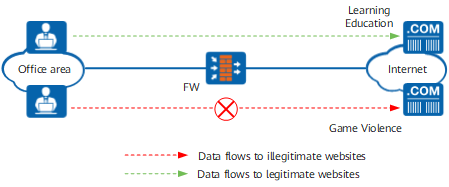
As shown in Figure 1, the FW is deployed at the network border as the enterprise's gateway. When enterprise users implement HTTP or HTTPS requests, the FW can allow, alert, or block users' requests by the URL filtering function.
URL filtering is applied to:
- Allow the request if the user accesses a legitimate website.
- Block the request if the user accesses an illegitimate website.
Relationship Between URL Filtering and DNS Filtering
| Comparison Item | URL Filtering | DNS Filtering |
|---|---|---|
| Access control phase | Control the access when HTTP/HTTPS URL requests are initiated. | Control the access when domain names are resolved. |
| Control granularity | The control granularity is fine, to the directory and file levels. | The control granularity is coarse, to the domain name level. |
| Impact on performance | Great | Slight |
| Control scope | Only HTTP/HTTPS access is controlled. | All services corresponding to the domain name can be controlled. |