Key Points for Configuring Blacklist/Whitelist-based URL Filtering
This section describes how to configure URL filtering based on the blacklist and whitelist.
You can use predefined URL categories to block access to adult and illegal websites. To separately control the access to a few websites (for example, www.example1.com, www.example2.com, www.example3.com, and www.example4.com), you can add www.example1.com and www.example2.com to the whitelist and www.example3.com and www.example4.com to the blacklist.
To implement URL filtering based on the blacklist and whitelist, refer to the following configuration logic:
Configure the blacklist and whitelist and their parameters in the URL filtering profile.
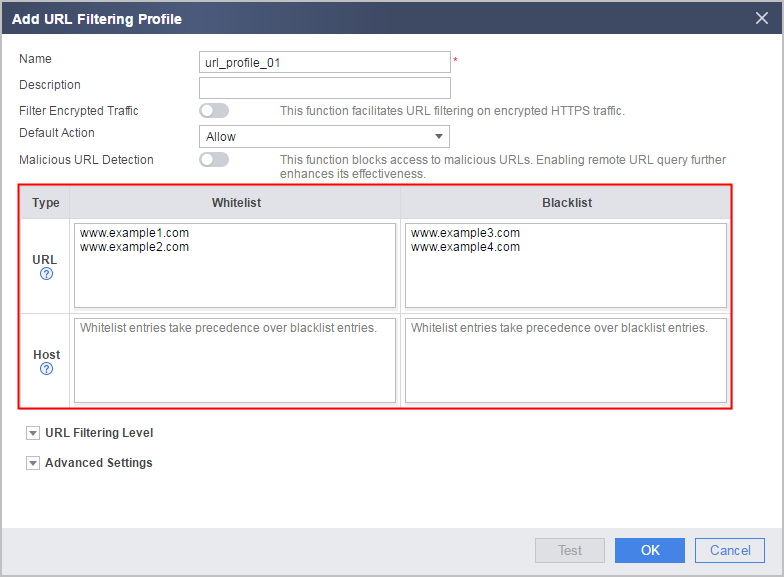 The matching scope of a URL rule covers the entire URL, whereas that of a HOST rule covers only the domain name (or an IP address) part. The two types of rules are used in the following scenarios:
- If the permitted or blocked URLs are in the domain name format, either URL rules or HOST rules can be configured in most cases. The URL rules and HOST rules have the same filtering effect. For example, permit or block the access to the domain name www.example.com.
- If the permitted or blocked URLs is in the level-2 domain name format and a small number of URLs are configured, either URL rules or HOST rules can be configured. If a large number of URLs are configured, configuring HOST rules is more simple. For example, permit or block the access to the level-2 domain name news.example.com.
- If the permitted or blocked URLs carry directory and parameter information, only URL rules can be configured. For example, permit or block the access to the URL www.example.com/news.
Configure a security policy, specify matching conditions, and reference the URL filtering profile in the security policy.
URL filtering can allow or block requests based on the time range, user, or user group by referencing these configuration items to control users' Internet access permissions in a more refined and accurate manner.