Google Account Control Flow
This section describes the flow for the FW to implement Google account control.
Some enterprises attempt to allow employees to log in to Google services only with specified enterprise accounts but not their personal accounts. To achieve this, configure the Google account control function on the FW. For example, an enterprise requires that an employee can log in to Google services only with an enterprise account ending with example.com. After the Google account control function is enabled, the login succeeds if the employee uses an account ending with example.com to log in to Google services and fails if the employee uses a personal account to log in to Google services.
The Google account control flow begins after the URL filtering flow is complete. Google account control is not implemented for the packets blocked by URL filtering. Figure 1 shows the Google account control flow.
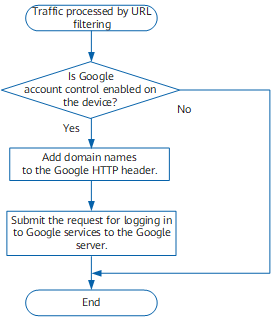
The FW checks whether Google account control is configured.
- If no, the action of the matching URL filtering rule is taken on packets.
- If yes, proceed to the next step.
The FW allows you to add the domain names of accessible Google services to the Google HTTP header.
- The FW submits the requests for accessing Google services to the Google server. The Google server controls the Google services accessible to enterprise users based on the HTTP header value.