Check the URL filtering effect
Check the URL filtering effect based on the URL filtering profile and entered URLs. This helps you adjust the profile based on the check result and provides information for you to quickly resolve the problems that may occur during URL filtering.
Procedure
- After the URL filtering profile is configured, click Test in URL filtering profile. In the dialog box that
is displayed, enter the URL to be checked.

Before checking the URL filtering effect, ensure that the URL filtering configuration is delivered and submitted.
URL filtering does not support the whitelist function for embedded web pages, safe search, Google account control, or blocking of abnormal packets. Therefore, the detection result may be different from the actual access.
- Click Start. The results of URL
filtering are displayed.
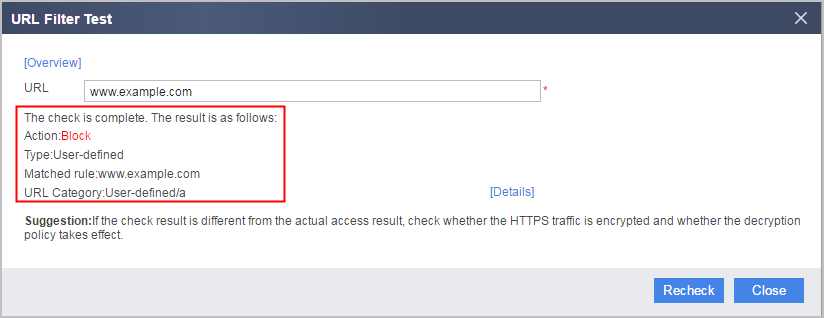
Parameter Description Action URL filtering detection action. The values are as follows:- Allow
- Alert
- Block
Type URL filtering type. The values are as follows: - Whitelist
- Blacklist
- User-defined
- Pre-defined
- Malicious URL
- Low-Reputation URL
- Timeout or default action
Matched rule Matched URL rule
URL Category URL category information in the format of category information/subcategory information.
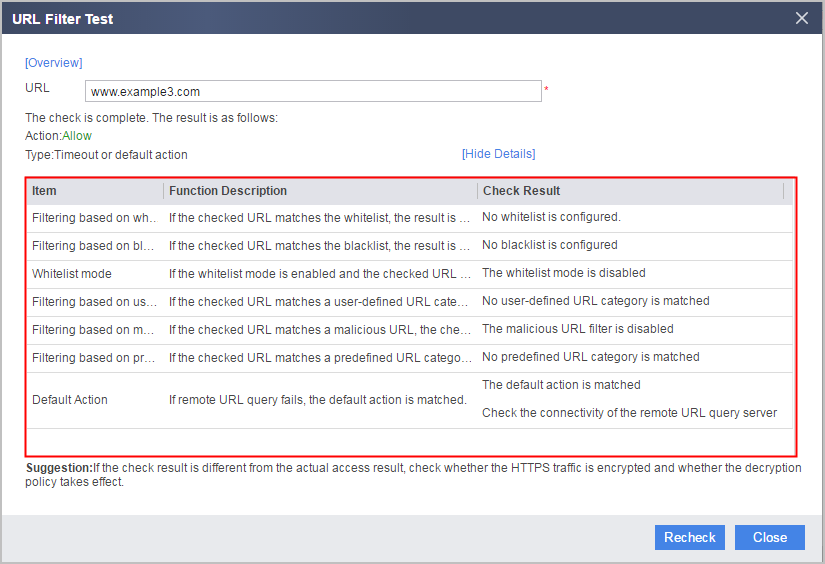
- Click Details to view detailed URL
filtering check results.