Connecting AC Power Cables
By default, the USG6515E, USG6525E, USG6550E, USG6555E, USG6560E, USG6565E, USG6575E-B, USG6580E, USG6585E, USG6605E-B, USG6610E, USG6615E, USG6620E, USG6625E comes with one AC power module. However, two AC power modules are supported. The USG6630E, USG6635E, USG6650E, USG6655E comes with two AC power module. Each AC power module requires an AC power cable. When two AC power modules are used, connect power cables to both AC power modules.
Context
Before connecting the power cables, ensure that the AC power supply in the equipment room meets the input requirements of the USG.

Do not connect or disconnect the power cables when the USG is powered on.
Procedure
- Ensure that the PGND cable is adequately grounded.
- Connect AC power cables to AC power modules.

When two power modules are used, connect them to different power sources to improve availability.
- Plug the other end of the power cable to the AC power socket or the output of the AC power supply device.Figure 1 Connecting AC power cables (USG6515E, USG6525E, USG6550E, USG6555E, USG6560E, USG6565E, USG6575E-B, USG6580E, USG6585E, USG6605E-B, USG6610E, USG6615E, USG6620E, USG6625E)
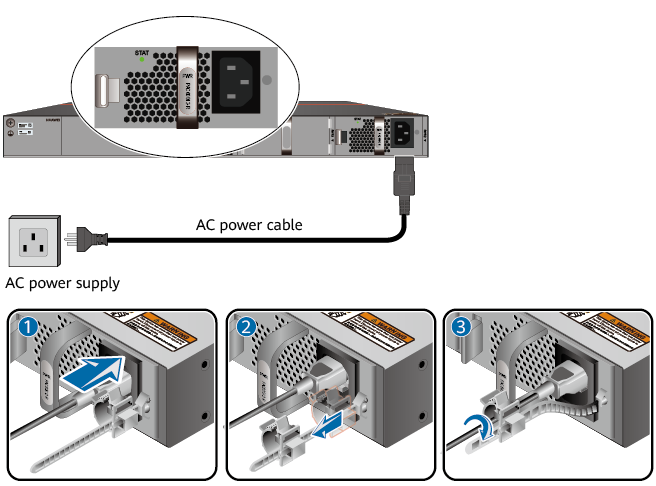 Figure 2 Connecting AC power cables (USG6630E, USG6635E, USG6650E, USG6655E)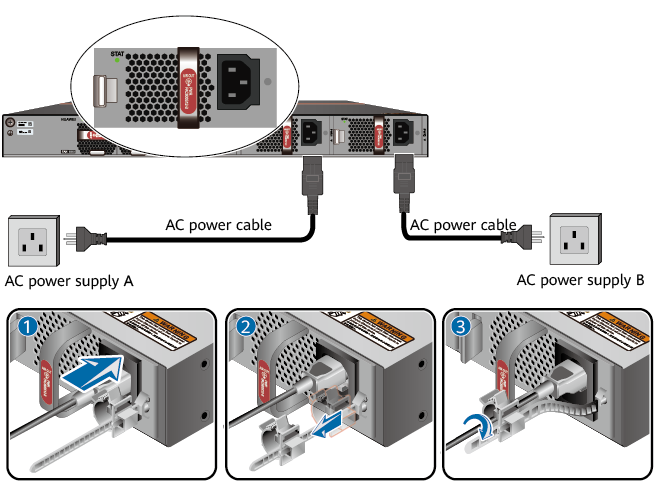
- Plug the other end of the power cable to the AC power socket or the output of the AC power supply device.