Console Cable
Connection
A console cable is connected as follows:
- The RJ45 connector is connected to the console port of the USG.
- The DB9 connector is connected to the COM port on a maintenance terminal.
Appearance and Structure
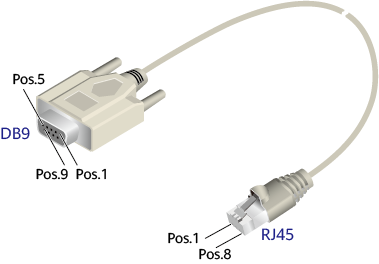
A console cable is an 8-wire shielded cable. Figure 1 shows the console cable.
Name |
Description |
|---|---|
DB9 |
DB9 connector(female). The connector has 9 pin holes with IDs from 1 to 9. It connects to the COM port of a PC. |
RJ45 |
RJ45 connector |
Pos |
Pin position |
Pin Assignments
Table 1 lists the pin assignments of a console cable.
USG |
Signal Description |
RJ45 Pin ID |
Signal Direction |
DB9 Pin ID |
|---|---|---|---|---|
NA |
RTS (Request to Send) |
1 |
← |
7 |
NA |
DTR (Data Terminal Ready) |
2 |
← |
4 |
TXD |
TXD (Transmit Data) |
3 |
→ |
2 |
NA |
DCD (Data Carrier Detect) |
4 |
→ |
1 |
GND |
GND |
5 |
- |
5 |
RXD |
RXD (Receive Data) |
6 |
← |
3 |
NA |
DSR (Data Set Ready) |
7 |
→ |
6 |
NA |
CTS (Clear to Send) |
8 |
→ |
8 |
NOTE:
Pins in the same row are connected to each other using a cable. The symbol → indicates that the signal travels from the RJ45 connector to the DB9 connector, whereas the symbol ← indicates that the signal travels from the DB9 connector to the RJ45 connector. Pos. 9 of the DB9 connector is empty. |
||||
Technical Specifications
Table 2 shows the technical specifications of the console cable.