Optical Fiber
Connection
Optical fibers are used for carrying signals on Gigabit networks or networks with higher packet rates. An optical fiber is a carrier of optical signals and transmits optical signals over a short distance. An optical fiber is connected as follows:
- One end is connected to the optical port on the USG through the corresponding optical module.
- The other end is connected to the optical port on the peer device.
Select optical modules and fibers based on peer device interfaces.

You are advised to use Huawei optical modules. Optical modules from other vendors may cause incompatibility issues and lead to faults on the USG6000E.
When using optical modules and optical fibers, pay attention to the following to ensure proper communication between devices:
Use single-mode and multi-mode optical fibers as required.
Tx (sending) of the local device corresponds to Rx (receiving) of the peer device.
The wavelengths of the optical modules on both ends must be the same.
Do not overbend optical fibers. The bend radius must not be shorter than 40 mm.

To avoid eye injuries, do not look straight at the optical transmit interface of the laser or the optical connector.
Appearance and Structure
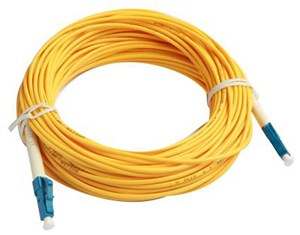
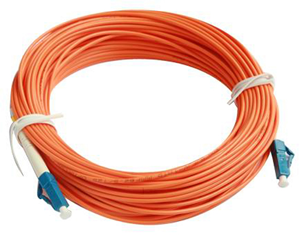
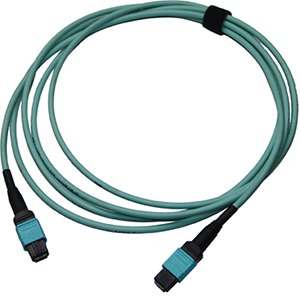
Optical fibers are classified into single-mode and multi-mode optical fibers. Single-mode optical fibers are used for long-distance transmission whereas multi-mode optical fibers are used for short-distance transmission. Indoor single-mode optical fibers usually have a yellow jacket, as shown in Figure 1. The jacket of the LC/PC-LC/PC multi-mode optical fiber is orange, as shown in Figure 2, and that of the MPO/PC-MPO/PC multi-mode optical fiber is cyan, as shown in Figure 3. Optical fibers are not delivered with the USG6000E. Purchase optical fibers separately as required.
- To ensure the normal transmission of optical signals, do not use single-mode optical fibers to connect multi-mode optical modules, nor multi-mode optical fibers to connect single-mode optical modules.
- To connect extension optical fibers, purchase LC/PC-LC/PC adapters.
LC/PC connector
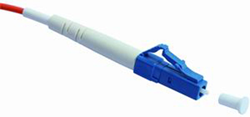
The procedure for inserting and removing LC/PC connectors is as follows:
- Insert and remove the connector along the axis without rotating the connector.
- When you insert the fiber, carefully insert the fiber head into the optical interface on the interface board.
- To remove the optical fiber, squeeze the pinch on the fiber connector, gently push on the fiber connector, and then pull it out.
SC/PC connector
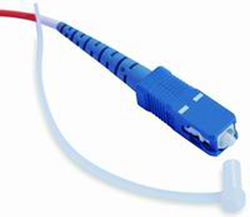
The procedure for inserting and removing SC/PC connectors is as follows:
- Insert and remove the connector along the axis without rotating the connector.
- When you insert the fiber, carefully insert the fiber head into the optical interface on the interface board.
- To remove the optical fiber, gently push on the fiber connector, and then pull out the connector.
FC/PC connector
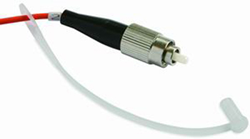
The procedure for inserting and removing FC/PC connectors is as follows:
- When you insert an optical fiber, aim the FC/PC connector at the optical interface on the interface board to avoid damaging the inner layer of the optical interface. Then insert the fiber into the optical interface, rotate the outer screw jacket clockwise, and then fasten the optical connector.
- To remove an optical fiber, rotate the outer screw jacket counter-clockwise on the optical interface until the screw loosens. Then gently pull out the optical fiber.
MPO/PC optical fiber connector
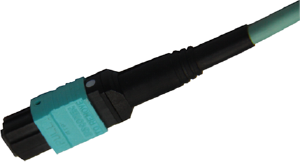
Note the following points when removing and inserting an MPO/PC fiber connector:
- When inserting the connector, hold the shell labeled "PUSH" and feed the male connector into the female connector until you hear a clicking sound. The male and female connectors are securely installed.
- To disassemble the connector, hold the shell labeled "PULL" and remove the male connector.
There are four types of optical fibers for the USG6000E: LC/PC-LC/PC, LC/PC-SC/PC, LC/PC-FC/PC, and MPO/PC-MPO/PC, which are based on the types of connectors on both ends of the fibers, as listed in Table 1.
Technical Specifications
| Description | Part Number | Model | Connector X1 | Connector X2 | Cable length | Bend radius |
|---|---|---|---|---|---|---|
| Patch Cord,SC/PC,SC/PC,Single-mode,5m,G.652D,3mm | 14130098 | SS-OP-D-SC-S-5 | SC/PC | SC/PC | 5 m | 30 mm |
| Patch Cord,LC/PC,SC/PC,Single-mode,5m,G.652D,2mm | 14130193 | SS-OP-LC-SC-S-5 | LC/PC | SC/PC | 5 m | 30 mm |
| Patch Cord,LC/PC-LC/PC,Singlemode,G.652D,2mm,5m | 14130195 | SS-OP-D-LC-S-5 | LC/PC | LC/PC | 5 m | 30 mm |
| Patch Cord,LC/PC,SC/PC,Single-mode,10m,G.652D,2mm | 14130196 | SS-OP-LC-SC-S-10 | LC/PC | SC/PC | 10 m | 30 mm |
| Patch Cord,LC/PC,FC/PC,Single-mode,10m,G.652D,2mm | 14130197 | SS-OP-LC-FC-S-10 | LC/PC | FC/PC | 10 m | 30 mm |
| Patch Cord,LC/PC,LC/PC,Single-mode,10m,G.652D,2mm | 14130199 | SS-OP-D-LC-S-10 | LC/PC | LC/PC | 10 m | 30 mm |
| Patch Cord,LC/PC,FC/PC,Multi-mode,10m,A1b,2mm | 14130221 | SS-OP-LC-FC-M-10 | LC/PC | FC/PC | 10 m | 30 mm |
| Patch Cord,LC/PC,LC/PC,Multi-mode,10m,A1B,2mm | 14130222 | SS-OP-D-LC-M-10 | LC/PC | LC/PC | 10 m | 30 mm |
| Patch Cord,LC/PC,SC/PC,Multi-mode,10m,A1b,2mm | 14130223 | SS-OP-LC-SC-M-10 | LC/PC | SC/PC | 10 m | 30 mm |
| Optical adapter-LC/PC-LC/PC-Blue-Shell:Plastic-Sleeve:Zirconia-Square | 14130248 | QW1P0FIBER06 | LC/PC | LC/PC | - | - |
| Patch Cord,LC/PC,LC/PC,Single-mode,20m,G.652D,2mm | 14130251 | SS-OP-D-LC-S-20 | LC/PC | LC/PC | 20 m | 30 mm |
| Patch Cord,LC/PC,SC/PC,Multi-mode,30m,A1b,2mm | 14130275 | SS-OP-LC-SC-M-30 | LC/PC | SC/PC | 30 m | 30 mm |
| Patch Cord,LC/PC,SC/PC,Single-mode,30m,G.652D,2mm | 14130276 | SS-OP-LC-SC-S-30 | LC/PC | SC/PC | 30 m | 30 mm |
| Patch Cord,LC/PC,SC/PC,Multi-mode,20m,A1b,2mm | 14130279 | SS-OP-LC-SC-M-20 | LC/PC | SC/PC | 20 m | 30 mm |
| Patch Cord,LC/PC,SC/PC,Single-mode,20m,G.652D,2mm | 14130280 | SS-OP-LC-SC-S-20 | LC/PC | SC/PC | 20 m | 30 mm |
| Patch Cord,LC/PC,LC/PC,Multi-mode,20m,A1b,2mm | 14130295 | SS-OP-D-LC-M-20 | LC/PC | LC/PC | 20 m | 30 mm |
| Patch Cord,LC/PC,LC/PC,Multi-mode,5m,A1b,2mm | 14130296 | SS-OP-D-LC-M-5 | LC/PC | LC/PC | 5 m | 30 mm |
| Patch Cord,LC/PC,SC/PC,Multi-mode,50m,A1b,2mm | 14130311 | SS-OP-LC-SC-M-50 | LC/PC | SC/PC | 50 m | 30 mm |
| Patch Cord,LC/PC,SC/PC,Single-mode,50m,G.652D,2mm | 14130312 | SS-OP-LC-SC-S-50 | LC/PC | SC/PC | 50 m | 30 mm |
| Patch Cord,LC/PC,LC/PC,Single-mode,6m,G.652D,2mm | 14130360 | SS-OP-D-LC-S-6 | LC/PC | LC/PC | 6 m | 30 mm |
| Optical Cable Parts,MPO/PC,MPO/PC,MULTI-MODE,2m,8 CORES,0m/0m,GJFH-8A1A.2(OM3),3.5MM,LSZH,43MM SHORT MPO,BENDING INSENSITIVE | 14130823 | F00MPMP01 | MPO/PC | MPO/PC | 2 m | 18 mm |
| Optical Cable Parts,MPO/PC,MPO/PC,Multimode(OM3,Bending Insensitive),30m,8 Cores,0m/0m,GJFH 8A1a,3.5mm,LSZH,42mm Short MPO,Indoor | 14130823-002 | FMMM03001 | MPO/PC | MPO/PC | 30 m | 17.5 mm |
| Optical Cable Parts,MPO/PC,MPO/PC,Multimode(OM3,Bending Insensitive),100m,8 Cores,0m/0m,GJFH 8A1a,3.5mm,LSZH,42mm Short MPO,Indoor | 14130823-003 | FMMM10001 | MPO/PC | MPO/PC | 100 m | 17.5 mm |
| Optical Cable Parts,MPO/PC,MPO/PC,MULTI-MODE,15m,8 CORES,0m/0m,GJFH-8A1A.2(OM3),3.5MM,LSZH,60mm MPO,Bending insensitive | 14130923 | SS-OP-D-MPO12-M-15 | MPO/PC | MPO/PC | 15 m | 18 mm |
| Optical Cable Parts,MPO/PC,MPO/PC,Multi-mode,10m,8 cores,GJFH-8A1a.3(OM4),3.5mm,0mm,LSZH,Bending Insensitive | 14134486 | MPO12-MPO12-M4-10 | MPO/PC | MPO/PC | 10 m | 17.5 mm |