Web: Example for Configuring Mobile Office Users Accessing the Intranet Through the SSL VPN Tunnel (Chinese Cryptographic Certificate)
Networking Requirements
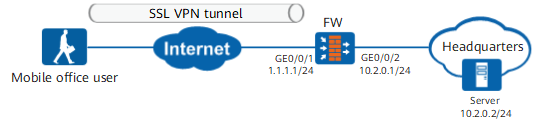
Figure 1 shows the network topology. The headquarters of an enterprise has multiple departments including the research department. Local authentication of the FW is used to authenticate employees in each department.
Authenticated users can access the enterprise intranet.
The enterprise has the following requirement: Mobile office users in the research department can obtain an intranet IP address when they are on the move and can access various resources in the enterprise as if they were on a LAN. In addition, to enhance security, certificate and local authentication (certificate-challenge authentication) needs to be used together to authenticate mobile office users. In this case, users need to install client certificates and enter passwords.
Configuration Roadmap
To allow mobile office users to access intranet resources in certificate-challenge authentication mode, the administrator must provide the client certificate and user names and passwords. When mobile office users access the virtual gateway, the FW uses the CA certificate issued by the same CA to authenticate the client certificates of mobile office users. Users also need to enter passwords.
Apply for a CA certificate and client certificate from the CA, and import the CA certificate to the FW for authenticating mobile office users.
- On the FW, configure users and add a research user group, and set user passwords. The configured data is used for identity authentication and authorization of users in the user group, ensuring that mobile office users can use the SSL VPN service.
- Create an SSL VPN gateway and enable the network extension function so that mobile office users can access intranet resources.
- Configure security policies to allow mobile office users to access intranet resources.
On the intranet server, create a route to the virtual IP address pool of the mobile office users and issue the client certificate to the mobile office users. Mobile office users install this client certificate in the VPN client. The certificate is used for the FW to authenticate users when they access the SSL VPN virtual gateway.
Procedure
- Apply for CA certificates and client certificates.
- Upload the CA certificates and client certificates to the device.
Upload the CA certificates and client certificates to the pki/public/ directory of the device. sm2.rca.pem and sm2.oca.pem are CA certificates, and sm2.sig.crt.pem and sm2.enc.crt.pem are client certificates. For details about how to import certificates, see "Object Configuration" > "Certificate Configuration" in the Configuration Guide.
<FW> system-view
[FW] pki realm sm_sig
[FW-pki-realm-sm_sig] quit
[FW] pki realm sm_enc
[FW-pki-realm-sm_enc] quit
[FW]pki import sm2-key-pair sm2.enc.key pem sm2.enc.key.pem exportable password admin@123
[FW]pki import-certificate local realm sm_enc pem filename sm2.enc.crt.pem
[FW]pki import sm2-key-pair sm2.sig.key pem sm2.sig.key.pem exportable password admin@123
[FW]pki import-certificate local realm sm_sig pem filename sm2.sig.crt.pem no-check-same-name
[FW]pki import-certificate ca filename oca.crt
[FW]pki import-certificate ca filena
- Configure interfaces.
- Click
 corresponding to GE0/0/1 and set the parameters as follows:
Zone
untrust
IPv4
IP Address
1.1.1.1/24
- Click
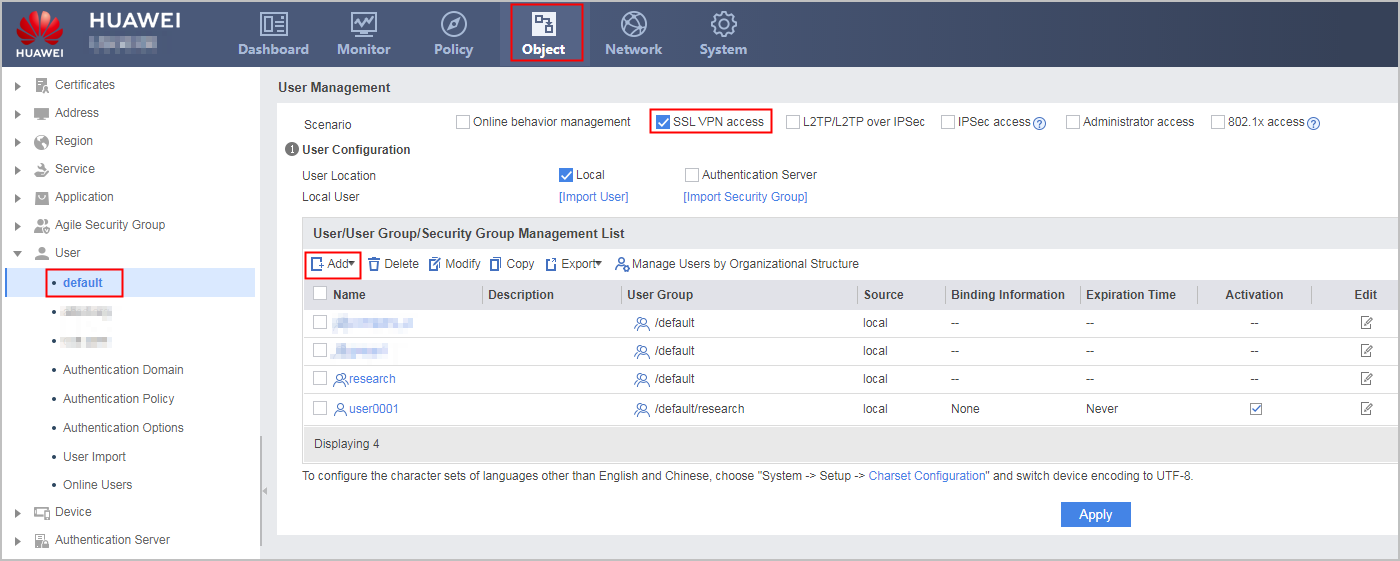
- Configure users.
- Choose , and set the parameters as follows:
Configure a user and a user group based on the values of User Filtering Field and Group Filtering Field planned for the virtual gateway. For example, if the virtual gateway uses Subject-CN as User Filtering Field and Subject-OU as Group Filtering Field, the user name must be the same as the value of Subject-CN in the client certificate, and the user group name must be the same as the value of Subject-OU in the client certificate. For details about how to obtain the values of the Subject-CN and Subject-OU fields in the client certificate, see 11. In addition, the user and user group created here are used for identity authentication and subsequent role authorization.
- Choose , and set the parameters as follows:
- Configure the SSL VPN gateway.
- Click Add and set the parameters as follows:
User Filtering Field indicates the field of the client certificate that is used as the user name. Group Filtering Field indicates the field of the client certificate that is used as the user group name. The two parameters are used for identity authentication and subsequent role authorization.
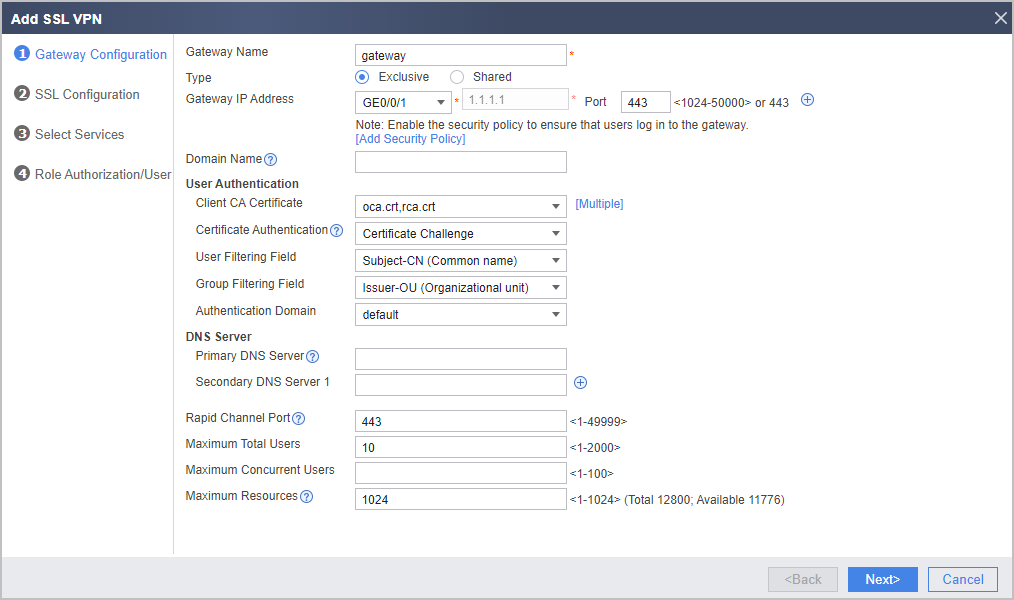
- Click Add and set the parameters as follows:
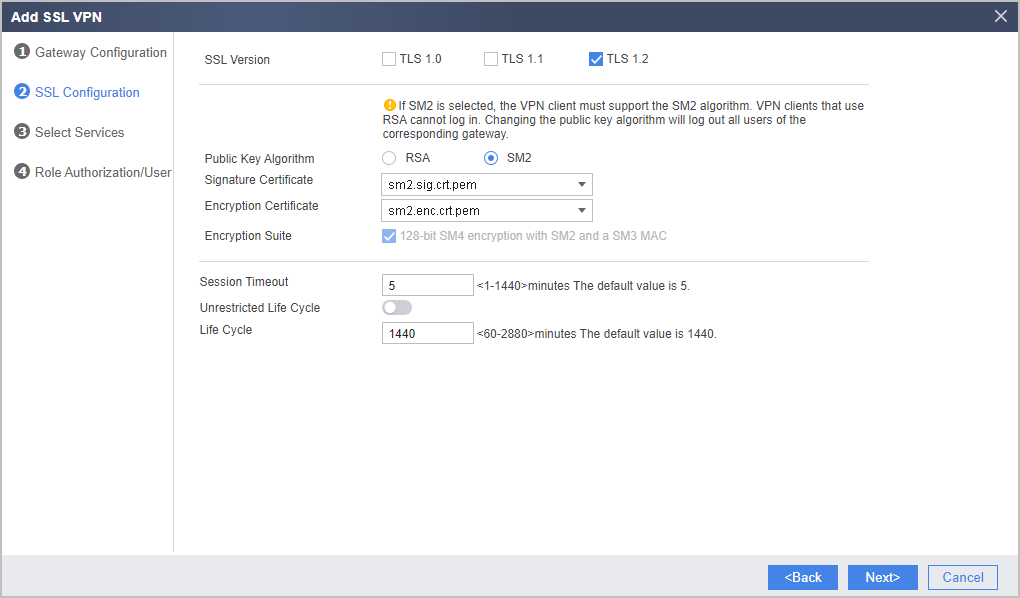
- Configure the SSL version, cipher suite, session timeout, and session lifecycle. click Next.
- Select Network Extension and click Next.
- Configure the network extension function.
- Set the parameters as follows.
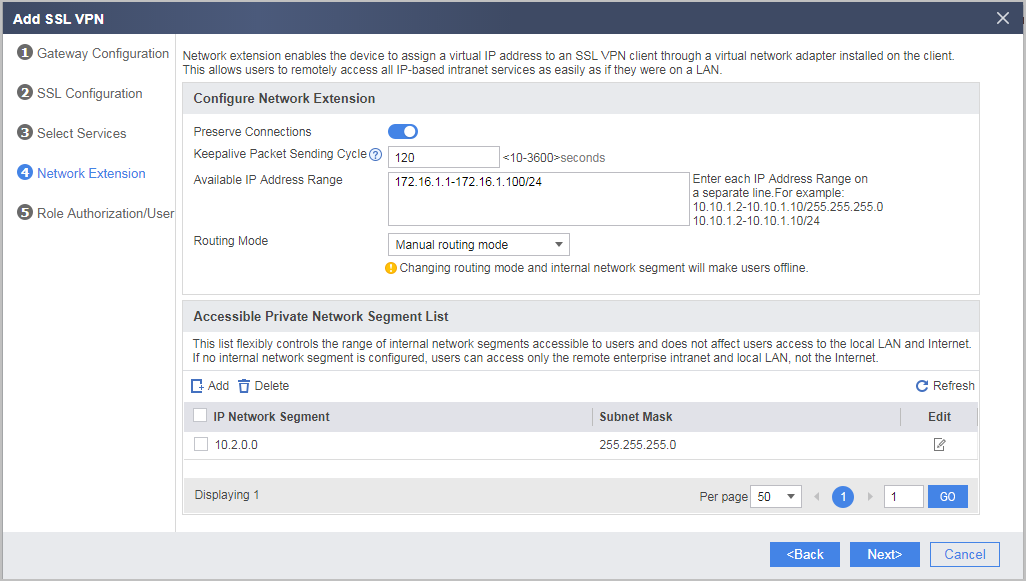
- Set the parameters as follows.
- Configure SSL VPN role authorization/users.
- Click Add in List of Authorized Roles and set the role authorization parameters as follows. After the configuration is complete, click OK.

If you do not configure role authorization for users in certificate-challenge authentication mode, the users use the authorization of the default role after logging in to the virtual gateway. Generally, to precisely control users' resource access permission, you are advised to configure independent role authorization for users.
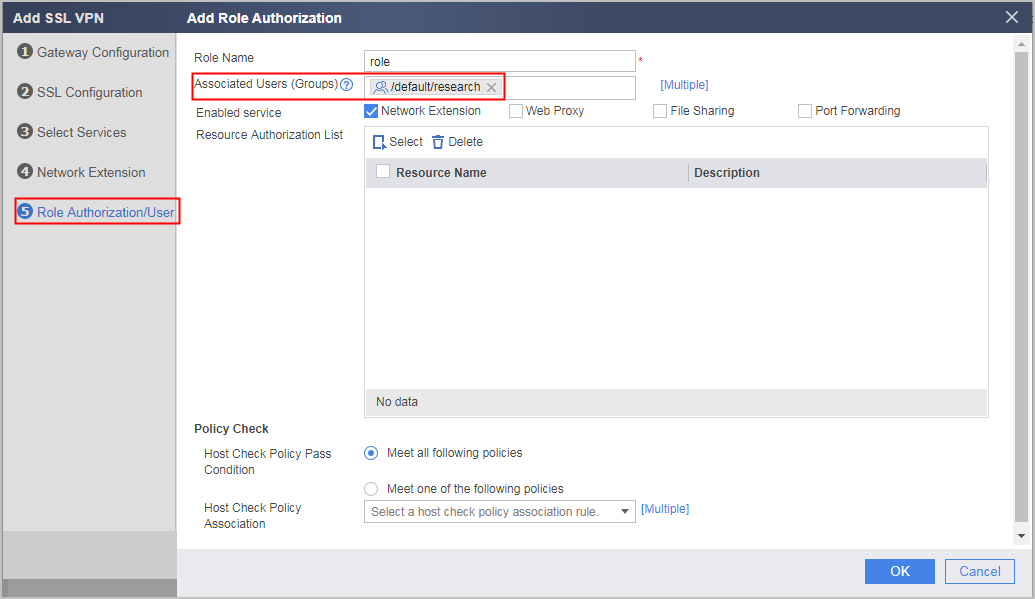
- Click Add in List of Authorized Roles and set the role authorization parameters as follows. After the configuration is complete, click OK.
- Configure security policies.
- On the intranet server, configure a route to the network segment 172.16.1.0 to 172.16.1.254.
- Configure the client.
Start the client and create a connection. Then enter the IP address and port number, select the Chinese cryptographic algorithm, and add the corresponding signature certificate and encryption certificate. For details about how to use the SSL VPN function through client access, see VPN Client Download Description.
Configuration Scripts
#
aaa
 authentication-scheme default
 authorization-scheme default
 domain default
  service-type ssl-vpn
  internet-access mode password
  reference user current-domain
#
interface GigabitEthernet0/0/1
 ip address 1.1.1.1 255.255.255.0
#
interface GigabitEthernet0/0/2
 ip address 10.2.0.1 255.255.255.0
#
firewall zone trust
 set priority 85
 add interface GigabitEthernet0/0/2
#
firewall zone untrust
 set priority 5
 add interface GigabitEthernet0/0/1
#
 v-gateway public ssl version tlsv12
 v-gateway public ssl ciphersuit custom aes256-sha aes128-sha
 v-gateway gateway interface GigabitEthernet0/0/1 private
 v-gateway gateway alias gateway
#
#****BEGIN***gateway**1****#
v-gateway gateway
 basic
  ssl version tlsv12
  certificate-server sm2 signature sm2.sig.crt.pem enable
  certificate-server sm2 encryption sm2.enc.crt.pem enable
  ssl timeout 5
  ssl lifecycle 1440
  ssl ciphersuit custom aes256-sha aes128-sha
 service
  network-extension enable
  network-extension keep-alive enable
  network-extension keep-alive interval 120
  network-extension netpool 172.16.1.1 172.16.1.100 255.255.255.0
  netpool 172.16.1.1 default
  network-extension mode manual
  network-extension manual-route 10.2.0.0 255.255.255.0
 security
  authentication-mode cert-challenge
  policy-default-action permit vt-src-ip
  certification cert-anonymous cert-field user-filter subject cn group-filter subject ou
  client-cert-require enable
  certification user-cert-filter key-usage any
  undo public-user enable hostchecker
 cachecleaner
 vpndb
  group /default
  group /default/research
 role
 role default
  role default condition all
 role role
  role role condition all
    role role network-extension enable
#****END****#
#
security-policy
 rule name policy01
  source-zone untrust
  destination-zone local
  destination-address 1.1.1.0 mask 255.255.255.0
  service https
  action permit
 rule name policy02
  source-zone untrust
  destination-zone trust
  source-address 172.16.1.0 mask 255.255.255.0
  destination-address 10.2.0.0 mask 255.255.255.0
  action permit
#
 ip route-static 172.16.1.0 255.255.255.0 GigabitEthernet0/0/1 1.1.1.2
#
# The following configurations are saved in the database and are not displayed in the configuration file.
 user-manage user user0001 domain default
 password %$%$j@p.U.0bwNQv9nE#tf]G-+"v%$%$
  parent-group /default/research
 v-gateway gateway
    role
   role role group /default/research
#