Configuring ASPF/ALG for Known Protocols
Configuring ASPF/ALG for Known Protocols on the Web UI
To simplify configuration, the ASPF and ALG functions use the same configuration interface. You do not need to perform repeated configurations.
The web configuration is global (corresponding to the firewall detect protocol command). After the global ASPF/ALG function is enabled, the interzone and intrazone ASPF/ALG function is also enabled.

When a user uses a non-well-known port to provide a well-known application service, you can configure the port mapping function to identify the service as a well-known application and then enable ASPF/ALG of the corresponding protocol. For details on port mapping configuration, see Configuring a Predefined Application.
- Choose .
- Specify the protocol to be inspected.
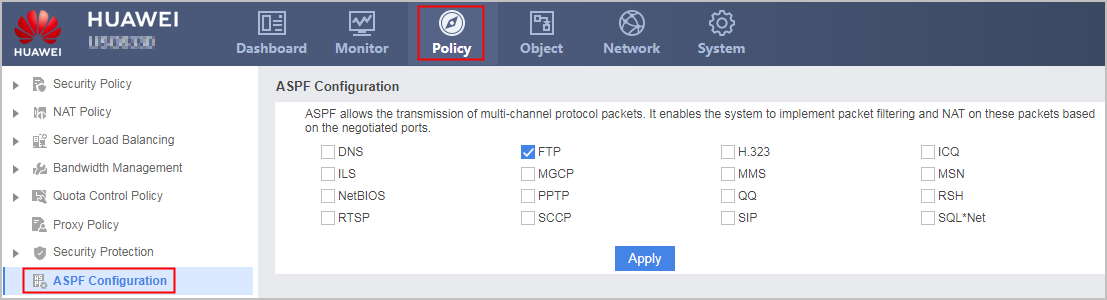
The SIP ASPF/ALG function takes effect only for UDP-based SIP traffic and TLS-encrypted SIP traffic. For TLS-encrypted SIP traffic, the FW performs SSL decryption before ASPF/ALG processing.
Enable ASPF/ALG for a specific protocol as required. Disable ASPF/ALG for protocols that do not require ASPF/ALG.
- Click Apply.
Configuring ASPF/ALG for Known Protocols on the CLI
To simplify configuration, the ASPF and ALG functions use the same configuration interface. You do not need to perform repeated configurations.
You can configure global, interzone, or intrazone ASPF/ALG on the FW.
If ASPF/ALG is enabled globally, it is enabled in both interzone and intrazone. The configuration is simple and quick, but much unnecessary traffic may enter the ASPF/ALG process, greatly consuming performance.
After interzone or intrazone ASPF/ALG is enabled, the FW performs ASPF/ALG only on traffic in the specified interzone or zone.
When a user uses a non-well-known port to provide a well-known application service, you can configure the port mapping function to identify the service as a well-known application and then enable ASPF/ALG of the corresponding protocol. For details on port mapping configuration, see Configuring a Predefined Application.
- Configure global ASPF/ALG.
- Run the system-view command to enter the system view.
- Run the firewall detect [ ipv6 ] protocol command to set the protocol for which ASPF/ALG is performed.
Note the following points during configuration:
To perform ASPF/ALG on traffic of multiple protocols, run this command set the protocols one by one.
In the NAT64 scenario, if the IPv4 ASPF/ALG function of any protocol is enabled (the ipv6 parameter does not need to be specified), NAT64 ALG is enabled.
In the DS-Lite scenario, the FW translates IPv4 addresses that traverse the IPv6 network. When DS-Lite ALG of a specified protocol is enabled, the ipv6 parameter does not need to be specified.
In IPv6 non-NAT and NAT66 scenarios, when IPv6 ASPF/NAT66 ALG of a specified protocol is enabled, the ipv6 parameter must be specified.
ASPF/ALG for SIP configured using the firewall detect sip command takes effect only on UDP-based or TLS-encrypted SIP traffic. For TLS-encrypted SIP traffic, the FW performs SSL decryption before ASPF/ALG processing.
Enable ASPF/ALG for a specific protocol as required. Disable ASPF/ALG for protocols that do not require ASPF/ALG.
- Configure interzone ASPF/ALG.
- Run the system-view command to enter the system view.
- Run the firewall interzone zone-name1 zone-name2 command to access the interzone view.
- Run the detect [ ipv6 ] protocol command to set the protocol for which ASPF/ALG is performed.
Note the following points during configuration:
To perform ASPF/ALG on traffic of multiple protocols, run this command set the protocols one by one.
In the NAT64 scenario, if the IPv4 ASPF/ALG function of any protocol is enabled (the ipv6 parameter does not need to be specified), NAT64 ALG is enabled.
In the DS-Lite scenario, the FW translates IPv4 addresses that traverse the IPv6 network. When DS-Lite ALG of a specified protocol is enabled, the ipv6 parameter does not need to be specified.
In IPv6 non-NAT and NAT66 scenarios, when IPv6 ASPF/NAT66 ALG of a specified protocol is enabled, the ipv6 parameter must be specified.
ASPF/ALG for SIP configured using the detect sip command takes effect only on UDP-based or TLS-encrypted SIP traffic.For TLS-encrypted SIP traffic, the FW performs SSL decryption before ASPF/ALG processing.
To perform ASPF/ALG for TCP-based SIP traffic, run the detect [ ipv6 ] sip tcp command.
Enable ASPF/ALG for a specific protocol as required. Disable ASPF/ALG for protocols that do not require ASPF/ALG.
- Configure intrazone ASPF/ALG.
- Run the system-view command to enter the system view.
- Run the firewall zone [ name ] zone-name command to access the view of a security zone.
- Run the detect [ ipv6 ] protocol command to set the protocol for which ASPF/ALG is performed.
Note the following points during configuration:
To perform ASPF/ALG on traffic of multiple protocols, run this command set the protocols one by one.
In the NAT64 scenario, if the IPv4 ASPF/ALG function of any protocol is enabled (the ipv6 parameter does not need to be specified), NAT64 ALG is enabled.
In the DS-Lite scenario, the FW translates IPv4 addresses that traverse the IPv6 network. When DS-Lite ALG of a specified protocol is enabled, the ipv6 parameter does not need to be specified.
In IPv6 non-NAT and NAT66 scenarios, when IPv6 ASPF/NAT66 ALG of a specified protocol is enabled, the ipv6 parameter must be specified.
ASPF/ALG for SIP configured using the detect sip command takes effect only on UDP-based or TLS-encrypted SIP traffic.For TLS-encrypted SIP traffic, the FW performs SSL decryption before ASPF/ALG processing.
To perform ASPF/ALG for TCP-based SIP traffic, run the detect [ ipv6 ] sip tcp command.
Enable ASPF/ALG for a specific protocol as required. Disable ASPF/ALG for protocols that do not require ASPF/ALG.