CLI: Example for Configuring FTP/TFTP ASPF
In the applications of multi-channel protocols and NAT, ASPF acts as an important auxiliary means. This example describes how to configure ASPF, so that intranets can provide FTP and TFTP services normally. Meanwhile, intranet users are prevented from downloading harmful controls during the access to the extranet Web server.
Networking Requirements
The FW is deployed at the egress of an enterprise that provides FTP and TFTP services. Meanwhile, enterprise employees need to access certain accessible extranet Web sites that may contain harmful Java controls.
FTP is a predefined protocol, and hence you only need to run the detect ftp command in the interzone to realize the normal forwarding of FTP packets. On the contrary, TFTP is not predefined in the system. In this case, you can match TFTP packets through user-defined ASPF.
Figure 1 shows the networking diagram.
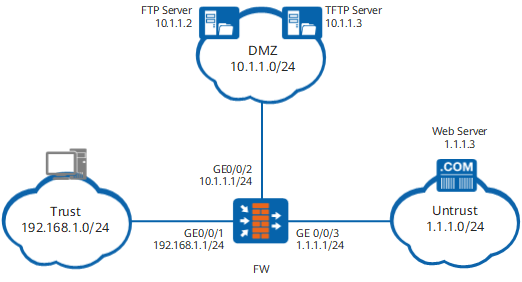
Data Planning
Data |
Description |
|---|---|
Interface number: GigabitEthernet 0/0/1 IP address: 192.168.1.1 Security zone: Trust |
The interface is connected to the PC of the employee through the switch. They are on the same network segment. |
Interface number: GigabitEthernet 0/0/2 IP address: 10.1.1.1 Security zone: DMZ |
The interface is connected to the server through the switch. They are on the same network segment. |
Interface number: GigabitEthernet 0/0/3 IP address: 1.1.1.1 Security zone: Untrust |
The interface is connected to the extranet. They are on the same network segment. Through previous configurations, the interface already accesses the Internet. |
IP address range: 192.168.1.0/24 |
The IP addresses of the PCs of all employees are classified into the network segment and deployed in the Trust zone. |
IP address range: 10.1.1.0/24 Two servers are available:
|
Both servers are deployed in the DMZ. |
IP address range: 1.1.1.0/24 A Web server with IP address 1.1.1.3/24 is in the Untrust zone. |
It is to define extranet hosts and servers. |
Procedure
- Set the IP addresses of interfaces, and add the interfaces
to corresponding security zones.
<FW> system-view
[FW] interface GigabitEthernet 0/0/1
[FW-GigabitEthernet0/0/1] ip address 192.168.1.1 24
[FW-GigabitEthernet0/0/1] quit
[FW] interface GigabitEthernet 0/0/2
[FW-GigabitEthernet0/0/2] ip address 10.1.1.1 24
[FW-GigabitEthernet0/0/2] quit
[FW] interface GigabitEthernet 0/0/3
[FW-GigabitEthernet0/0/3] ip address 1.1.1.1 24
[FW-GigabitEthernet0/0/3] quit
[FW] firewall zone trust
[FW-zone-trust] add interface GigabitEthernet 0/0/1
[FW-zone-trust] quit
[FW] firewall zone dmz
[FW-zone-dmz] add interface GigabitEthernet 0/0/2
[FW-zone-dmz] quit
[FW] firewall zone untrust
[FW-zone-untrust] add interface GigabitEthernet 0/0/3
[FW-zone-untrust] quit
- Create ACL 3001 to control the traffic of accessing the
intranet TFTP server. The TFTP service requires the information such
as user-defined port numbers. Therefore, you need to create an independent
ACL rule.
[FW] acl 3001
[FW-acl-adv-3001] rule permit udp destination-port eq tftp
[FW-acl-adv-3001] quit
- Run the detect ftp and detect user-defined commands in the interzone to realize the normal forwarding of FTP
and TFTP packets respectively.
[FW] firewall interzone trust dmz
[FW-interzone-trust-dmz] detect ftp
[FW-interzone-trust-dmz] detect user-defined 3001 outbound
[FW-interzone-trust-dmz] quit
- Run the detect java-blocking command in the interzone
to prevent the downloading of the harmful Java control.
[FW] firewall interzone trust untrust
[FW-interzone-trust-untrust] detect java-blocking
[FW-interzone-trust-untrust] quit
Configuration Scripts
The following lists the related scripts of this configuration example.
#
 sysname FW
#
acl number 3001
 rule 5 permit udp destination-port eq tftp
#
interface GigabitEthernet0/0/1
 ip address 192.168.1.1 255.255.255.0
#
interface GigabitEthernet0/0/2
 ip address 10.1.1.1 255.255.255.0
#
interface GigabitEthernet0/0/3
 ip address 1.1.1.1 255.255.255.0
#
 firewall zone local
 set priority 100
#
firewall zone trust
 set priority 85
 add interface GigabitEthernet0/0/1
#
firewall zone untrust
 set priority 5
 add interface GigabitEthernet0/0/3
#
firewall zone dmz
 set priority 50
 add interface GigabitEthernet0/0/2
#
firewall interzone trust dmz
 detect ftp
 detect user-define 3001 outbound
#
firewall interzone trust untrust
 detect java-blocking
#
return