CLI: Example for Configuring SIP Over TLS NAT ALG
This section provides an example for configuring SIP over TLS ALG.
Networking Requirements
As shown in Figure 1, a SIP server is deployed on the enterprise intranet. When going online, each SIP client needs to send a register message to the SIP servers. The register messages are carried through SIP.
To enhance security, TLS is required on the SIP clients and SIP server to encrypt SIP messages. The FW is deployed between the SIP clients and SIP server to encrypt SIP messages and implement ALG.
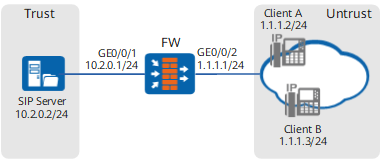
Configuration Roadmap
- Configure IP addresses for interfaces and assign the interfaces to security zones.
- Configure a security policy for communication between SIP clients and the SIP server.
- Import the server certificate and its private key to decrypt SSL-encrypted traffic and authenticate the server identity.
- Configure an inbound detection profile.
- Configure an SSL-encrypted traffic detection policy to decrypt TLS-encrypted SIP messages.
- Configure destination NAT so that the intranet SIP server can provide services externally (public address: 1.1.1.10).
- Configure ALG to properly forward SIP messages.
Procedure
- Configure IP addresses for interfaces and assign the interfaces to security zones.
<FW> system-view
[FW] interface GigabitEthernet 0/0/1
[FW-GigabitEthernet0/0/1] ip address 10.2.0.1 24
[FW-GigabitEthernet0/0/1] quit
[FW] interface GigabitEthernet 0/0/2
[FW-GigabitEthernet0/0/2] ip address 1.1.1.1 24
[FW-GigabitEthernet0/0/2] quit
[FW] firewall zone trust
[FW-zone-trust] add interface GigabitEthernet 0/0/1
[FW-zone-trust] quit
[FW] firewall zone untrust
[FW-zone-untrust] add interface GigabitEthernet 0/0/2
[FW-zone-untrust] quit
- Configure a security policy to allow SIP clients to send messages to the SIP server.
[FW] security-policy
[FW-policy-security] rule name policy_sec1
[FW-policy-security-rule-policy_sec1] source-zone untrust
[FW-policy-security-rule-policy_sec1] destination-zone trust
[FW-policy-security-rule-policy_sec1] source-address 1.1.1.0 24
[FW-policy-security-rule-policy_sec1] destination-address 10.2.0.2 32
[FW-policy-security-rule-policy_sec1] service sip
[FW-policy-security-rule-policy_sec1] action permit
[FW-policy-security-rule-policy_sec1] quit
- Import the server certificate and its private key to decrypt SSL-encrypted traffic and authenticate the server identity.
Ensure that the server certificate imported by the FW is the same as the server certificate loaded by the SIP server. Contact the SIP server administrator to obtain the server certificate and its private key.
- Configure an inbound detection profile to protect the SIP server.
[FW] profile type decryption name profile
[FW-profile-decryption-profile] detect type inbound
[FW-profile-decryption-profile] unsupport ssl-version block
[FW-profile-decryption-profile] unsupport ssl-cipher block
[FW-profile-decryption-profile] ssl-cipher client-side high medium low
[FW-profile-decryption-profile] ssl-version client-side ssl3.0 tls1.0 tls1.1 tls1.2
[FW-profile-decryption-profile] ssl-cipher server-side high medium low
[FW-profile-decryption-profile] ssl-version server-side ssl3.0 tls1.0 tls1.1 tls1.2
[FW-profile-decryption-profile] quit
- Configure an SSL-encrypted traffic detection policy to decrypt TLS-encrypted SIP messages.
[FW] decryption-policy
[FW-policy-decrytion] rule name decryption_policy1
[FW-policy-decrytion-rule-decryption_policy1] source-zone untrust
[FW-policy-decrytion-rule-decryption_policy1] destination-zone trust
[FW-policy-decrytion-rule-decryption_policy1] source-address 1.1.1.0 24
[FW-policy-decrytion-rule-decryption_policy1] destination-address 10.2.0.2 32
[FW-policy-decrytion-rule-decryption_policy1] service sip
[FW-policy-decrytion-rule-decryption_policy1] action decrypt profile profile
[FW-policy-decrytion-rule-decryption_policy1] quit
[FW-policy-decrytion] quit
- Configure destination NAT so that the intranet SIP server can provide services externally (public address: 1.1.1.10).
[FW] nat-policy
[FW-policy-nat] rule name policy_nat1
[FW-policy-nat-rule-policy_nat1] source-zone untrust
[FW-policy-nat-rule-policy_nat1] destination-zone trust
[FW-policy-nat-rule-policy_nat1] service sip
[FW-policy-nat-rule-policy_nat1] destination-address 1.1.1.10 32
[FW-policy-nat-rule-policy_nat1] action destination-nat static address-to-address address 10.2.0.2 5061
[FW-policy-nat-rule-policy_nat1] quit
[FW-policy-nat] quit
- Configure ALG to properly forward SIP messages.
[FW] firewall interzone trust untrust
[FW-interzone-trust-untrust] detect sip
[FW-interzone-trust-untrust] quit
Configuration Scripts
The following lists the related script of this configuration example.
#
 sysname FW
#
app-proxy server certificate filename sip_server.pem
#
interface GigabitEthernet0/0/1
 ip address 10.2.0.1 255.255.255.0
#
interface GigabitEthernet0/0/2
 ip address 1.1.1.1 255.255.255.0
#
firewall zone trust
 set priority 85
 add interface GigabitEthernet0/0/1
#
 firewall zone untrust
 set priority 5
 add interface GigabitEthernet0/0/2
#
firewall interzone trust untrust
 detect sip
#
security-policy
 rule name policy_sec1
  source-zone untrust
  destination-zone trust
  source-address 1.1.1.0 mask 255.255.255.0
  destination-address 10.2.0.2 mask 255.255.255.0
  service sip
  action permit
#
profile type decryption name profile
  detect type inbound
  unsupport ssl-version block
  unsupport ssl-cipher block
#
decryption-policy
 rule name decrption_policy1
  source-zone untrust
  destination-address 10.1.1.0 mask 255.255.255.0
  service sip
  action decrypt profile profile
#
nat-policy
  rule name policy_nat1
    source-zone untrust
    destination-zone trust
    destination-address 1.1.1.10 mask 255.255.255.0
    service sip
    action destination-nat static address-to-address address 10.2.0.2 5061
#
return