CLI: Example for Configuring URPF
This provides an example for configuring the URPF.
Networking Requirements
In this example, IPv6 URPF is enabled on the inbound interface of the ISP. As shown in Figure 1, the client FW_A connects to FW_B (a FW in the ISP network). Then enable URPF on GigabitEthernet 0/0/1 of FW_B. Configure the IPv6 URPF strict check on FW_B and set the packet whose source IP address matches with IPv6 ACL 2010 to pass the check at any time. Enable IPv6 URPF on GigabitEthernet 0/0/1 of FW_A, configure the IPv6 URPF strict check, and enable the default route match.
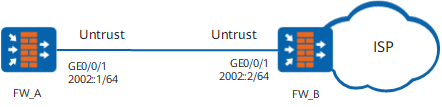
Configuration Roadmap
The configuration roadmap is as follows:
Configure IPv6 ACLs on FW_B, allowing the traffic from the specified network segments to pass the IPv6 URPF check.
Configure an IPv6 IP address for the interface on FW_B and enable IPv6 URPF on the interface.
Configure an IPv6 IP address for the interface on FW_A and enable IPv6 URPF on the interface.
Procedure
- Configure FW_B.
# Enable the IPv6 function.
<sysname_B> system-view
[sysname_B] ipv6
# Configure IPv6 ACL 2010, allowing the traffic from the network segment 2002::1/64 to pass the IPv6 URPF check.
[sysname_B] acl ipv6 number 2010
[sysname_B-acl6-basic-2010] rule permit source 2002::1 64
[sysname_B-acl6-basic-2010] quit
# Configure an IPv6 address for GigabitEthernet 0/0/1.
[sysname_B] interface GigabitEthernet 0/0/1
[sysname_B-GigabitEthernet0/0/1] ipv6 enable
[sysname_B-GigabitEthernet0/0/1] ipv6 address 2002::2 64
# Enable IPv6 URPF on GigabitEthernet 0/0/1 and set the IPv6 URPF check mode to strict.
[sysname_B-GigabitEthernet0/0/1] ipv6 urpf strict acl6 2010
[sysname_B-GigabitEthernet0/0/1] quit
# Add the interface to the untrust zone.
[sysname_B] firewall zone untrust [sysname_B-zone-untrust] add interface GigabitEthernet 0/0/1 [sysname_B-zone-untrust] quit - Configure FW_A.
# Enable the IPv6 function.
<sysname_A> system-view
[sysname_A] ipv6
# Configure an IP address for GigabitEthernet 0/0/1.
[sysname_A] interface GigabitEthernet 0/0/1
[sysname_A-GigabitEthernet0/0/1] ipv6 enable
[sysname_A-GigabitEthernet0/0/1] ipv6 address 2002::1 64
# Enable URPF on GigabitEthernet 0/0/1 and set the URPF check mode to strict.
[sysname_A-GigabitEthernet0/0/1] ipv6 urpf strict allow-default-route
[sysname_A-GigabitEthernet0/0/1] quit
# Add the interface to the untrust zone.
[sysname_A] firewall zone untrust
[sysname_A-zone-untrust] add interface GigabitEthernet 0/0/1
[sysname_A-zone-untrust] quit
# Configure the default route.
[sysname_A] ipv6 route-static :: 0 2002::2
Verification
To view the packets discarded due to URPF, run the display firewall statistics system discarded or display firewall ipv6 statistics system discarded command and check the URPF packets discarded field.
Configuration Scripts
-
#
sysname FW_B
#
ipv6
#
acl ipv6 number 2010
 rule 0 permit source 2002::1 64
#
interface GigabitEthernet 0/0/1
 ipv6 enable
 ipv6 address 2002::2 64
 ipv6 urpf strict acl6 2010
#
firewall zone untrust
 set priority 5
 add interface GigabitEthernet 0/0/1
#
return
-
#
sysname FW_A
#
ipv6
#
interface GigabitEthernet 0/0/1
 ipv6 enable
 ipv6 address 2002::1 64
 ipv6 urpf strict allow-default-route
#
firewall zone untrust
 set priority 5
 add interface GigabitEthernet 0/0/1
#
ipv6 route-static :: 0 2002::2
#
return