Configuring an HWTACACS Server
This section describes how to set parameters for a FW to communicate with an HWTACACS server.
Context
If an HWTACACS server is deployed to implement server authentication on users, a FW sends the user names and passwords to the HWTACACS server. To ensure normal communication between the FW and the HWTACACS server, set the parameters on the FW for communication with the HWTACACS server.

To use the HWTACACS server to assign IP addresses for PPPoE dial-up users, you must specify the HWTACACS server as the authorization server.
Procedure
- Choose .
- Click Add.
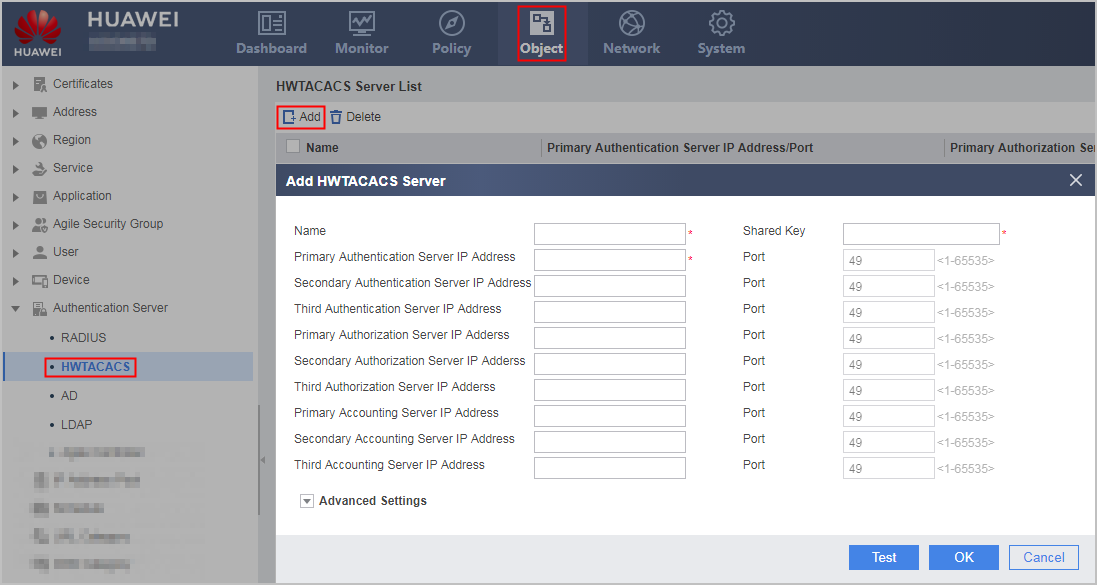
- Set the parameters for communication with an HWTACACS server.

The parameter settings on the FW must be consistent with those on the HWTACACS server.
Parameter
Description
Name
Name of an HWTACACS server
Shared Key
Shared key for the communication between a FW and an HWTACACS server
The FW and HWTACACS server use this key to encrypt packets.
Primary Authentication Server IP Address/Port
IP address and port of the primary HWTACACS server that provides authentication services
Normally, an HWTACACS server provides authentication services on port 49.
Secondary Authentication Server IP Address/Port
IP address and port of the secondary HWTACACS server that provides authentication services
The FW preferentially uses the active HWTACACS server. If the primary HWTACACS server is unreachable, the FW uses the secondary HWTACACS server.
Third Authentication Server IP Address/Port
IP address and port of the third HWTACACS server that provides authentication services
If the secondary authentication server is unreachable, the third authentication server is used.
Primary Authorization Server IP Address/Port
IP address and port of the primary HWTACACS server that provides authorization services
Normally, an HWTACACS server provides authorization services on port 49
Secondary Authorization Server IP Address/Port
IP address and port of the secondary HWTACACS server that provides authorization services
The FW preferentially uses the active HWTACACS server. If the primary HWTACACS server is unreachable, the FW uses the secondary HWTACACS server.
Third Authorization Server IP Address/Port
IP address and port of the third HWTACACS server that provides authorization services
If the secondary authorization server is unreachable, the third authorization server is used.
Primary Accounting Server IP Address/Port
IP address and port of the primary HWTACACS server that provides accounting services
Normally, an HWTACACS server provides accounting services on port 49.
Secondary Accounting Server IP Address/Port
IP address and port of the secondary HWTACACS server that provides accounting services
The FW preferentially uses the active HWTACACS server. If the primary HWTACACS server is unreachable, the FW uses the secondary HWTACACS server.
Third Accounting Server IP Address/Port
IP address and port of the third HWTACACS server that provides accounting services
If the secondary accounting server is unreachable, the third accounting server is used.
Advanced Settings
Source IP Address
IP address used by a FW to communicate with an HWTACACS server
If this parameter is not specified, the FW uses the IP address of the outbound interface to communicate with the HWTACACS server.
Unit
Traffic unit an HWTACACS server uses for charging
- Byte
- KB
- MB
- GB
Reply Timeout
Duration for which a FW waits for reply packets from an HWTACACS server
To check whether an HWTACACS server fails, the FW periodically sends request packets to the HWTACACS server. If the FW does not receive any reply packet within the specified timeout period, it retransmits the request packet.
Quiet Time
Duration that the HWTACACS server waits to restore the active state it has recovered, in minutes
User Name Format
- Without Authentication Domain: indicates that the user name in the packet sent by the FW to the HWTACACS server does not contain the name of the authentication domain. If the user name on the HWTACACS server does not contain @, select this item.
- Include Authentication Domain: indicates that the user name in the packet sent by the FW to the HWTACACS server contains the name of the authentication domain. If the user name on the HWTACACS server contains @, select this item.
- Entered User Name: indicates that the user name in the packet sent by the FW to the HWTACACS server is the one entered by the user and that the FW does not change the user name. In this case, ensure that the user name entered by the user is the same as that on the HWTACACS server. For example, if the user name on the HWTACACS server is test@huawei, the user needs to enter test@huawei; if the user name on the HWTACACS server is test, the user needs to enter test.
- Click Test. In the dialog box that is displayed, click OK and enter the user name and password that are configured on the HWTACACS server. Click Start Checking to check the connectivity to the HWTACACS server.
After the connectivity test succeeds, click Cancel.
- Click OK.