Configuring an AD Server
This section describes how to set parameters for a FW to communicate with an AD server.
Context
In the AD SSO scenario, set the parameters for a FW to communicate with an AD server so that user information on the AD server can be imported to the FW.
If the AD server is deployed to implement server authentication on users, the FW sends user names and passwords to the AD server.

Ensure that the FW and AD server have the same system time and time zone.
Procedure
- Choose .
- Click Add.
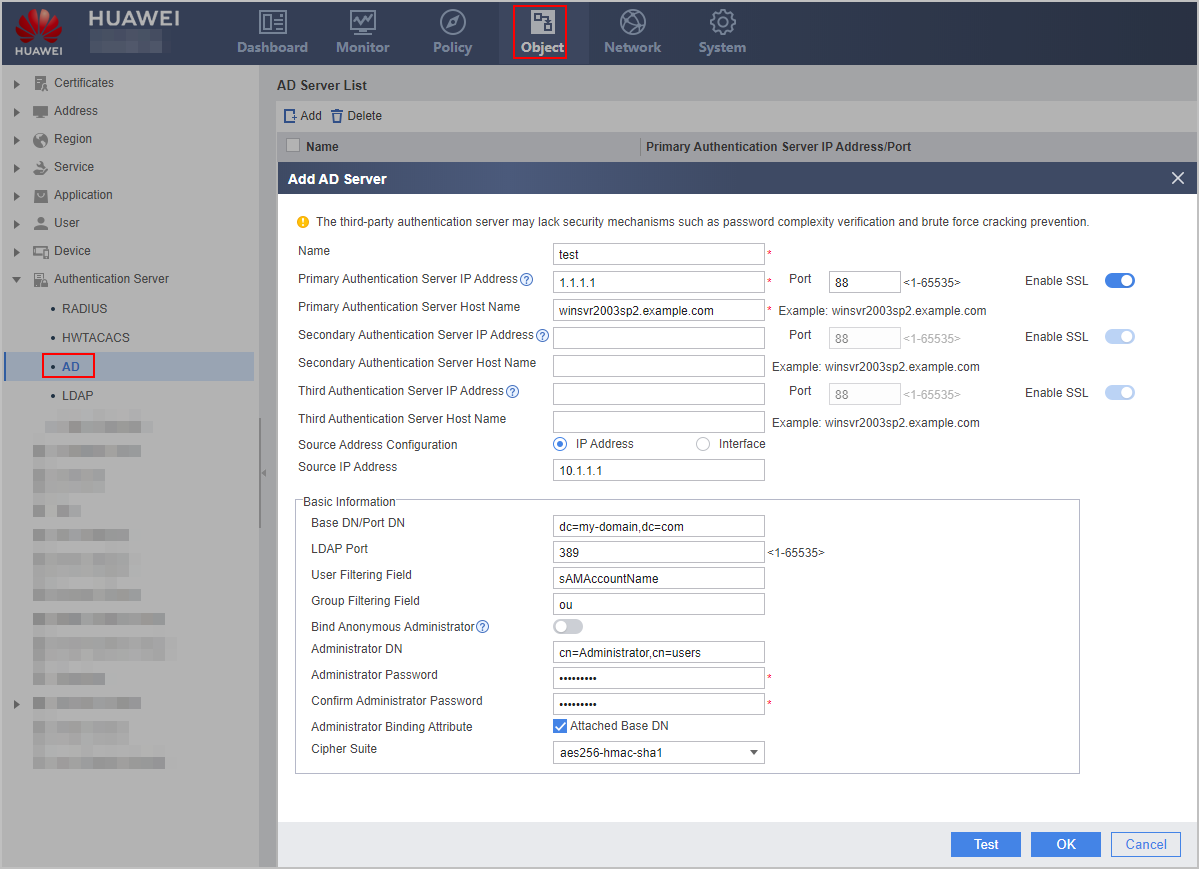
- Set the parameters for communication with an AD server.

The parameter settings on the FW must be consistent with those on the AD server.
For the V600R007C20 version, whether to enable SSL for AD authentication cannot be configured on the web UI. When you configure the AD server on the web UI, SSL (ldap-over-ssl) is enabled by default. To disable SSL (no-ssl), perform the configuration on the CLI. From V600R007C20SPC100, you can configure whether to enable SSL for AD authentication on the Web UI. Since no-ssl has security risks, ldap-over-ssl is recommended. When ldap-over-ssl is deployed, it must also be enabled on the AD server. For details, see the operating system guide of the AD server.
Parameter
Description
Name
Name of an AD server
Primary Authentication Server IP Address/Port
IP address and Kerberos authentication port of the primary AD server that provides authentication services
Primary Authentication Server Host Name
Name of the primary AD server that provides authentication services
Secondary Authentication Server IP Address/Port
IP address and Kerberos authentication port of the secondary AD server that provides authentication services
A FW preferentially communicates with the primary AD server. If the primary AD server is unreachable, the FW communicates with the secondary AD server.
Secondary Authentication Server Host Name
Name of the secondary AD server that provides authorization services
Third Authentication Server IP Address/Port
IP address and Kerberos authentication port of the third AD server that provides authentication services
A FW preferentially communicates with the primary or secondary AD server. If the primary and secondary AD server is unreachable, the FW communicates with the third AD server.
Third Authentication Server Host Name
Name of the third AD server that provides authorization services
Enable SSL
Whether to use LDAP over SSL for encrypted transmission during AD authentication.
During AD authentication, LDAP is used in interaction between the device and AD server. LDAP data is not encrypted during transmission. For security purposes, you can enable SSL to use LDAP over SSL for encrypted transmission. In this case, you need to import the CA certificate corresponding to the AD server certificate into the device to authenticate the AD server.
Source Address Configuration
By default, the FW uses the actual outbound interface IP address to communicate with the AD server. To enable the FW to use another IP address to communicate with the AD server, configure this parameter. You can configure either the IP address or the interface.
For example, in the networking where two FWs serve as the egress gateways of the headquarters and branch respectively, if the branch FW needs to have an IPSec tunnel established between the branch and headquarters and proactively communicates with the AD server at the headquarters, you can specify the source IP address used by the branch FW to communicate with the AD server so that communication packets between the branch FW and AD server can be transmitted through the IPSec tunnel.
If you do not specify the source IP address used by the branch FW to communicate with the AD server, the branch FW uses the actual outbound interface IP address to communicate with the AD server. In this case, communication packets cannot be transmitted through the IPSec tunnel.
Source IP Address
Source IP address used by the FW to communicate with the AD server.
In hot standby networking, if the FW needs to import the user/user group/security group from the AD server, do not specify the source IP address as the virtual IP address. If so, the active device can import the user/user group/security group from the AD server, whereas the standby device cannot.
Interface
Source interface selected from the drop-down list and used by the FW to communicate with the AD server, which can be a loopback or VLANIF interface.
Basic Information
Base DN/Port DN
Base distinguished name (DN) of an AD server, which indicates the starting position for entry search.
LDAP Port
Port used by an AD server to implement LDAP authentication
The AD server generally uses port 389 to implement LDAP authentication.
User Filtering Field
User filtering field of an AD server. The default value is recommended.
NOTE:In the active directory, each user account has a User logon name (cn as the user attribute) and User logon name [pre-Windows 2000] (sAMAccountName as the user attribute) for versions earlier than Windows 2000. By default, the active directory uses the first 20 bytes of the User logon name as the User logon name [pre-Windows 2000]. If the User logon name contains 20 bytes or less, the User logon name is the same as User logon name [pre-Windows 2000]. You can change the User logon name [pre-Windows 2000] from the default value.
When the FW interworks with the AD server, the FW uses the User Filtering Field to determine which user logon name in the active directory is used as the user name. During authentication, the entered user name must match the user filtering field. For example, the User logon name (cn as the user attribute) of a user is testaccount in the active directory and the User logon name [pre-Windows 2000] (sAMAccountName as the user attribute) of the user is test, and the user filtering field on the FW is set to sAMAccountName, the user must use test instead of testaccount as the user name. Otherwise, the user cannot be authenticated.
Group Filtering Field
Group filtering field of an AD server. The default value is recommended.
Bind an Anonymous Administrator
Whether to allow an anonymous administrator
If you select Bind an Anonymous Administrator, the AD server allows an anonymous administrator to log in.
The AD server provided by the Windows Server 2003 or Windows Server 2008 operating system does not allow an anonymous administrator to log in.
Administrator DN
Administrator DN used for obtaining the permission to operate an AD server
In common cases, the administrator DN is under the Base DN. You do not need to enter the full path of an administrator DN when the Base DN is to be attached to the administrator DN.
For example, on the AD server of the Windows Server 2003 operating system, the administrator account is under Base DN example.com and belongs to the users group. In this case, set the administrator DN to either of the following values:
- cn=administrator,cn=users if Attached Base DN in Administrator Binding Attribute is selected.
- cn=administrator,cn=users,dc=example,dc=com if Attached Base DN in Administrator Binding Attribute is not selected.
Administrator Password
Administrator password of an AD server
Confirm Administrator Password
Administrator password (of an AD server) that is re-entered for confirmation
Administrator Binding Attribute
Whether to attach the Base DN to the administrator DN
If the Base DN does not include the administrator DN, deselect Administrator Binding Attribute. Note that you must enter the full path in Administrator DN.
Cipher Suite
The cipher suite used for interaction between the device and the Kerberos server integrated in the AD server.
The cipher suite selected here must be enabled on the AD server. You can run the secpol.msc command in the Run window of the AD server to access the Local Security Policy window. Then, choose to check whether the cipher suite of the AD server is enabled.
- Click Detect. In the dialog box that is displayed, click OK and enter the user name and password that are configured on the AD server. Click Start Checking to check the connectivity to the AD server.
Entering user names that contain spaces for detection is not supported. In subsequent AD server authentication and user import, however, user names can contain spaces.
After the connectivity test succeeds, click Cancel.
- Click OK.