CLI: Example for Configuring Interworking Between BFD and IPv4 Static Routes
If two static routes with different priorities to the same destination are configured, active and standby links can be automatically switched through the probing over the reachability of the gateway.
Networking Requirements
As shown in Figure 1, a company accesses the Internet through dual links. Static routes are configured respectively between FW_A and FW_B as well as between FW_A and FW_C. FW_A->FW_B is the active link, and FW_A->FW_C is the standby link. It is required that traffic can be immediately switched to the standby link when the active link is faulty, and it can be also switched back after the active link is recovered.
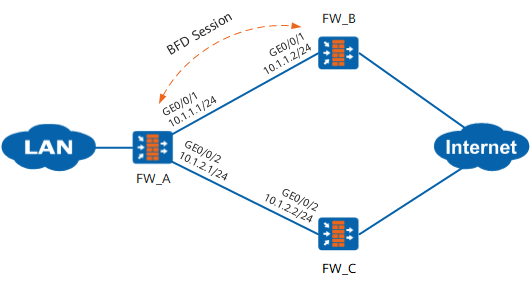
Configuration Roadmap
The roadmap is as follows:
Configure static routes to different destinations between FW_A and FW_B as well as between FW_A and FW_C. Configure the priorities for the routes, distinguishing the active and standby links.
To better switch traffic on the active link, manually configure the BFD function between FW_A and FW_B.
Procedure
- Configure FW_A.

This example describes only major BFD-related configurations, with IP address and security zone configurations omitted.
# Configure a static route, and set the priority of the static route between FW_A and FW_C to 100. In this case, FW_A->FW_B is the active link, and FW_A->FW_C is the standby link.
<FW_A> system-view
[FW_A] ip route-static 0.0.0.0 0.0.0.0 10.1.1.2
[FW_A] ip route-static 0.0.0.0 0.0.0.0 10.1.2.2 preference 100
# Configure the BFD session for FW_B.
[FW_A] bfd
[FW_A-bfd] quit
[FW_A] bfd ab bind peer-ip 10.1.1.2
[FW_A-bfd-session-ab] discriminator local 10
[FW_A-bfd-session-ab] discriminator remote 20
[FW_A-bfd-session-ab] commit
[FW_A-bfd-session-ab] quit
# Configure interworking between the static route and BFD.
[FW_A] ip route-static 0.0.0.0 0.0.0.0 10.1.1.2 track bfd-session ab# Configure a security policy between the Local zone and the security zone where GE 1/0/1 resides to permit BFD packets.
[FW_A] firewall zone untrust
[FW_A-zone-untrust] add interface GigabitEthernet 0/0/1
[FW_A-zone-untrust] quit
[FW_A] security-policy
[FW_A-policy-security] rule name bfd1
[FW_A-policy-security-rule-bfd1] source-zone local
[FW_A-policy-security-rule-bfd1] destination-zone untrust
[FW_A-policy-security-rule-bfd1] source-address 10.1.1.1 32
[FW_A-policy-security-rule-bfd1] destination-address 10.1.1.2 32
[FW_A-policy-security-rule-bfd1] action permit
[FW_A-policy-security-rule-bfd1] quit
[FW_A-policy-security] rule name bfd2
[FW_A-policy-security-rule-bfd2] source-zone untrust
[FW_A-policy-security-rule-bfd2] destination-zone local
[FW_A-policy-security-rule-bfd2] source-address 10.1.1.2 32
[FW_A-policy-security-rule-bfd2] destination-address 10.1.1.1 32
[FW_A-policy-security-rule-bfd2] action permit
[FW_A-policy-security-rule-bfd2] quit
- Configure FW_B.
# Configure the BFD session for FW_A.
<FW_B> system-view
[FW_B] bfd
[FW_B-bfd] quit
[FW_B] bfd ab bind peer-ip 10.1.1.1
[FW_B-bfd-session-ab] discriminator local 20
[FW_B-bfd-session-ab] discriminator remote 10
[FW_B-bfd-session-ab] commit
[FW_B-bfd-session-ab] quit
# Configure security policies between the Local zone and the security zone where GE 1/0/1 resides to permit BFD packets.
[FW_B] firewall zone trust
[FW_B-zone-trust] add interface GigabitEthernet 0/0/1
[FW_B-zone-trust] quit
[FW_B] security-policy
[FW_B-policy-security] rule name bfd1
[FW_B-policy-security-rule-bfd1] source-zone local
[FW_B-policy-security-rule-bfd1] destination-zone trust
[FW_B-policy-security-rule-bfd1] source-address 10.1.1.2 32
[FW_B-policy-security-rule-bfd1] destination-address 10.1.1.1 32
[FW_B-policy-security-rule-bfd1] action permit
[FW_B-policy-security-rule-bfd1] quit
[FW_B-policy-security] rule name bfd2
[FW_B-policy-security-rule-bfd2] source-zone trust
[FW_B-policy-security-rule-bfd2] destination-zone local
[FW_B-policy-security-rule-bfd2] source-address 10.1.1.1 32
[FW_B-policy-security-rule-bfd2] destination-address 10.1.1.2 32
[FW_B-policy-security-rule-bfd2] action permit
[FW_B-policy-security-rule-bfd2] quit
Verification
After the configurations are complete, view the information in the routing table.
# Run the display ip routing-table command on FW_A to view the routing table. The active link takes effect.
<FW_A> display ip routing-table
Route Flags: R - relay, D - download to fib
------------------------------------------------------------------------------
Routing Tables: Public
        Destinations : 7        Routes : 7

Destination/Mask    Proto  Pre  Cost     Flags NextHop         Interface

       10.1.1.0/24  Direct 0    0           D  10.1.1.1        GigabitEthernet0/0/1
       10.1.1.1/32  Direct 0    0           D  127.0.0.1       InLoopBack0
       10.1.2.0/24  Direct 0    0           D  10.1.2.1        GigabitEthernet0/0/2
       10.1.2.1/32  Direct 0    0           D  127.0.0.1       InLoopBack0
      127.0.0.0/8   Direct 0    0           D  127.0.0.1       InLoopBack0
      127.0.0.1/32  Direct 0    0           D  127.0.0.1       InLoopBack0
      0.0.0.0/0     Static 60   0          RD  10.1.1.2        GigabitEthernet0/0/1
View the BFD session status on FW_A or FW_B.
# Run the display bfd session all command. You can view that the status of the BFD session is Up. The following uses the information that is displayed on FW_A as an example.<FW_A> display bfd session all -------------------------------------------------------------------------------- Local Remote Peer IP Address Interface Name State Type -------------------------------------------------------------------------------- 10 20 10.1.1.2 -- Up Static --------------------------------------------------------------------------------Stimulate that the active link is faulty.
# Run the shutdown command on interface GigabitEthernet 0/0/1 of FW_A.
<FW_A> display ip routing-table
Route Flags: R - relay, D - download to fib
------------------------------------------------------------------------------
Routing Tables: Public
        Destinations : 5        Routes : 5

Destination/Mask    Proto  Pre  Cost     Flags NextHop         Interface

       10.1.2.0/24  Direct 0    0           D  10.1.2.1        GigabitEthernet0/0/2
       10.1.2.1/32  Direct 0    0           D  127.0.0.1       InLoopBack0
      127.0.0.0/8   Direct 0    0           D  127.0.0.1       InLoopBack0
      127.0.0.1/32  Direct 0    0           D  127.0.0.1       InLoopBack0
        0.0.0.0/0   Static 100  0          RD  10.1.2.2        GigabitEthernet0/0/2
Query the routing table on FW_A. The route of the active link is invalid, and the route of the standby link takes effect.
After the undo shutdown command is run, the active link recovers, and the route of the active link becomes valid again.
Configuration Scripts
Configuration scripts of FW_A
#
 sysname FW_A
#
bfd
#
interface GigabitEthernet 0/0/1
 ip address 10.1.1.1 255.255.255.0
#
interface GigabitEthernet 0/0/2
 ip address 10.1.2.1 255.255.255.0
#
bfd ab bind peer-ip 10.1.1.2
 discriminator local 10
 discriminator remote 20
 commit
#
ip route-static 0.0.0.0 0.0.0.0 10.1.1.2 track bfd-session ab
ip route-static 0.0.0.0 0.0.0.0 10.1.2.2 preference 100
#
security-policy
 rule name bfd1
  source-zone local
  destination-zone untrust
  source-address 10.1.1.1 32
  destination-address 10.1.1.2 32
  action permit
 rule name bfd2
  source-zone untrust
  destination-zone local
  source-address 10.1.1.2 32
  destination-address 10.1.1.1 32
  action permit
#
return
- Configuration scripts of FW_B
#
 sysname FW_B
#
bfd
#
interface GigabitEthernet 0/0/1
 ip address 10.1.1.2 255.255.255.0
#
bfd ba bind peer-ip 10.1.1.1
 discriminator local 20
 discriminator remote 10
 commit
#
security-policy
 rule name bfd1
  source-zone local
  destination-zone trust
  source-address 10.1.1.2 32
  destination-address 10.1.1.1 32
  action permit
 rule name bfd2
  source-zone trust
  destination-zone local
  source-address 10.1.1.1 32
  destination-address 10.1.1.2 32
  action permit
#
return
Configuration scripts of FW_C
#
 sysname FW_C
#
interface GigabitEthernet0/0/1
 ip address 10.1.2.2 255.255.255.0
#
return