CLI: Example for Configuring BFD-DHCP Interworking
By binding the link where DHCP runs to BFD, you can resolve the problem that the automatically delivered static route cannot be bound to the BFD session.
Networking Requirements
As shown in Figure 1, the router is the gateway of a building. All enterprises in the building access the Internet through the router. FW acts as the gateway of an enterprise in the building. To ensure network continuity, the enterprise uses the dual-uplink networking. The active link accesses the Internet through DHCP, that is, FW as the DHCP client accesses the Internet by obtaining the IP address from the DHCP server. The standby link accesses the Internet through PPPoE.
Because the DHCP client cannot sense link reachability, FW cannot switch the traffic to the standby link in the event of link faults. To interwork with BFD, check the availability of the link where the DHCP client resides. Upon link faults, service traffic is rapidly switched to the standby link.
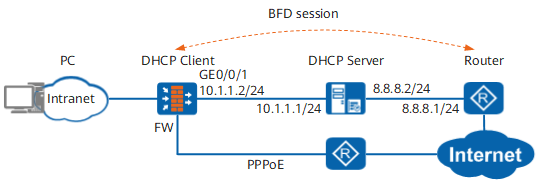
Procedure
- Configure static BFD sessions.

This example describes only major BFD-related configurations, with IP address and security zone configurations omitted.
# Configure BFD session 1 with peer IP address 8.8.8.1, local discriminator 10, and remote discriminator 20.
[FW] bfd
[FW-bfd] quit
[FW] bfd 1 bind peer-ip 8.8.8.1 interface GigabitEthernet 0/0/1 nexthop dhcp
[FW-bfd-session-1] discriminator local 10
[FW-bfd-session-1] discriminator remote 20
[FW-bfd-session-1] commit
[FW-bfd-session-1] quit
- Configure the DHCP-BFD interworking.
# Associate DHCP with the BFD session.
[FW] dhcp enable
[FW] interface GigabitEthernet 0/0/1
[FW-GigabitEthernet0/0/1] ip address dhcp-alloc
[FW-GigabitEthernet0/0/1] dhcp client track bfd-session 1
[FW-GigabitEthernet0/0/1] quit
- Configure the default route.
# Configure the default route with outbound interface Dialer 0 and route priority 255.
When the FW acts as the DHCP client, the priority of the unr route obtained from the DHCP server is 60. When PPPoE is used for backup access, the priority of the default route must be larger than 60. The higher the priority value, the lower the priority.
[FW] ip route-static 0.0.0.0 0.0.0.0 Dialer 0 preference 255 - Configure security policies between the Local zone and the security zone where GE 1/0/1 resides to permit BFD packets.
[FW] firewall zone untrust
[FW-zone-untrust] add interface GigabitEthernet 0/0/1
[FW-zone-untrust] quit
[FW] security-policy
[FW-policy-security] rule name bfd1
[FW-policy-security-rule-bfd1] source-zone local
[FW-policy-security-rule-bfd1] destination-zone untrust
[FW-policy-security-rule-bfd1] destination-address 8.8.8.1 32
[FW-policy-security-rule-bfd1] action permit
[FW-policy-security-rule-bfd1] quit
[FW-policy-security] rule name bfd2
[FW-policy-security-rule-bfd2] source-zone untrust
[FW-policy-security-rule-bfd2] destination-zone local
[FW-policy-security-rule-bfd2] source-address 8.8.8.1 32
[FW-policy-security-rule-bfd2] action permit
[FW-policy-security-rule-bfd2] quit
- Configure the router.
Verification
When the active link is reachable, access packets are forwarded by FW to the active link.
# Run the display bfd session all command. You can view that BFD sessions are created and they are in Up state. The following uses the information displayed on FW as an example.
[FW] display bfd session all
--------------------------------------------------------------------------------
Local  Remote  Peer IP Address Interface Name                  State     Type
--------------------------------------------------------------------------------
10     20      8.8.8.1         GigabitEthernet0/0/1            Up        Static
--------------------------------------------------------------------------------
# Run the display ip routing-table command on FW. You can view that the default route to FW is the gateway address obtained through the DHCP server and the route priority is 245.
[FW] display ip routing-table
Route Flags: R - relay, D - download to fib
------------------------------------------------------------------------------
Routing Tables: Public
        Destinations : 7        Routes : 7

Destination/Mask    Proto  Pre  Cost     Flags NextHop         Interface

        0.0.0.0/0   Static 245  0          RD  10.1.1.1        GigabitEthernet0/0/1
When the active link is faulty, FW switches the traffic to the standby link.
# Run the display bfd session all command. You can view that the status of the BFD session is Down. The following uses the information displayed on FW as an example.
[FW] display bfd session all
--------------------------------------------------------------------------------
Local  Remote  Peer IP Address Interface Name                  State     Type
--------------------------------------------------------------------------------
10     20      8.8.8.1         GigabitEthernet0/0/1            Down      Static
--------------------------------------------------------------------------------
# Run the display ip routing-table command. You can view that default route obtained through the DHCP server is deleted and the backup default route with outbound interface Dialer 0 is loaded to the routing table.
[FW] display ip routing-table
Route Flags: R - relay, D - download to fib
------------------------------------------------------------------------------
Routing Tables: Public
        Destinations : 5        Routes : 5

Destination/Mask    Proto  Pre  Cost     Flags NextHop         Interface

        0.0.0.0/0   Static 255  0           D  0.0.0.0         Dialer0
When the active link recovers, run the display bfd session all command on FW. You can view that the status of the BFD session turns to Up. Run the display ip routing-table command. You can view that the default route to FW obtained through the DHCP server is re-loaded to the routing table.
Configuration Scripts
Configuration scripts of FW
#
sysname FW
#
bfd
#
interface GigabitEthernet0/0/1
 ip address dhcp-alloc
 dhcp client track bfd-session 10
#
bfd 1 bind peer-ip 8.8.8.1 interface GigabitEthernet0/0/1 nexthop dhcp
 discriminator local 10
 discriminator remote 20
 commit
#
 ip route-static 0.0.0.0 0.0.0.0 Dialer 0 preference 255
 ip route-static 0.0.0.0 0.0.0.0 10.1.1.1 preference 245 track bfd-session 1
#
security-policy
 rule name bfd1
  source-zone local
  destination-zone untrust
  destination-address 8.8.8.1 32
  action permit
 rule name bfd2
  source-zone untrust
  destination-zone local
  source-address 8.8.8.1 32
  action permit
#
return
Configuration scripts of the router
#
sysname Router
#
bfd
#
interface GigabitEthernet0/0/1
 ip address 8.8.8.1 255.255.255.0
#
bfd 1 bind peer-ip 10.1.1.2
 discriminator local 20
 discriminator remote 10
 commit
#
 ip route-static 10.1.1.0 255.255.255.0 8.8.8.2
#
return