Certificates Filtering
After you configure certificate attribute-based access control, only the certificates that meet specific conditions can pass verification, which helps implement fine-grained control over users' access permissions.
Procedure
- Choose .
- Click Add.
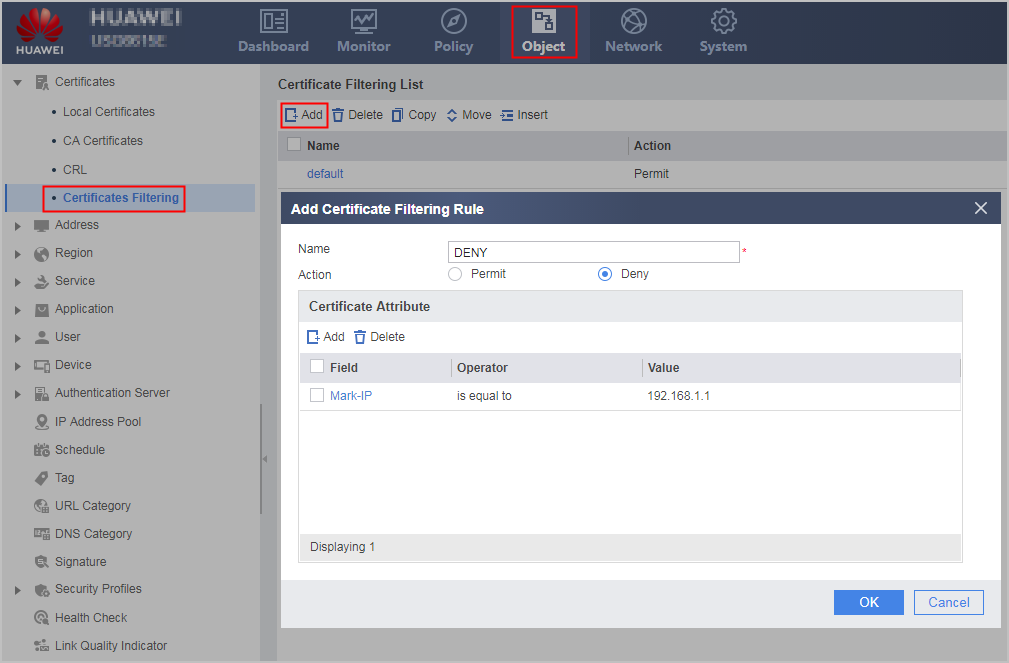
- Set parameters in New Certificate Filtering Rule.
Parameter
Description
Name
Rule name
Action
Permit or deny. Only permitted certificates can pass certificate verification.
Certificate Attribute
Add
Adds a rule. You can configure attributes based on the Subject-DN, Issuer-DN, Mark-IP, Mark-fqdn, and Validity. The attributes are ANDed. The action of the rule takes effect on a certificate only when the certificate matches all the attributes in the rule.
NOTE:When the Field is Validity and Operator is included, the certificate validity must be within the scope of the value and cannot contain the boundary values.
Delete
Deletes a rule.
- Click OK.
The filtering list contains the created certificate filtering rule.

- Click Move to move a rule below and above another rule.
- Click Insert to insert a new rule before a specific rule.