CRL
A CRL contains a list of certificates that have been revoked by a CA. Two devices check whether the CRL contains each other's certificate before communicating with each other. This section describes how to upload a CRL using the web UI.
Procedure
- Choose .
- Enable Verify Revoked Certificates, and then click Apply to enable the revoked certificate verification function.
- Click Upload.
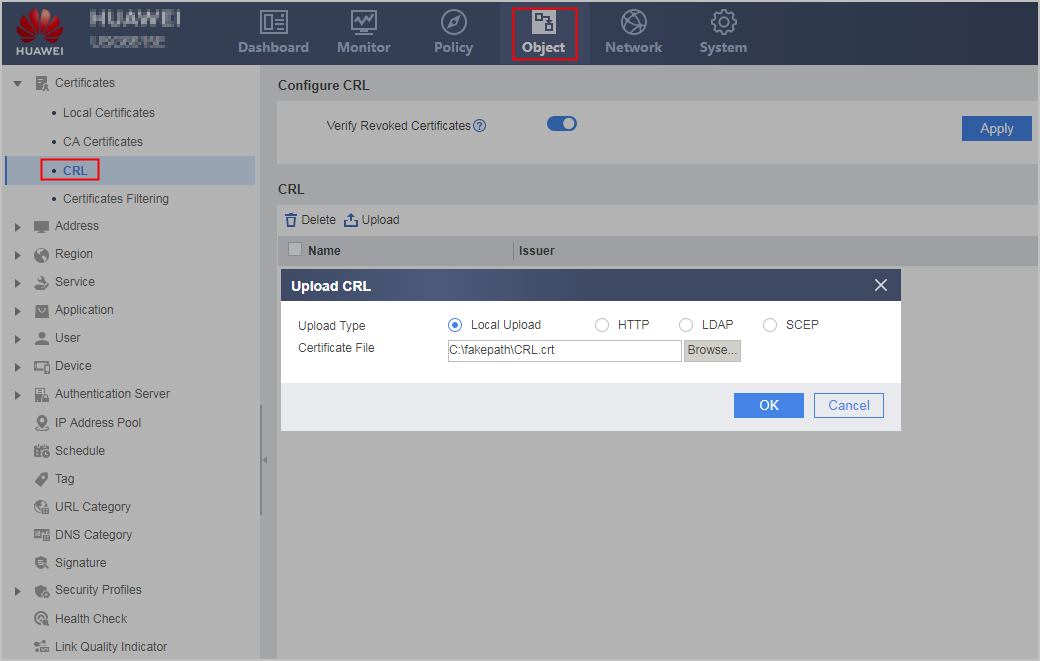
- Use any of the following modes to upload the CRL.
Local Upload: If you have stored a CRL file to a management device, use this mode to upload the CRL.
Parameter
Description
Upload Type
Local Upload
Certificate File
Click Browse... to select the CRL file to be uploaded and click Open.
HTTP
Parameter
Description
Upload Type
HTTP
URL
URL from which a CRL is obtained. The URL contains a CRL file name and extension, such as http://10.1.2.1:80/root.crl.
Automatic Update
Enable the automatic CRL update function.
Update Interval
Set an interval at which a CRL is automatically updated.
LDAP
Parameter
Description
Upload Type
LDAP
Server
Name of the selected LDAP server
File Name
CRL file name
Automatic Update
Enable the automatic CRL update function.
Update Interval
Set an interval at which a CRL is automatically updated.
SCEP
Parameter
Description
Upload Type
SECP
Local Certificate
Choose a local certificate.
URL
URL from which a CRL is obtained. The URL contains a CRL file name and extension, such as http://10.1.2.1:80/certsrv/mscep/mscep.dll.
Automatic Update
Enable the automatic CRL update function.
Update Interval
Set an interval at which a CRL is automatically updated.
- Click OK.
The CRL file list contains the uploaded CRL file.