CA Certificate
A CA certificate is issued by a CA to a device to verify the validity of its remote device's certificate. This section describes how to upload and export a CA certificate using the web UI.
Context
In SCEP or CMPv2 online application mode, a local certificate and a CA certificate are applied at the same time.
After you upload a CA certificate to a device using the web UI, the device automatically installs the certificate in the memory.
Procedure
- Choose .
- Click Upload.
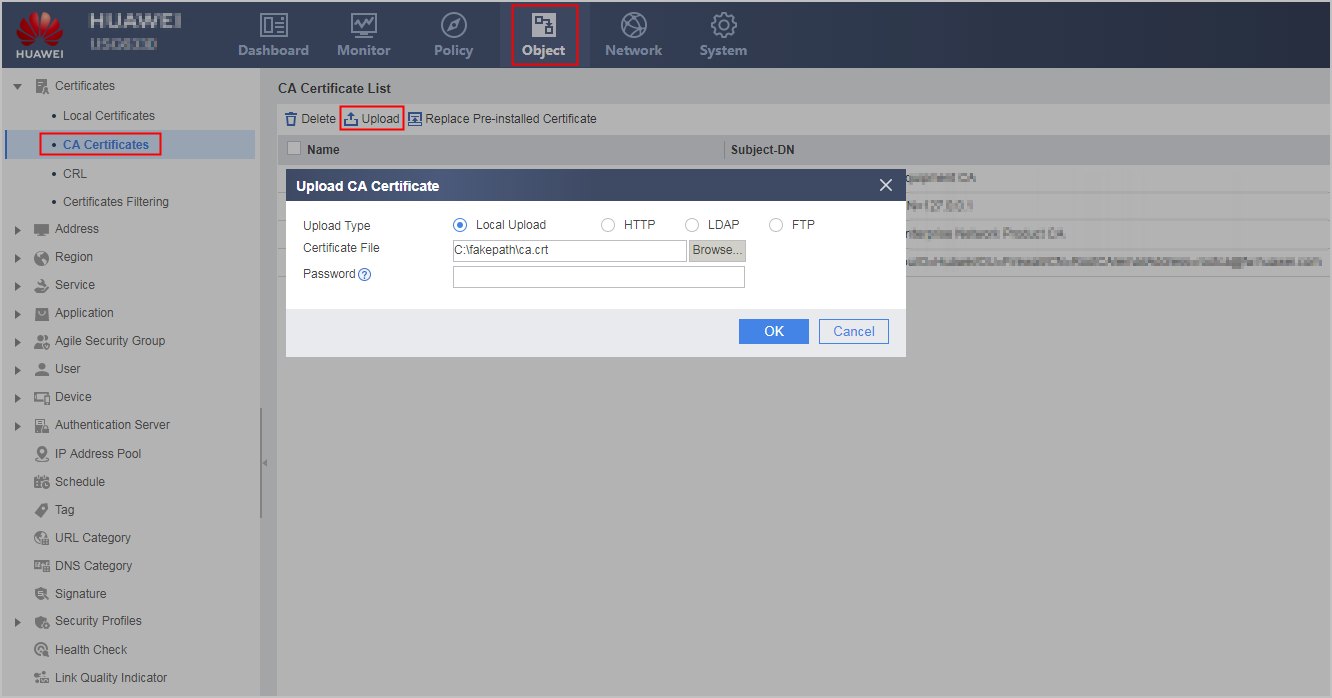
- Use any of the following modes to upload the CA certificate.
Local Upload: If you have stored the CA certificate to a management device, use this mode to upload the CA certificate.
Parameter
Description
Upload Type
Local Upload
Certificate File
Click Browse... to select the certificate file to be uploaded and click Open. The file name extension can be cer, der, crt, p12, pfx, or pem.
Password
The password is required for an encrypted CA certificate.
HTTP
Parameter
Description
Upload Type
HTTP
URL
URL from which a certificate is obtained. The URL contains a file name and extension, such as http://10.1.2.1:80/certnew.cer. The file name extension can be cer, der, crt, p12, pfx, or pem.
LDAP
Parameter
Description
Upload Type
LDAP
Server
Name of the selected LDAP server
Password
Administrator password of an LDAP server.
It is mandatory when the server template is not associated with an anonymous administrator.
File Name
Certificate file name. The file name extension can be cer, der, crt, p12, pfx, or pem.
FTP
Parameter
Description
Upload Type
FTP
File Name
Name of the certificate file to be downloaded. The file name extension can be cer, der, crt, p12, pfx, or pem.
IP Address
IP address of the selected FTP server
Port
Port number of the selected FTP server
Anonymous Login
After you select enable, you can log in to an FTP server anonymously.
Username
User name of an FTP account
Password
Password of an FTP account
- Click OK.
The certificate file list contains the uploaded certificate file.