Local Certificate
During communication between the device and peer, the device sends its local certificate to the peer for authentication. An administrator can send a local certificate request to the CA online or offline.
Configuring the Certificate Request File
- Choose .
- Click Add.
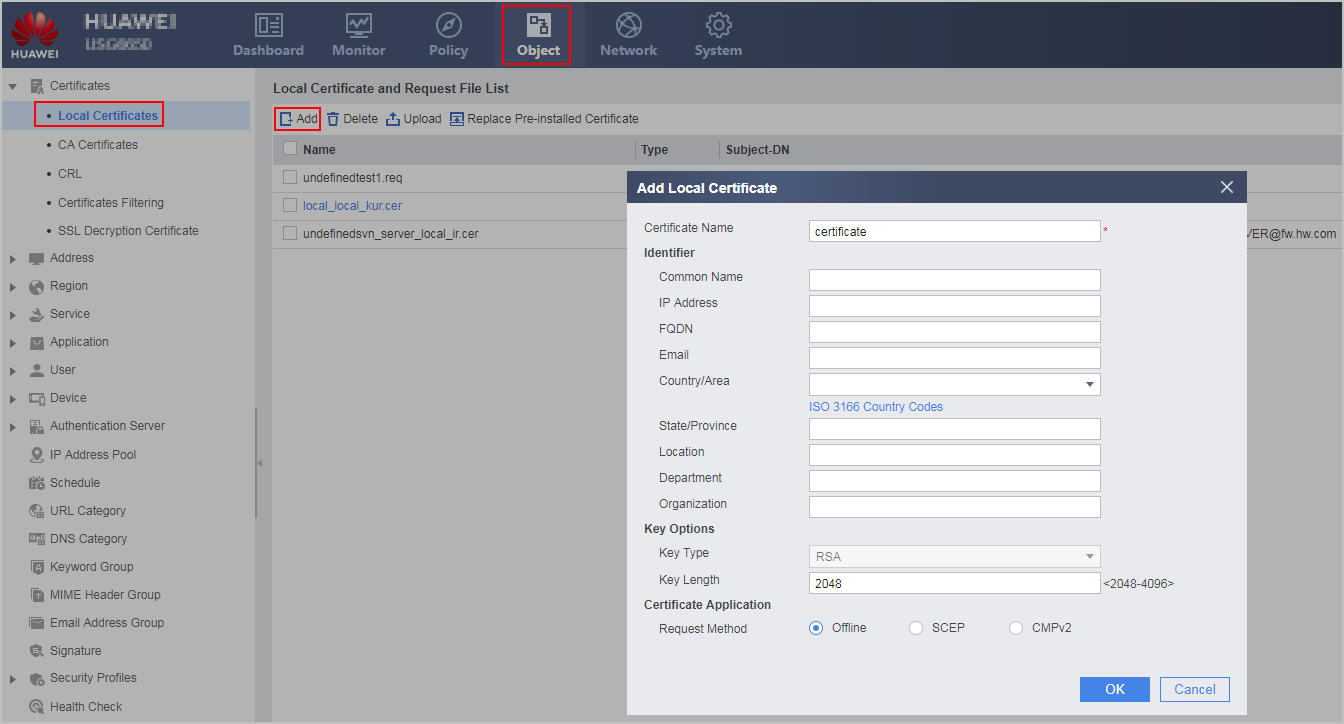
- Fill in the certificate name.
The certificate name does not support such special characters as the period (.), exclamation mark (!), number sign (#), dollar sign ($), and percent sign (%).
The certificate is named in format certificate name+local.cer.
- Fill in parameters for identification. That is, filling in information of the entity applying for the certificate.
Parameter
Description
Common Name
Common name of the FW
If the common name is not specified, the certificate name that you set will be used as the common name.
IP Address
Public IP address/domain name of the FW
NOTE:When using IKEv1 to establish an IPSec tunnel, you must use the IP address of the local end of the IPSec tunnel.
FQDN
Email
Email address of the FW owner
Country/Area
FW location
State/Province
Location
Department
Organization
- Fill in key parameters.
Parameter
Description
Key Type
The device supports only RSA key pairs currently. After specifying this parameter, a public and private key pair is generated. The public key is used for certificate application, while the private key is stored on the FW.
Key Length
A shorter key is faster to encrypt and decrypt but is less secure.
- Configure certificate application.
Choose one application mode before continuing the following configurations. The FW supports the following application modes.
Application Mode
Description
Online application through SCEP
You are advised to apply for a certificate online through SCEP if the device can access the CA server and the CA server supports the SCEP. This application mode supports automatic certificate application and update, which facilitates certificate maintenance.
In SCEP online application mode, a CA certificate is applied at the same time, and the applied local certificate is imported to the device.
Online application through CMPv2
You can apply for a certificate online through CMPv2 if the device can access the CA server and the CA server supports the CMPv2. This application mode supports automatic certificate application and update, which facilitates certificate maintenance.
NOTE:Before requesting a certificate using CMPv2, acquire a root certificate of the CA server offline, and import it to the FW memory; otherwise, the verification fails.
Send a certificate request to apply for a certificate.
An administrator can send the request generated on the device to the CA or upload the request on the CA web UI for certificate application. After the local certificate is issued, the administrator needs to import the certificate to the device.
Use the CA web UI for certificate application.
An administrator enters the local certificate information on the CA web UI. After the local certificate is issued, the administrator needs to import the certificate and key file (or certificate with key information) to the device.
This section describes only how to import the issued local certificate to the device. For the application procedure, refer to the CA Help.
NOTE:a. The offline method requires the application of a CA certificate to verify the local certificate. For details, refer to the CA Help.
- Offline application does not require configuration of other parameters.
Online application through SCEP and CMPv2 requires configuration of online application parameters. The parameters are described follows:
Table 1 SCEP online application parameter description Parameter
Description
CA Server URL
Make sure that the FW and CA server are reachable. You can enter an IP address or a domain name.
Digest Algorithm
- MD5
- SHA-1
- SHA-256
- SHA-384
- SHA-512
CA Fingerprint Algorithm
- MD5
- SHA-1
- SHA-256
CA Fingerprint
The CA fingerprint must be the same as the CA fingerprint on the CA server. For how to obtain the CA fingerprint, refer to the CA Help.
CA Identity
Specify the CA identity. The identifier here refers to the name of the CA server trusted by entities.
RA
Specify whether to apply for certificates from the RA. If you choose RA, certificates are applied from the RA, or the certificates are applied from the CA.
Challenge Password
If the CA uses the challenge password for the certificate request, you must specify the challenge password, which is also the password set on the CA server. For how to obtain the challenge password, refer to the CA Help.
Query Cycle
If certificate requests are processed manually in the CA, the certificate issuing may take a long time. Therefore, the FW needs to send a query periodically to obtain the issued certificate in a timely manner.
Queries
Communication Mode
Specify the communication mode for the FW to establish a TCP connection with the CA server:- Source Interface
- IP Address: In a hot standby scenario, the FW uses a virtual IP address to establish a TCP connection with a CA server, but the source interface for communication is a real IP address. Therefore, an IP address is required for the FW to establish a TCP connection with the CA server. Set the IP address to the virtual IP address.
Source Interface
This parameter is available only when the communication mode is set to Source Interface.
When the FW has multiple egresses, you can set the parameter to specify the source interface used by the FW to establish a TCP connection with the CA server. The interface IP address is used as the source IP address used by the FW to establish a TCP connection with the CA server.
Ensure that the specified source interface is a Layer 3 interface and has an IP address.
IP Address
This parameter is available only when the communication mode is set to IP Address.
Specify the source IP address for the FW to establish a TCP connection with the CA server.
NOTE:This parameter does not support the configuration of an IPv6 address.
Virtual Router
When the CA server is bound with a specific VPN instance (named vrf1), you can set the parameter to specify the VPN instance (or vrf1) bound to the PKI so that the FW can communicate with the CA server to obtain certificates or verify the certificate validity.
Table 2 CMPv2 online application parameter description Parameter
Description
CA Subject
The field order in the CA subject must be the same as that in the actual CA certificate. Otherwise, the server regards the subject as incorrect.
Server URL
URL of the CMPv2 server. Ensure that the FW and the CMPv2 server are reachable. You can enter an IP address or a domain name.
Authentication Mode
Message authentication: authentication based on the reference value and authentication key of the message authentication code. The parameter is configured only during the First Request.
- Signature: authenticate based on an identity certificate.
Reference Value
Reference value and authentication key of the Message Authentication Code, which need to be acquired from a CMP server in outband mode.
key
Identity Certificate
When CMPv2 is used to apply for a certificate, configure a certificate used to prove identity of the device. For different CMPv2 application modes, the configured certificates also vary.
- First Request: an extra certificate.
- Authentication Request: a local certificate issued to the device by the CA.
- Key Update Request: a local certificate issued to the device by the CA, and to be updated.
Communication Mode
Specify the communication mode for the FW to establish a TCP connection with the CMPv2 server:- Source Interface
- IP Address: In a hot standby scenario, the FW uses a virtual IP address to establish a TCP connection with a CMPv2 server, but the source interface for communication is a real IP address. Therefore, an IP address is required for the FW to establish a TCP connection with the CMPv2 server. Set the IP address to the virtual IP address.
Source Interface
This parameter is available only when the communication mode is set to Source Interface.
When the FW has multiple egresses, you can set the parameter to specify the source interface used by the FW to establish a TCP connection with the CMPv2 server. The interface IP address is used as the source IP address used by the FW to establish a TCP connection with the CMPv2 server.
Ensure that the specified source interface is a Layer 3 interface and has an IP address.
IP Address
This parameter is available only when the communication mode is set to IP Address.
Specify the source IP address for the FW to establish a TCP connection with the CMPv2 server.
NOTE:This parameter does not support the configuration of an IPv6 address.
Virtual Router
When the CMPv2 server is bound with a specific VPN instance (named vrf1), you can set the parameter to specify the VPN instance (or vrf1) bound to the PKI so that the FW can communicate with the CMPv2 server to obtain certificates or verify the certificate validity.
- Click OK.
- Generate a certificate request file offline.
Generated certificate request *.req is displayed in Local Certificate And Request File List.
Generate a certificate request file online and apply for a local certificate.
The certificate issuing depends on the CA efficiency. To save time, an administrator can perform other operations while waiting for certificate issuing.

 indicates that the certificate request is not processed. Please wait.
 indicates that the certificate request fails or times out. You can click to resend the request.
- If the certificate name is a blue link, such as
 , the certificate is issued and imported to the device.
Click
 to view certificate details.
- Generate a certificate request file offline.
Applying For a Local Certificate Offline
If you submitted the request on the CA web UI and have obtained the certificate or certificate location, perform 3.
- Click
 to download the request file to the administrator PC.
 - Send the certificate request file to the CA.
The administrator can use the URL provided by the CA to upload the certificate request file. The administrator can also use email or portable storage media to send the certificate request file to the CA. After the CA issues a certificate, perform the following operations:
- Click Upload to import the certificate to the device.
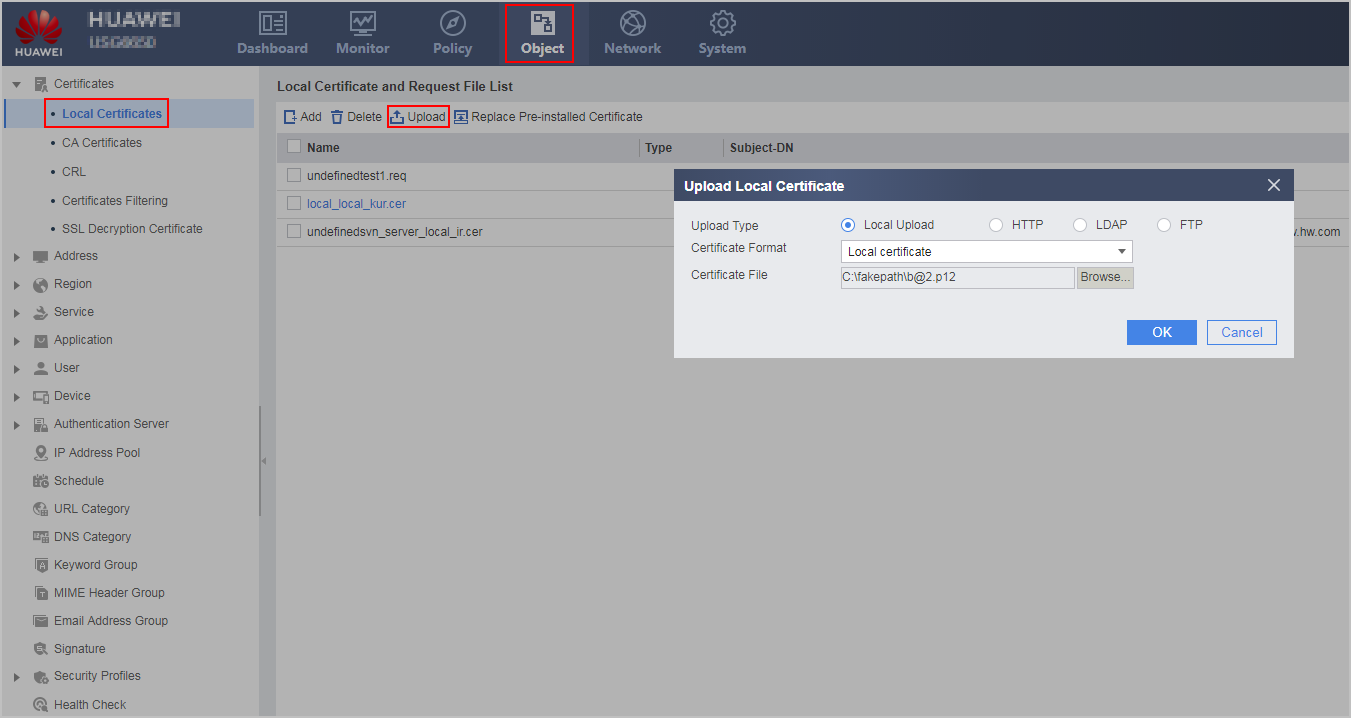
The FW supports the following methods to import the certificate based on the certificate storage position.
Local upload: used for certificates saved on the administrator PC.
Parameter
Description
Upload Type
Select Local Upload.
Certificate Format
Local certificate: including certificates with suffix cer, der, crt, p12, pfx, or pem and without key information.
PKCS12 certificate or PEM certificate with key: for the certificate with suffix p12, pem, or pfx and key information To import the certificate, you must specify a certificate password. You can obtain the certificate password from the CA.
Certificate or PEM certificate without key: including certificates with suffix cer, crt, der, p12, pfx, or pem and with an independent key file. To import the certificate, you must specify a key type, a key file format, a key file and the key file password. You can obtain the key file password from the CA.
Certificate File
Certificate file issued by the CA
Key Type
- RSA: supports .pem, .p12, .key, and .pfx key files.
- SM2: supports .pem, .key, and .der key files.
Key File Format
The key file format varies according to key types:- If the key type is RSA, the supported key file formats include pem and p12.
- If the key type is SM2, the supported key file formats include pem and der.
Key File
Key file issued by the CA
Password
Certificate or key password
HTTP: used for certificates saved on the web server.
Parameter
Description
Upload Type
Select HTTP.
URL
Enter the URL to obtain a certificate. The URL must contain the file name and extension, such as http://10.1.2.1:80/certnew.cer. The file name extension can be cer, der, crt, p12, pfx, or pem.
LDAP: used for certificates saved on the LDAP server.
Parameter
Description
Upload Type
Select LDAP.
Server
You can select the existing LDAP server or create an LDAP server. For the configuration method, see Configuring an LDAP Server.
Password
Administrator password of an LDAP server.
It is mandatory when the server template is not associated with an anonymous administrator.
File Name
Enter the certificate file name. The file name extension can be cer, der, crt, p12, pfx, or pem.
FTP: used for certificates saved on the FTP server.
Parameter
Description
Upload Type
Select FTP.
IP Address
Select the FTP server IP address.
Port
Select the FTP server port number.
File Name
Enter the name of the certificate file to be downloaded. The file name extension can be cer, der, crt, p12, pfx, or pem.
Anonymous Login
If this parameter is enabled, an anonymous user can log in to the FTP server. If not, the user name and password are required.
Username
FTP account name
Password
FTP account password
- Click OK.
- Click to view certificate details.
Follow-up Procedure
Back up the local certificate.
Click for the certificate (with suffix cer, crt, der, p12, pfx, or pem) to download the certificate file to the administrator PC. If a certificate contains a key, you must enter a password for security.