Web: Example for Configuring FW HA Mirroring in the Cloud Management Solution
This section describes how to configure FW HA mirroring in the cloud management solution.
Networking Requirements
On the network shown in Figure 1, the service interfaces of two FWs work at Layer 3 and are directly connected to switches. The upstream switch is connected to the carrier network, and the public IP address the carrier assigns to the enterprise ranges from 1.1.1.1 to 1.1.1.5. It is required that the two FWs running in cloud management mode form hot standby mirroring networking and intranet users can access the Internet. After the FWs are managed by the cloud management platform, service configurations are delivered by the cloud management platform.
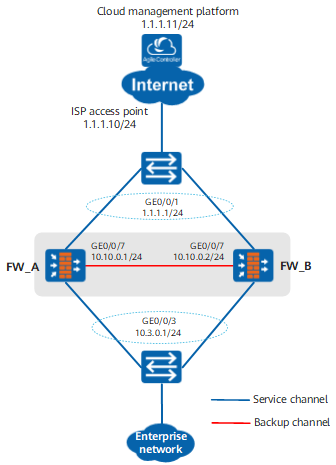
Procedure
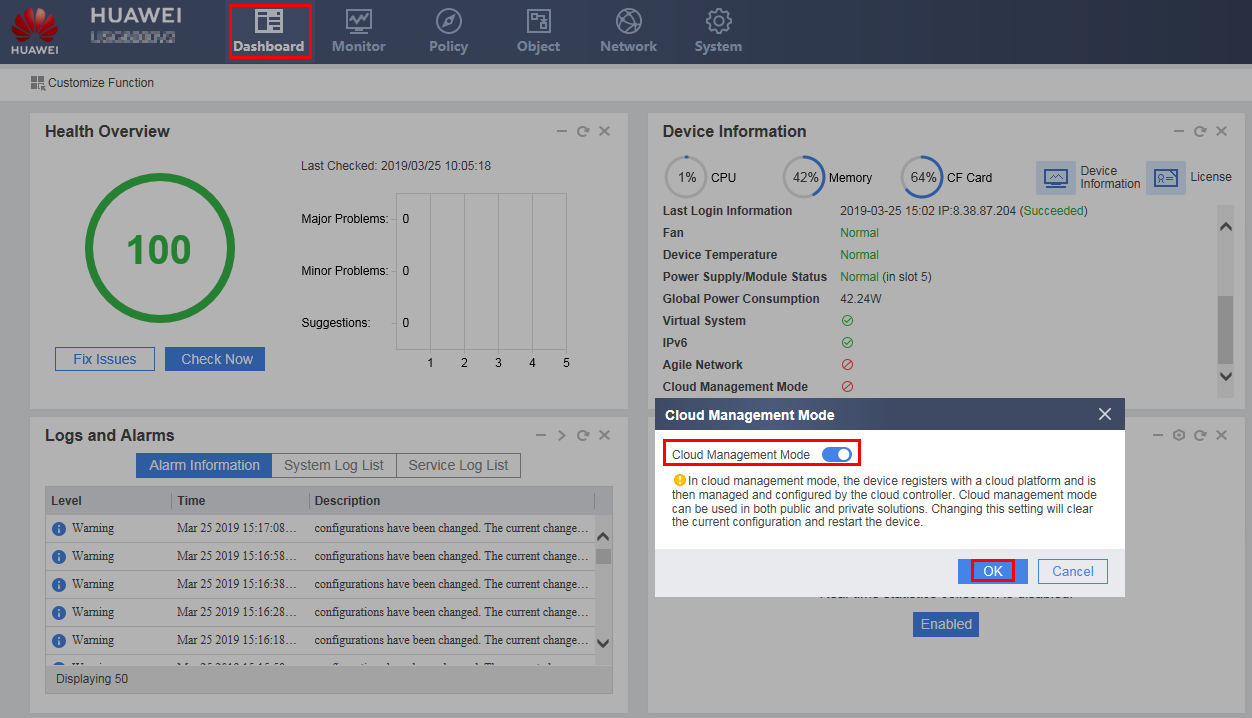
- The administrator logs in to FW_A and FW_B through the management port to switch the device from the traditional running mode to the cloud management mode.
Take FW_A as an example. Choose , click Configure, select Enable, and click OK. Then, the device automatically restarts. Repeat the preceding steps to configure FW_B.
- Configure interface IP addresses.After FW_A and FW_B are restarted, the system is switched to the cloud management running mode. You need to log in to the web UI again. In this case, the FW does not have an administrator account. On the web login page, register an administrator account as prompted, log in to the FW, and configure the FW. The following uses FW_A as an example.
- Choose .
- Click
 of GigabitEthernet 0/0/1 and set the parameters as follows:
Zone
untrust
IPv4
IP Address
1.1.1.1/24
Default Gateway
1.1.1.10
- Click OK.
- Repeat the preceding steps to configure GigabitEthernet 0/0/3 and GigabitEthernet 0/0/7.
Zone
trust
IPv4
IP Address
10.3.0.1/24
Zone
dmz
IPv4
IP Address
10.10.0.1/24
- Repeat the preceding steps to configure interfaces of FW_B. On FW_B, the IP address of heartbeat interface GigabitEthernet 0/0/7 must be set to 10.10.0.2/24.
- Configure security policies.
In cloud management mode, the FW has the interzone security policies with the action being permit enabled by default for the Untrust, Trust, and Local zones, requiring no manual configuration. After connection with the cloud management platform, the cloud management platform delivers other services to the FW. The security policies required by these services can also be delivered by the cloud management platform.
- Configure HA mirroring in cloud management mode.
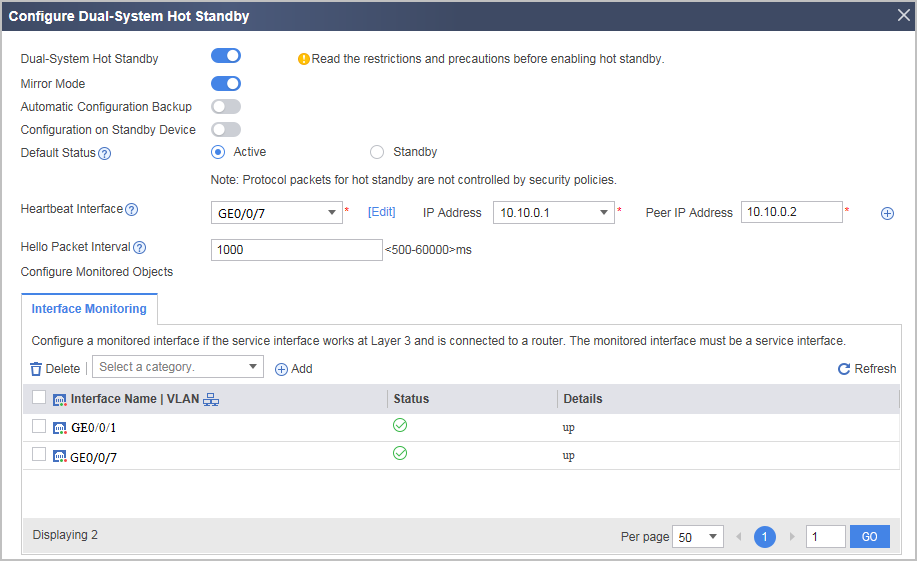
Configure HA mirroring for FW_A.
Choose , click Configure next to Dual-System Hot Standby, and set the parameters as follows.
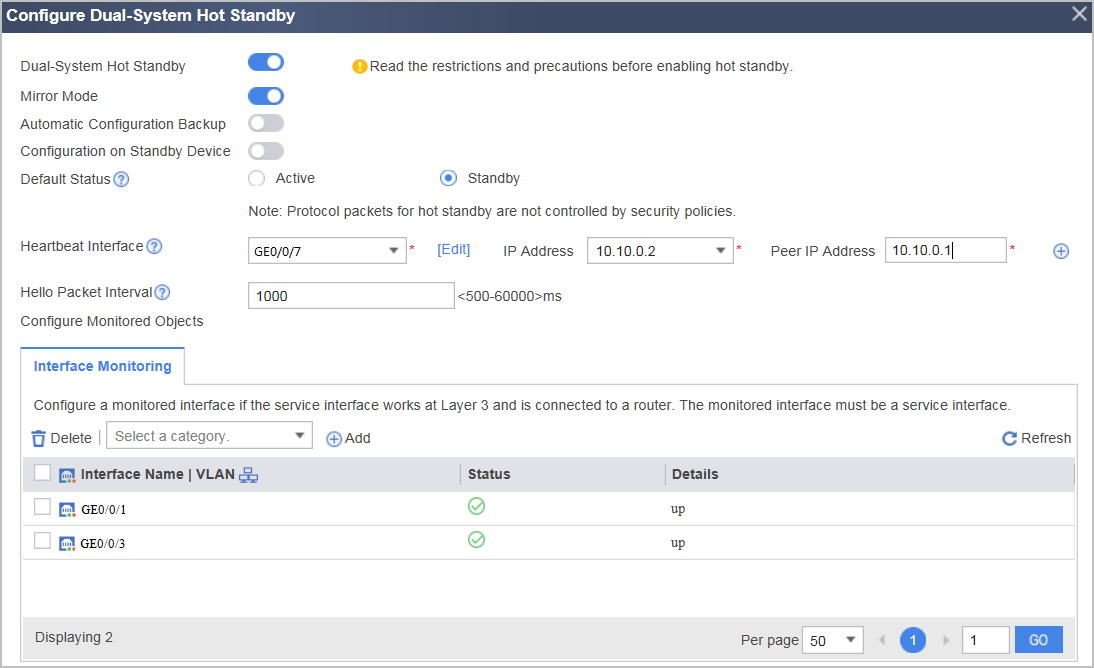
Configure HA mirroring for FW_B.
Choose , click Configure next to Dual-System Hot Standby, and set the parameters as follows.
- Configure the FW to register to the cloud management platform.
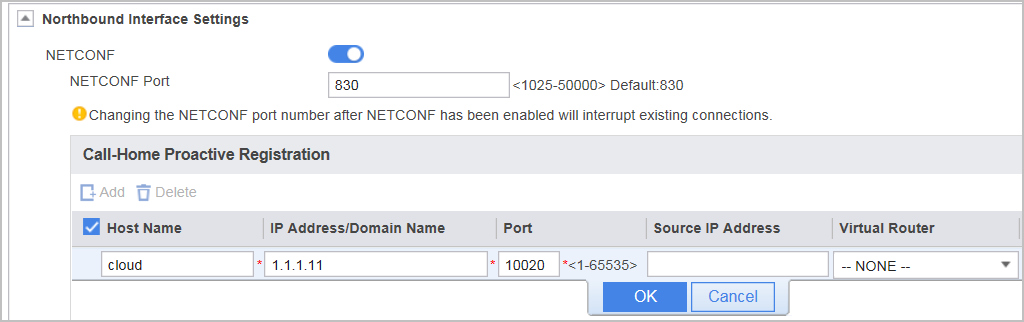
Take FW_A as an example. Choose , click Add of Call-Home Proactive Registration in Northbound Interface Settings, enter the connection information, and click OK and then Apply. Repeat the preceding steps to configure FW_B.
Verification
- Choose and check the status of the devices in hot standby mode.
In normal cases: for FW_A, Current Running Mode is Active/Standby Backup and Current Working Role is active ; for FW_B, Current Running Mode is Active/Standby Backup and Current Working Role is Standby.
- Choose and view the connection status between the FW and the cloud management platform. In normal cases, both FW_A and FW_B are in Connected state.