Cluster Establishment Process
This section describes how a cluster is established.
Set cluster negotiation parameters.
Set negotiation parameters and enable the cluster function on each member device. Then, each device enters the cluster negotiation phase.
Determine the cluster management group status.
Through negotiation, cluster members elect a management master device.
Other devices are management backup devices. From this moment, the cluster comes into being.
Determine the cluster business group status.
Cluster members negotiate to elect a business master device and establish the ranking and backup relationship in the business group.
The business group uses the preemption mechanism. It updates the ranking and backup relationship in real time according to device status.
Cluster Negotiation Parameters
- Cluster ID: unique identifier of a cluster. Clusters are differentiated according to their IDs.
- Shared Key: the shared key for encrypting packets between cluster members. By default, cluster channel packets are transferred in plain text. For security, you are advised to run this command to configure an encryption key.
- Detection period: interval at which cluster members send detection packets. If no response packet is received after three consecutive detection packets are sent, a device considers the peer separated from the cluster.
Hello packet sending interval/detection multiplier: interval at which the management master device sends Hello packets to management backup devices after a cluster is set up. Management backup devices do not send Hello packets to each other. If the management master device does not receive Hello packets from a peer within the Hello packet timeout period, it considers the peer not in the cluster any more.
Hello packet timeout period = Hello packet detection multiplier x Hello packet sending interval
- Number of business backup nodes: number of backup nodes of business entries for the business master device. More backup nodes will degrade the overall specifications. For example, a business group has three members, among which two are business backup nodes, forming 1:2 backup. In this case, the number of available sessions on each device is 1/3 of that on a single device.
- Preemption delay: the preemption mechanism is enabled for business groups by default. In general, you are advised to set a preemption delay to preserve backup time for route convergence and entry backup. If the preemption delay is too short, it may result in service anomalies.
- Cluster member list: IDs of all members and channel IP addresses. The three IP addresses are for the interfaces of negotiation, backup, and forwarding channels of each member. (Both physical and logical interfaces are supported. Eth-Trunk interfaces are recommended.)
- Negotiation channel: carries cluster status negotiation packets and certain backup configurations. If the negotiation channel fails, the system automatically uses the backup channel for data transmission.
- Backup channel: carries service backup packets and configuration synchronization packets.
- Forwarding channel: carries service traffic transmitted across devices.
Cluster Management Group
From the management perspective, all devices in a cluster can be classified into the management master device and management backup devices.
Management master device
Synchronizes configurations in the cluster, detects and notifies the cluster status, and adjusts the cluster member status. A cluster has only one management master device at a time.
The management master device periodically notifies other members of the cluster status, regardless of whether they are online.
Cluster-supported functions must be configured on the management master device. Then, the device synchronizes the configuration to other members. C_NoX_M is displayed at the front of the command-line prompt of the management master device, in which X indicates the ID of the device in the cluster, for example, C_No2_M.
Management backup device
Receives service configuration synchronization, cluster status notification and detection, and status adjustment information.
C_NoX_S is displayed at the front of the command-line prompt of a management backup device, in which X indicates the ID of the device in the cluster, for example, C_No3_S.
Figure 1 shows the management status switching process.
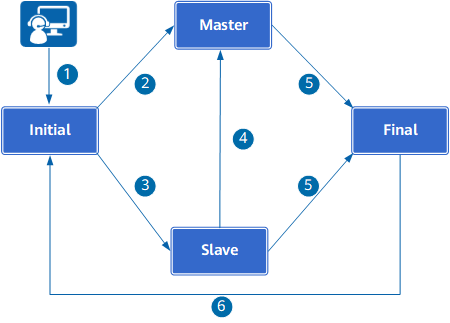
When a device has the cluster function enabled, the device enters the Initial state and sends unicast detection packets to all members in the cluster.
A C_NoX_I prefix exists in front of the device command prompt, with X indicating the node ID of the device in the cluster, such as C_No2_I.
If the health rating of a common cluster member device becomes 0, or both the negotiation and backup channels are down, the member device is in initial state. If the device is in initial state, you cannot configure its service functions.
If the device does not receive any response after sending three consecutive detection packets, the cluster has only one member. Therefore, the device becomes the management master device (Master).
- A response packet is received:
- The response packet carries information about the management master device (indicating the existence of the management master device). Then, the device is in the Slave state.
- The response packet does not carry information about the management master device (indicating the non-existence of the management master device). Then, the system compares the health ratings of cluster members. The cluster member with the highest health rating becomes the management master device. If two devices with the same health rating, the one with a larger negotiation IP address will become the master.
The original management master device fails. The cluster member with the highest health rating becomes the new management master device. If two devices with the same health rating, the one with a larger negotiation IP address will become the master.
The management master device does not support preemption. The management master is changed only when the original management master is faulty or the administrator runs the cluster switch master command to specify a new management master.
- The cluster function is disabled. The device enters the Final state.
- The cluster function is enabled again. The device enters the Initial state and sends detection packets.
Cluster Business Group
The concept of business group is introduced to ensure the correct backup and traffic switchover among cluster devices. All or some devices in a cluster can be added to a business group to provide services for a specific DC. Each cluster member can join multiple business groups. Generally, a business group provides services for one DC.
- Invalid: The priorities of devices in the business group have not been configured, and the business group negotiation is not performed.
- Initial: The priorities of devices in the business group have been configured, but the negotiation is not completed.
- Master: The negotiation is completed, and a device in the business group is in Master state to carry services. The device in Master state is called the business master device. Only one member in a business group can be in Master state.
- Slave: The negotiation is completed, and a device in the business group is in Slave state, not carrying services. The device in Slave state is called the business backup device. A business group can have multiple backup devices. A backup device does not carry service traffic. Instead, it backs up the master device.
Business master and backup devices are concepts for business groups. For a device, it can serve as the master device in one business group and the backup device in another business group at the same time.
First, compare device health ratings. The device with the highest health rating becomes the business master device. The health rating is automatically calculated by the system. The value ranges from 0 to 10000. A larger value indicates that the device is more healthy.
The health rating will degrade if the interface, IP-link, or BFD session tracked by the cluster is down, the number of CPUs on a device decreases. The health rating will be restored to the full score even if a fault is rectified.
The health rating indicates the health of a device during its operation, irrelevant to the hardware configuration of the device. The health rating of any device is the full score after the device properly starts.
If two devices have the same health rating, compare their priorities. The device with a higher priority will become the business master device. The node priority command can be used to set a priority. The value ranges from 1 to 100. A larger value indicates a higher priority.
In a business group, only members configured with priorities participate in the ranking within the business group and have opportunities to carry traffic.
Master/Backup Status Preemption Mechanism for Business Groups
- After the management master device detects a more optimal device in a business group than the current business master device, it notifies all member devices.
- If the current business master device detects that the new business master device announced by the management master device is another device, it starts to back up data to the new business master device in batches. At the same time, the new business master device enters the preemption state.
- After the batch backup is completed, the management master device re-determines the master/backup relationship of the current business group and instructs all members to switch the status.
Configuring the Preemption Function for the Business Group
After the function is enabled, the original business master preempts the master state after recovering from a fault. After the function is disabled, the original business master preempts the master state only when its health is higher than that of the current business master. In specific scenarios, for example, if you want the network to be stable and do not want frequent traffic switching, you can disable preemption function.
Business Group Information |
Elected Business Master (Preemption Enabled) |
Elected Business Master (Preemption Disabled) |
|---|---|---|
Normal business group information
|
Device A |
Device A |
Business group information when device A fails
|
Device B |
Device B |
Business group information when device A recovers
|
Device A |
Device B |