CLI: Example for Configuring the FW as an FTP Client
This section describes how to configure the FW as an FTP client to obtain files from an FTP server.
Networking Requirements
As shown in Figure 1, configure the FW as an FTP client and download files from the FTP server to the specified local directory.

FTP transmits passwords and data in plaintext mode, causing security risks. To secure data transmission, use SFTP.
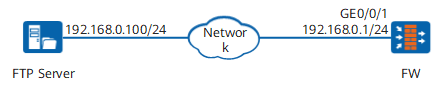
Data Planning
Item |
Data |
|---|---|
FTP server (already configured) |
IP address and subnet mask: 192.168.0.100/24 FTP account/password: ftp_sever/FTPserver@123 File: sys.bin |
FW |
Security policy: policy_ftp Directory for saving the file: hda1: (default directory on the FW) |
Procedure
- Configure a security policy for the Local-Trust interzone to permit the FTP service.
<FW> system-view
[FW] security-policy
[FW-policy-security] rule name policy_ftp
[FW-policy-security-rule-policy_ftp] service ftp
[FW-policy-security-rule-policy_ftp] source-zone local
[FW-policy-security-rule-policy_ftp] destination-zone trust
[FW-policy-security-rule-policy_ftp] source-address 192.168.0.1 24
[FW-policy-security-rule-policy_ftp] destination-address 192.168.0.100 24
[FW-policy-security-rule-policy_ftp] action permit
[FW-policy-security-rule-policy_ftp] quit
[FW-policy-security] quit
- Log in to the FTP server from the FW and download the file to the specified directory.
# Log in to the FTP server.
<FW> ftp 192.168.0.100
Trying 192.168.0.100
Press CTRL+K to abort
Connected to 192.168.0.100
Warning: FTP is not a secure protocol, and you are advised to use SFTP.
220 FTP service ready.
User(ftp 192.168.0.100:(none)):ftp_sever
331 Password required for ftp_sever
Password:
230 User ftp_sever logged in.
# Set the file transfer mode to binary and display the current directory on the FW for saving the file.
[ftp] binary
200 Type set to I.
[ftp] lcd
Info: Local directory now hda1:.
# Download the file from the FTP server and display the downloaded file in the specified directory on the FW.
[ftp] get sys.bin
200 PORT command okay.
150 Opening BINARY mode data connection for sys.bin.
226 Transfer complete.
ftp: 20116676 byte(s) received, in 43.60 seconds at 461.40 kbytes/sec.
[ftp] quit
<FW> dir
Directory of hda1:/
...
 3   -rw-  20116676  Aug 07 2009 06:58:17   sys.bin
...