This section describes how to configure the FW as an SFTP server and how to download files from the FW through SFTP on a PC.
Networking Requirements
As shown in Figure 1, a PC is used to log in to the FW and download files from the FW through SFTP.
Figure 1 Networking diagram for logging in to the FW through SFTP (password authentication)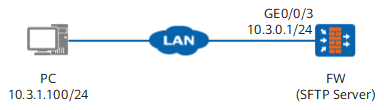
Data Planning
Item
|
Data
|
|---|
FW
|
SFTP administrator account: sftpadmin_a
Authentication type: password
Password: Mydevice@a
Service type: SFTP
|
Administrator PC
|
SFTP client software: PuTTY software (Windows XP operating system). The PuTTY software contains the PuTTY client for the STelnet service and the SFTP client PSFTP.
|
Procedure
- Configure the FW.
- Set an IP address for interface GigabitEthernet 0/0/3 and assign the interface to a security zone.
<FW> system-view
[FW] interface GigabitEthernet 0/0/3
[FW-GigabitEthernet0/0/3] ip address 10.3.0.1 24
[FW-GigabitEthernet0/0/3] service-manage enable
[FW-GigabitEthernet0/0/3] service-manage ssh permit
[FW-GigabitEthernet0/0/3] quit
[FW] firewall zone trust
[FW-zone-trust] add interface GigabitEthernet 0/0/3
[FW-zone-trust] quit
- Configure a security policy for the Local-Trust interzone to permit the SSH service.
[FW] security-policy
[FW-policy-security] rule name policy_sftp
[FW-policy-security-rule-policy_sftp] service ssh
[FW-policy-security-rule-policy_sftp] source-zone trust
[FW-policy-security-rule-policy_sftp] destination-zone local
[FW-policy-security-rule-policy_sftp] source-address 10.3.1.0 24
[FW-policy-security-rule-policy_sftp] action permit
[FW-policy-security-rule-policy_sftp] quit
[FW-policy-security] quit
- Enable the SFTP service.
[FW] sftp server enable
- Generate a local key pair.
[FW] rsa local-key-pair create
The key name will be: FW_Host

The range of public key size is (2048 ~ 2048).
NOTES: If the key modulus is greater than 512,
        it will take a few minutes.
Input the bits in the modulus[default = 2048]:2048
Generating keys...
.+++++
........................++
....++++
...........++
- Configure the VTY administrator interface.
[FW] user-interface vty 0 4
[FW-ui-vty0-4] authentication-mode aaa
[FW-ui-vty0-4] protocol inbound ssh
[FW-ui-vty0-4] user privilege level 3
[FW-ui-vty0-4] quit
- Create an SFTP administrator account and specify an authentication mode and a service type.
# Create SFTP administrator account sftpadmin_a and set the authentication mode to password, service type to SFTP, and service directory to hda1:.
[FW] ssh user sftpadmin_a
[FW] ssh user sftpadmin_a authentication-type password
[FW] aaa
[FW-aaa] manager-user sftpadmin_a
[FW-aaa-manager-user-sftpadmin_a] level 3
[FW-aaa-manager-user-sftpadmin_a] service-type ssh
[FW-aaa-manager-user-sftpadmin_a] password
Enter Password:
Confirm Password:
[FW-aaa-manager-user-sftpadmin_a] quit
[FW-aaa] quit
- Set the service type to SFTP for the SSH account.
[FW] ssh user sftpadmin_a service-type sftp
- Configure an SFTP service authorization directory for the SSH user.
[FW] ssh user sftpadmin_a sftp-directory hda1:
- Configure the administrator PC.
- Set the IP address and subnet mask of the administrator PC to 10.3.1.100/255.255.255.0.
- Install the PuTTY software. Details are omitted.
- Use the PuTTY to log in to FW_B through SFTP (the following uses PuTTY0.60 as an example).
- Run PSFTP.exe and enter open 10.3.0.1 to set up an SFTP connection with the FW. The system displays a prompt upon the first connection, as shown in Figure 2.
Figure 2 PSFTP security prompt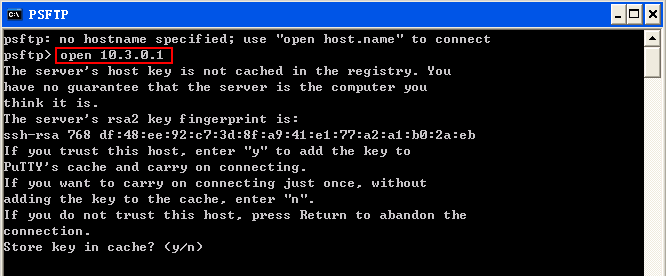
- Enter y and type the user name and password (sftpadmin_a/Mydevice@a) to log in to the FW, as shown in Figure 3.
Figure 3 Logging in to the FW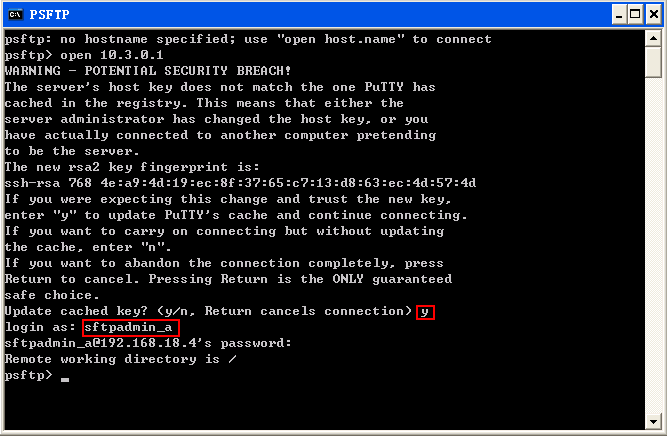
- Download files from the FW.
Figure 4 Downloading files from the FW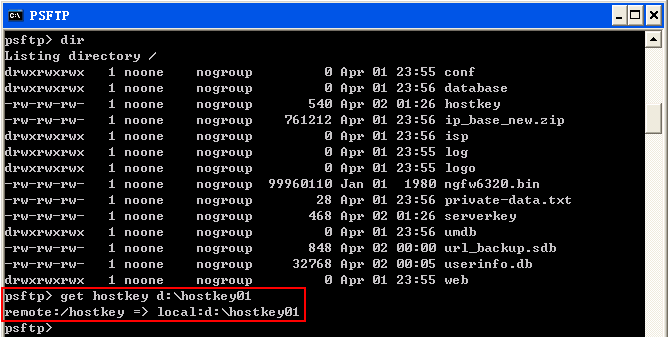
Configuration Scripts
#
 sysname FW
#
aaa
 manager-user sftpadmin_a
  password cipher %@%@fPXYG8r|>17U(MYaBLw0OE<3BRR/*~[B0>uW"^/){U_>wKB=%@%@
  service-type ssh
  level 3
#
interface GigabitEthernet0/0/3
 ip address 10.3.0.1 255.255.255.0
 service-manage enable
 service-manage ssh permit
#
firewall zone trust
 set priority 85
 add interface GigabitEthernet0/0/3
#
sftp server enable
ssh user sftpadmin_a
ssh user sftpadmin_a authentication-type password
ssh user sftpadmin_a service-type sftp
ssh user sftpadmin_a sftp-directory hda1:
#
user-interface vty 0 4
 authentication-mode aaa
 user privilege level 3
 idle-timeout 120 0
 protocol inbound ssh
#
security-policy
 rule name policy_sftp
  source-zone trust
  destination-zone local
  service ssh
  source-address 10.3.1.0 24
  action permit