CLI: Example for Downloading Files from the TFTP Server
This section describes how to download files from the TFTP server using the FW as the TFTP client.
Networking Requirements
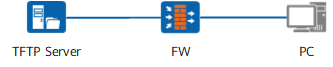
As shown in Figure 1, the IP address of the TFTP server is 10.111.16.160/24. Log in to the FW through PC and download test.cc from the TFTP server.

SFTP is recommended because of high security.
Data Planning
Item |
Data |
|---|---|
| Path of the source file on the TFTP server | test.cc |
| Name of the target file and storage path on the device | hda1:/test.cc |
Configuration Roadmap
The configuration roadmap is as follows:
Start the TFTP software on the TFTP server and set the location of the source file on the server.
Use the tftp command to download the file to the FW.
Procedure
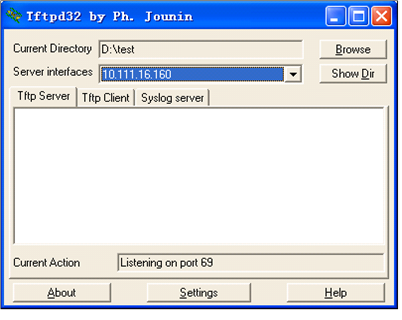
- Start the TFTP server. Specify the directory where test.cc resides as the base directory. Figure 2 shows the window.

The display varies with the TFTP server software running on the PC.
- Log in to the device through the PC and run the following commands to download the file:
<FW> tftp 10.111.16.160 get test.cc hda1:/test.cc
Transfer file in binary mode.
 Now begin to download file from remote tftp server, please wait for a while...
 \
 TFTP:       86235884 bytes received in 42734 second.
 TFTP:       15805100 bytes received in 42734 second.
 File downloaded successfully.
Verification
Check whether the downloaded file is in the specified directory of the device.
<FW> dir hda1:
Directory of hda1:/
   0   -rw-  86211956  Jun 08 2009 15:20:14   test.cc
   1   -rw-        40  Jun 24 2009 09:30:40   private-data.txt
   2   -rw-       396  May 19 2009 15:00:10   rsahostkey.dat
   3   -rw-       540  May 19 2009 15:00:10   rsaserverkey.dat
   4   -rw-      2718  Jun 21 2009 17:46:46   1.cfg
   5   -rw-     14343  May 19 2009 15:00:10   paf.txt
   6   -rw-      1004  Feb 05 2009 09:30:22   vrp1.zip
   7   -rw-      6247  May 19 2009 15:00:10   license.txt
   8   -rw-     14343  May 16 2009 14:13:42   paf.txt.bak