Binding NAT Address Pools to VRRP Groups
In active/standby mode, you do not need to manually bind the NAT address pool to the VRRP group. In load balancing hot standby, if addresses in a NAT address pool are not on the same subnet as the address of a VRRP group, you do not need to manually bind the NAT address pool to the VRRP group. If addresses in a NAT address pool are on the same subnet as the address of a VRRP group, you need to manually bind the NAT address pool to the VRRP group.
Prerequisites
Before you bind a NAT address pool to a VRRP group, ensure that:
- Hot standby has been configured on the FWs.
- The NAT policy configured on the active FW has been backed up to the standby FW.
Binding NAT Address Pools to VRRP Groups in Active/Standby Mode
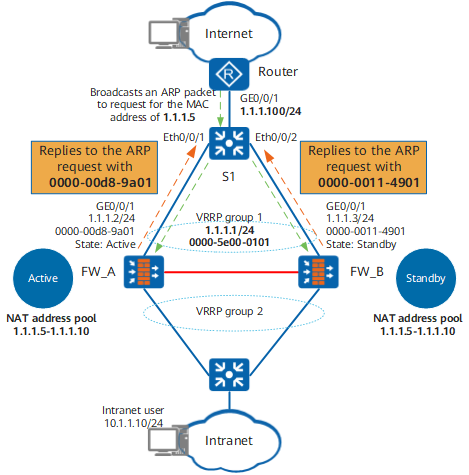
As shown in Figure 1, upon receiving a packet from an intranet user to the Internet, the FW translates the packet source IP address to an IP address in the NAT address pool.
If the IP address in the NAT address pool resides on the same subnet as the IP address of the VRRP group on the upstream interface of the FW, the Router broadcasts an ARP packet to request for the MAC address corresponding to the address in the NAT address pool after receiving the return packet from the Internet.
The two FWs have the same NAT address pool configuration. Therefore, both of them reply the MAC addresses of their upstream interfaces to the Router.
As a result, the Router may sometimes encapsulate return packets with the MAC address of the upstream interface on FW_A and send the return packets to FW_A, and sometimes encapsulate return packets with the MAC address of the upstream interface on FW_B and send the return packets to FW_B, which apparently affects normal service processing.
In such scenarios, you need to bind the NAT address pools to the VRRP groups on the FWs.
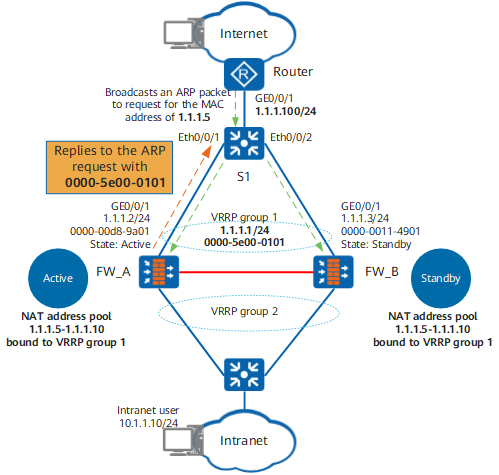
As shown in Figure 2, after the configuration is complete, only the firewall with the active VRRP group (FW_A) can reply to the ARP request from the Router. FW_A replies the virtual MAC address (for example, 0000-5e00-0101) of VRRP group 1 in the ARP reply packet to the Router. As a result, all return packets from the Internet to intranet users are forwarded only to FW_A.
The system can automatically bind the NAT address pool to the VRRP group with the smallest VRID if the NAT address pool and VRRP group reside on the same subnet. Therefore, in active/standby mode, you do not need to manually bind the NAT address pool to any VRRP groups.
Binding NAT Address Pools to VRRP Groups in Load Balancing Mode
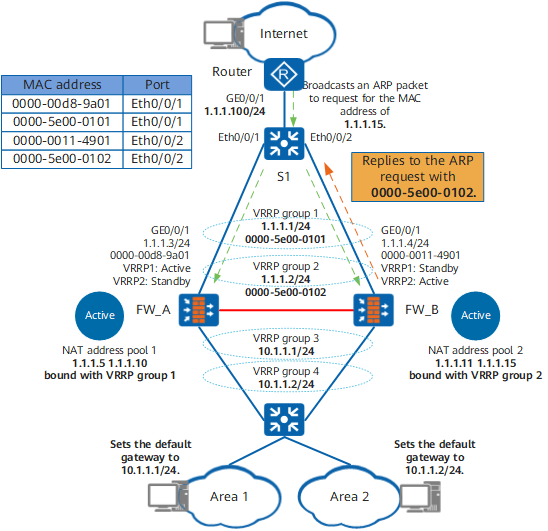
As shown in Figure 3, in the load balancing mode, intranet users in area 1 set their gateway address to the address of VRRP group 3, and intranet users in area 2 set their gateway address to the address of VRRP group 4. Then packets from area 1 to the Internet will be forwarded to FW_A, and packet source addresses will be translated to addresses in NAT address pool 1. Similarly, packets from area 2 to the Internet will be forwarded to FW_B, and packet source addresses will be translated to addresses in NAT address pool 2.
If the IP addresses of VRRP groups 1 and 2 reside on the same subnet as those in NAT address pools 1 and 2 and the return packets of intranet users in area 1 (or 2) reach the Router, the Router will request the MAC address corresponding to the IP address in NAT address pool 1 (or 2).
The two FWs then reply the MAC addresses of their upstream interfaces to the Router, causing MAC address conflict.
In such cases, you need to bind NAT address pool 1 to VRRP group 1 and NAT address pool 2 to VRRP group 2, as shown in Figure 3. Then the return packets of users in area 1 are forwarded only to FW_A, and the return packets of users in area 2 are forwarded only to FW_B.
Procedure
- Access the system view.
system-view
- Access the NAT address pool view.
nat address-group group-number [ group-name ]
- Bind NAT address pools to VRRP groups.
vrrp virtual-router-id
- Return to the system view.
quit
- Set the respective IP address or port ranges available for the NAT address pools on the FWs.
hrp nat resource { primary-group | secondary-group }

In load balancing scenarios, both FWs process service traffic. If NAPT is configured, the FWs may have conflicting public ports. To prevent such conflicts, configure respective NAT resources (including public IP addresses and ports) for the FWs. You can run the hrp nat resource primary-group command on the active FW. The standby FW will automatically generate the hrp nat resource secondary-group command (if you run the hrp nat resource secondary-group command on the active FW, the standby FW will automatically generate the hrp nat resource primary-group command).
In active/standby scenarios, you do not need to run the command.