CLI: Example for Configuring IDS Interworking with the NIP
This example describes the typical networking and method for configuring IDS interworking.
Networking Requirements
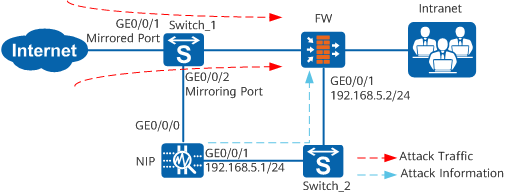
The FW and IDS (NIP in this example) work together to protect the intranet security, as shown in Figure 1.
The NIP records network events, including attacks and abnormal behavior (such as worms and Trojan horses), unusual network access, and misuse and abuse of network services in real time. When the NIP detects attacks or unusual behavior, the NIP delivers the attack information to the FW, and the FW blocks the attack traffic.
Data Planning
Item |
Data |
|---|---|
FW |
|
NIP |
|
Configuration Roadmap
- Specify interface IP addresses and assign the interfaces to security zones.
- Configure a security policy.
- Specify the interface IP addresses of the IDS.
- Specify the port for the FW to communicate with the NIP.
- Configure the authentication method and key for the FW.
- Configure the NIP.
Procedure
- Configure port mirroring on Switch_1.
The Huawei Technologies Co., Ltd. S5300 switch is used as an example to illustrate how to configure port mirroring. For configuration of other functions, refer to the product documents of the S5300 switch.
- Configure the FW.
- Complete the interworking configuration.
# Specify the interface IP addresses of the IDS.
[FW] firewall ids client 192.168.5.1# Specify the port for the FW to communicate with the IDS.
[FW] firewall ids port 30000# Configure the authentication method and key for the FW.
[FW] firewall ids authentication type aes256 key Admin@123
The IDS IP address, port number, and authentication method and key specified on the FW must be the same as those on the IDS.
# Enable the interworking between the FW and the IDS.
[FW] firewall ids enable
- Complete the interworking configuration.
- Configure the NIP.
Specify the IP address of the FW as 192.168.5.2, port number as 30000, authentication method as AES256, and authentication key as Admin@123.
Configuration Scripts
Configuration script of the FW:
#
 firewall ids authentication type aes256 key %$%$!^8fKr$NsR&Vql.7E`mIjJA8%$%$
 firewall ids client 192.168.5.1
 firewall ids port 30000
 firewall ids enable
#
interface GigabitEthernet 0/0/1
ip address 192.168.5.2 255.255.255.0
#
firewall zone trust
 set priority 85
 add interface GigabitEthernet 0/0/1
#
security-policy
  rule name abc
    source-zone trust
    destination-zone local
    source-address 192.168.5.1 24
    destination-address any
    service any
    user any
    application any
    time-range any
    action permit
#
firewall blacklist enable
#
return