Understanding ISP Link Selection
This section describes overview and implementation of ISP link selection.
Overview
ISP link selection is also called ISP address library link selection. When the FW functions as an egress gateway and connects to multiple ISP networks, you can enable ISP link selection on the FW to forward the traffic to a specific ISP network from the corresponding outbound interface. This ensures that the traffic is forwarded on the shortest path, improving the forwarding efficiency.
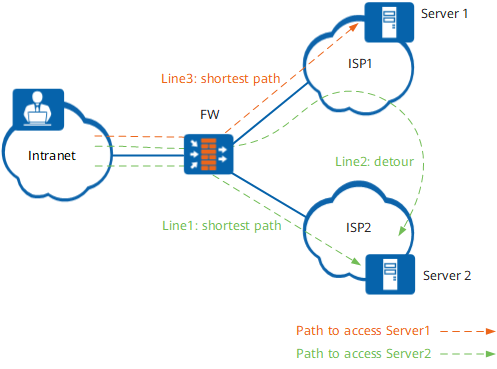
As shown in Figure 1, the FW has two ISP links to the Internet. If an intranet user accesses Server2 on ISP2 network and the FW has ECMP routes, the FW can forward the access traffic from two different paths to Server2, as shown in path 1 and path 2 in Figure 1. Apparently, path 2 is not the best path, and path 1 is the most desired path.
After you configure ISP link selection and intranet users access Server1 or Server2, the FW selects an outbound interface based on the ISP network of the destination address to forward the traffic from the shortest path to the server, as shown in path 3 and path 1 in Figure 1.
Implementation
ISP link selection is based on ISP routes. The ISP routes to an ISP network are generated in batches so that packets destined for the ISP network are forwarded through the corresponding outbound interface. ISP link selection can be used separately or together with intelligent uplink selection. Table 1 describes application scenarios of ISP link selection.
Application Scenario |
Description |
|---|---|
To enable traffic destined for a specified ISP network to be forwarded through corresponding outbound interfaces directly, configure ISP link selection. |
|
In this scenario, the corresponding outbound interface is selected based on the ISP network to which the destination address of the packet belongs, and intelligent uplink selection is performed based on multi-egress PBR, improving proper utilization of link resources. |
|
Combination of ISP Link Selection, Global Route Selection Policy, and DNS Transparent Proxy |
This scenario is applicable when intranet users access web servers through domain names. After DNS transparent proxy is configured, the device can modify the destination address (DNS server address) of a DNS request packet based on the selected outbound interface. ISP link selection enables the FW to select the corresponding outbound interface based on the ISP network to which the destination address of the packet belongs and perform the global route selection policy, improving proper utilization of link resources. |
To improve traffic forwarding reliability, ISP link selection can function with Health Check to ensure that traffic is not forwarded to faulty links. If the health check result indicates that a link is faulty, the FW will delete the ISP route entry. Therefore, traffic will neither match this route nor being forwarded to the faulty link. When the link recovers, the ISP route entry is created again, and traffic can be forwarded on this route.