Understanding Health Check
This section describes the overview, application scenarios, and implementation of health check.
Overview
Health check is to probe the service or link availability or the link delay and adjust traffic distribution based on probe results to guarantee service quality. The FW uses health check results to detect changes on the network in real time and takes measures immediately to ensure server or link availability and improve service stability and reliability. If multiple servers or links are available, the FW can select the server with the optimal performance based on the service type to process service traffic, or select the link that meets the requirements based on the link delay, jitter, and packet loss rate to transmit service traffic, improving user experience.
Generally, health check is not used independently and takes effect after being used together with intelligent uplink selection. Currently the health check function can be used together with the global route selection policy, ISP link selection, and multi-egress PBR.
Intelligent Uplink Selection
Intelligent uplink selection enables the FW that has multiple outbound interfaces to dynamically select an outbound interface by link bandwidth, link quality, link weight, or link priority, maximizing the usage of link bandwidth.
To improve traffic forwarding reliability, intelligent uplink selection can function with health check to prevent traffic from being forwarded over a faulty link. If the health check result shows that a link becomes faulty, the interfaces on the link will not be involved in intelligent uplink selection. When the link recovers, the interfaces on the link will participate in intelligent uplink selection and be assigned traffic.
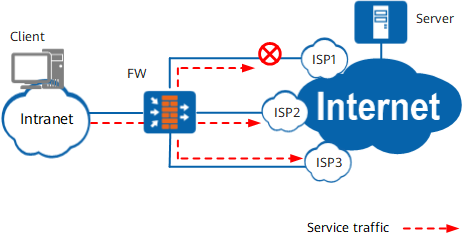
As shown in Figure 1, if health check is not enabled, the fault in ISP1 link cannot be detected. If ISP1 link is selected for traffic forwarding, user access will fail.
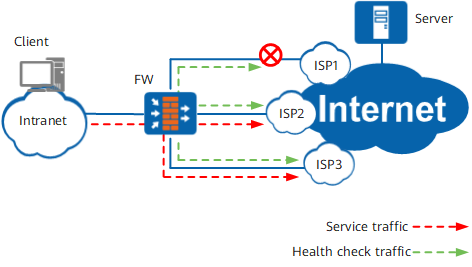
As shown in Figure 2, after health check is enabled on the FW, the FW can detect any fault in ISP1 link. When intelligent uplink selection is triggered, ISP1 link will not participate in intelligent uplink selection. The FW will select ISP2 or ISP3 link for traffic forwarding.
ISP Link Selection
ISP link selection enables the FW that serves as an egress gateway connected to multiple ISP networks to generate ISP routes in batches so that traffic destined to a specific ISP network can be forwarded by a specific outbound interface.
To improve traffic forwarding reliability, ISP link selection can function with health check to prevent traffic from being forwarded over a faulty link. If the health check result indicates that a link is faulty, the corresponding ISP route will be deleted. Therefore, traffic will not match this route and thereby not be forwarded to the faulty link. When the link recovers, the ISP route entry is created again, and traffic can be forwarded based on this route.
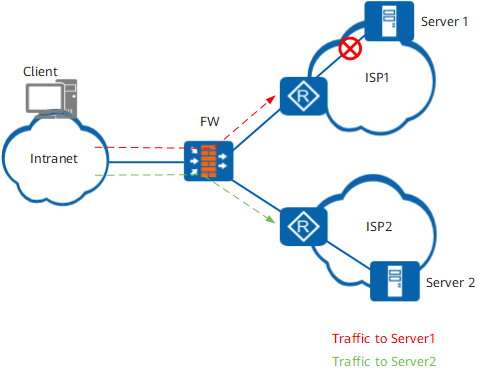
As shown in Figure 3, if health check is not enabled, the fault in ISP1 link cannot be detected. As a result, traffic destined for server 1 will still be forwarded over ISP1 link, causing a user access failure.
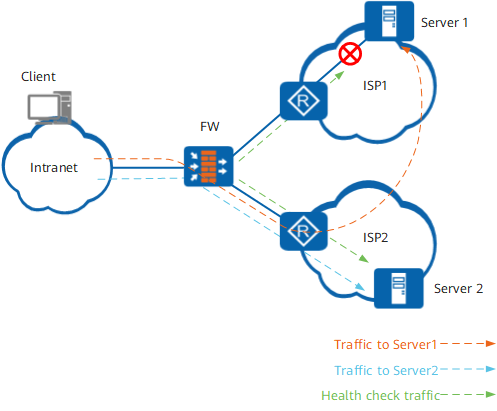
As shown in Figure 4, after health check is enabled, the FW can detect that server 1 is unreachable and delete the corresponding ISP route. If ISP1 and ISP2 networks have reachable routes to each other, traffic can reach server 1 via ISP2 network. Although the traffic path is not the optimal one, traffic forwarding is reliable, improving user experience.
Implementation
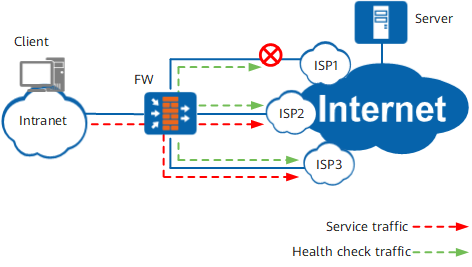
As shown in Figure 5, three outbound interfaces on the FW connect to the Internet through different ISP networks. The users can access resources on the Internet through any of these outbound interfaces. To check the health status of links connected to these outbound interfaces, the FW sends probe packets to devices on the ISP networks. If a link is available, the FW can receive a response packet from the connected device. To prevent misjudgment caused by the fault of a detected device, the FW can send probe packets to multiple devices through one outbound interface. The FW determines a link available only if the number of response packets received through the link reaches the specified value.
As shown in Figure 5, the final probe results indicate that the link though the ISP1 network is faulty. Therefore, the FW uses the links through the ISP2 and ISP3 networks to forward traffic destined for the Internet. The FW sends probe packets constantly to detect the status of each link. When a link recovers, the FW will use it again for traffic forwarding.
As shown in Table 1, the FW sends probe packets to destination devices using different protocols based on the device types. Then the FW analyzes the reply packets to evaluate the availability of the links.
Protocol |
Principle |
|---|---|
DNS |
DNS is used to send a request packet to a specific device. If the Transaction ID field in the request packet is the same as that in the response packet, the link is available. The default DNS domain name is www.huawei.com. You can set a desired DNS domain name as required. |
HTTP |
After the TCP three-way handshake, the FW uses HTTP to send a request to the specified device to obtain the specified destination root directory. If the FW receives an HTTP reply packet, the link is available, and the FW will send an RST packet to close the TCP connection. |
ICMP |
The FW sends an ICMP request to a device through a link. If the ICMP response packet returned by the device contains the same Identifier and Sequence Number fields as the request, the FW considers the link available. |
RADIUS |
RADIUS is used to send an authentication request to a specific server. In the request, the user name is guestguest, and password is empty. If the Identifier field in the request is the same as that in the response, the service is available. |
TCP |
The FW sends a TCP connection request to the specified device. If the connection is established, the link is available, and the FW will send an RST packet to close the TCP connection. |
TCP (simple detection) |
TCP packets are used to check the network connectivity. A link is considered available upon the reply to the first detection packet by the destination device, not completion of the three-way handshake. |
In addition to link connectivity, the health check can detect the delay, jitter, and packet loss rate of links in real time. The health check and link quality indicators are referenced in intelligent uplink selection. Links that meet quality requirements are preferentially selected, making link selection more intelligent.
Link Quality Parameter |
Calculation Method |
|---|---|
Delay |
Subtracting the probe sending time from the reply receiving time is the delay. The average delay of the N probe packets sent by the FW is the final delay. |
Jitter |
The absolute value of the difference between two adjacent probe delays is jitter. The average jitter of the N probe packets sent by the FW is the final jitter. |
Packet loss ratio |
After sending multiple probe packets, the FW counts the number of dropped packets and calculates the packet loss ratio. The packet loss ratio is the number of dropped packets divided by the number of probe packets. |
Currently, the delay, jitter, and packet loss rate can be calculated for DNS, HTTP, ICMP, TCP, simple TCP and RADIUS. The web UI can display up to 10 latest check records.