Configuring Health Check
This section describes how to configure health check.
Configuring Health Check Using the Web UI
- Configure health check function.
- Choose .
- Click Add in Health Check List.
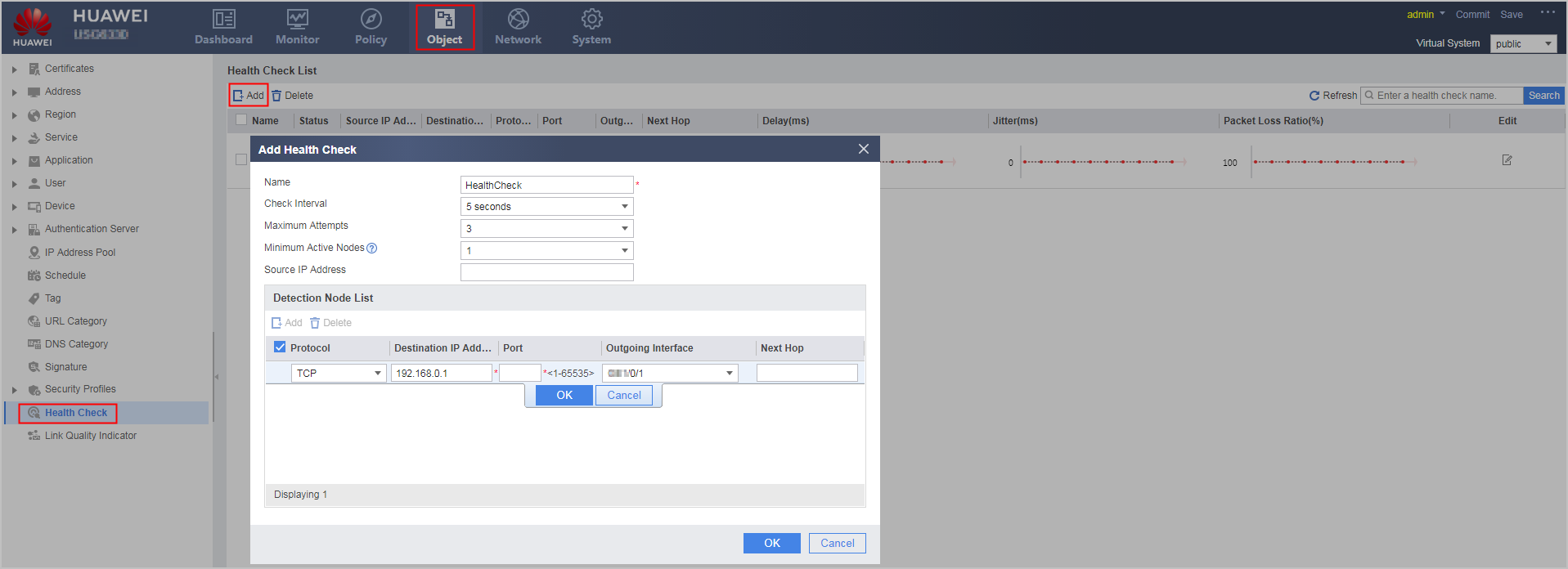
- Configure health check function.
Parameter
Description
Name
Health check name.
Check Interval
Interval between sending probe packets.
Maximum Attempts
Maximum number of consecutive probe failures.
Minimum Active Nodes
Minimum number of active nodes for the health check.
NOTE:Minimum number of active nodes cannot be greater than the number of Detection nodes. Otherwise, the health check status becomes Down.
Source IP Address
Source IP address of probe packets.
Detection node
Click Add, set probe packet parameters, and click OK.
Protocol
Protocol type of probe packets.
TCP: sends TCP probe packets.
Simple TCP: TCP packets are used to check the network connectivity. A link is considered available upon the reply to the first detection packet by the destination device, not completion of the three-way handshake.
HTTP: sends HTTP probe packets.
DNS: sends DNS probe packets.
ICMP: sends ICMP probe packets.
RADIUS: sends RADIUS probe packets.
NOTE:When configuring the protocol and port for health check, ensure that the protocol and port have been enabled on the peer. Otherwise, the check will fail. If the peer is a network device, ICMP is recommended.
Destination IP Address
Destination IP address for health check.
The FW and destination device reside on the two sides of a link. The FW sends probe packets to the IP address of the destination device to check the health status of the link.
Port
Port number of the destination device.
Outgoing Interface
Outbound interface of probe packets.
To apply health check on an interface, you must set the interface as the outbound interface of health detection packets when adding a health detection node.
NOTE:When configuring the outgoing interface for health check, ensure that the outgoing interface is the same as that of the destination IP address to be detected. Otherwise, health check does not send detection packets and the detection status is Down.
- Click OK.
The new health check is displayed in Health Check List.
- Apply the health check.
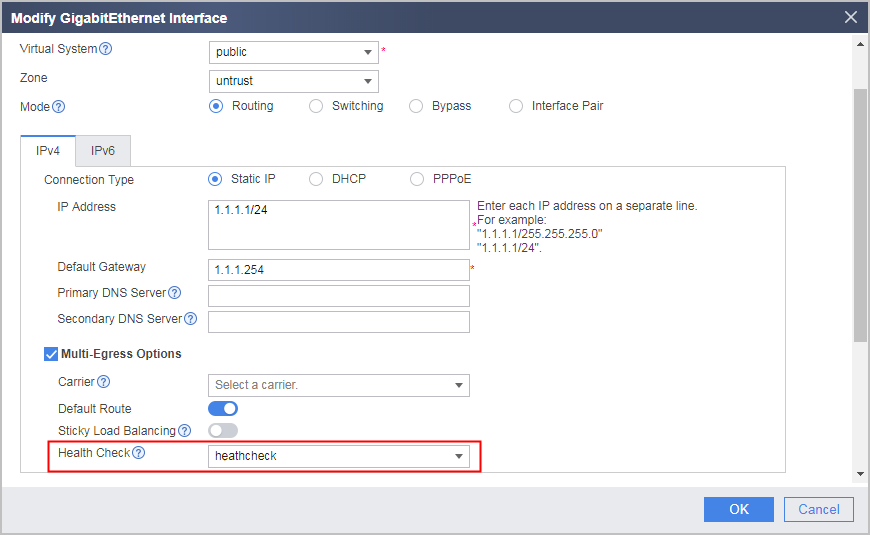
If the interface is an intelligent uplink selection member interface, apply the health check on the interface. The following section describes the procedure for applying health check.
- Choose .
- Click
 of the specified interface.
 - Select Multi-egress options.
- In the Health Check drop-down list, select an existing health check.
Configuring Health Check Using the CLI
- Configure health check function.
Operation
Command
Description
Access the system view
-
Enable the health check function
By default, the health check function is disabled.
Create a health check and accesses the health check view
healthcheck name healthcheck-name [ vpn-instance vpn-instance-name ]
-
Add detection nodes for health check
IPv4: destination ip-address [ interface interface-type interface-number [ next-hop next-hop-ip-address ] ] protocol { icmp | { dns | http | radius } [ destination-port port-number ] | { tcp | tcp-simple } destination-port port-number }
IPv6: destination ipv6-address [ interface interface-type interface-number [ next-hop next-hop-ipv6-address ] ] protocol icmp6
The detection node is the destination device on the other side of the link, and ip-address is its IP address.
NOTE:When configuring the protocol and port for health check, ensure that the protocol and port have been enabled on the peer. Otherwise, the check will fail. If the peer is a network device, ICMP is recommended.
When configuring the outgoing interface for health check, ensure that the outgoing interface is the same as that of the destination IP address to be detected. Otherwise, health check does not send detection packets and the detection status is Down.
Set the source IP address of probe packets
source-ip ip-address
Use an available and routable IP address (public or private) based on network deployment as the IP address of the detection source for the health check. You can use the IP address of the interface where the health check resides or an IP address in the source NAT address pool as the IP address of the detection source.
If you do not set the IP address of the detection source, the FW will use the interface IP address as the IP address of the detection source. If multiple IP addresses are specified for the interface, the FW selects the IP address on the same subnet as the gateway address as the IP address of the detection source.
Set the minimum number of active nodes for health check
least active-linknumber number
By default, the minimum number of active nodes is 1. That is, the health check is Up as long as one node is Up.
The health check enters the Down state if the number of active nodes is less than the minimum number of active nodes.
NOTE:If the specified minimum number of active nodes is greater than the number of health check detection nodes, the health check status will remain Down. Therefore, the specified minimum number of active nodes must be less than or equal to the number of health check detection nodes.
Set the interval for sending probe packets
tx-interval interval-time
By default, the interval between sending probe packets is 5 seconds.
Set the number of sampling times for the health check status.
quality-detect-times time
By default, the device samples the latest 20 consecutive detection results to calculate the health check status.
V600R007C20SPC300 and later versions support this command.
Set the number of consecutive probe failures
times time
If the number of consecutive probe failures reaches the upper limit (time), the FW considers the node unavailable and changes its status to Down.
By default, the maximum number of consecutive probe failures is 3.
- Optional: Return to the system view. Configure a DNS domain name for health check.
healthcheck domain-name domain-name
If the protocol for health check is DNS, you can use the command to set a DNS domain name. The default DNS domain name is www.huawei.com.
- Apply the health check.
- Access the interface view.
interface interface-type { interface-number | interface-number.subinterface-number }
- Apply health check to the interface.
healthcheck healthcheck-name
Only one health check can be applied to an interface.
- Access the interface view.