IPSec Intelligent Link Selection
When the FW serves as a gateway in a branch office, it can implement dynamic switchovers among multiple IPSec tunnels using IPSec intelligent link selection.
The IPSec intelligent link selection function can be used in two scenarios based on the link switchover mechanism. One is to switch the link based on the link quality probe result, and the other is to switch the link based on the route status change.
Link Switchover Based on the Link Quality Probe Result
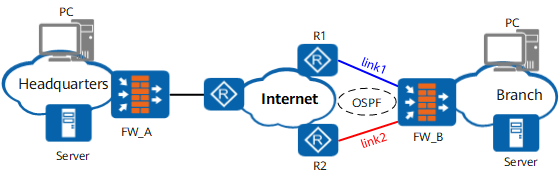
As shown in Figure 1, the gateway devices between which IPSec tunnels can be established have multiple WAN interfaces. And there are multiple trusted links between the gateway devices. IPSec intelligent link selection is required to enable FW_B in the branch to implement dynamic switchovers among multiple IPSec tunnels. After establishing an IPSec tunnel over one link, the gateway devices detect the delay or packet loss ratio of the IPSec tunnel in real time. If the delay or packet loss ratio exceed the set thresholds, the gateway devices automatically use a backup link to establish another IPSec tunnel and switch traffic to this tunnel.
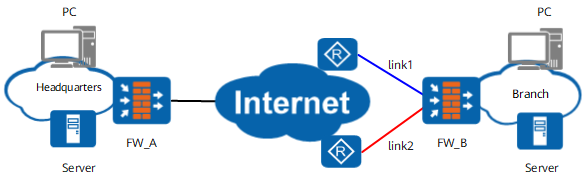
After IPSec intelligent link selection is configured on FW_B, FW_B selects a link to establish an IPSec tunnel and then sends ICMP packets to detect the delay or packet loss rate over the IPSec tunnel. If the delay or packet loss rate is greater than the configured threshold, FW_B deletes the current IPSec tunnel and selects another link to establish an IPSec tunnel. FW_B continues to detect the delay or packet loss rate over the new tunnel. If the delay or packet loss rate is still greater than the configured threshold, FW_B continues to switch to another link until the delay and packet loss rate is within the normal range or the number of switchover cycles reaches the upper threshold. In this way, IPSec intelligent link selection ensures quality IPSec communication between the branch office and HQ.
In addition, the FW supports automatic switchback to a high-priority link. After the IPSec tunnel is switched to the backup link (for example, Link 2 in Figure 1) because the quality of the high-priority link (for example, Link 1 in Figure 1) fails to meet the requirements, the FW continuously detects the quality of the high-priority link. If the quality of the high-priority link continuously meets the requirements within with the specified switchback delay, the FW automatically switches the IPSec tunnel back to the high-priority link to maximize the use of the high-priority link.
Link Switchover Based on the Route Status Change
As shown in Figure 2, Link 1 and Link 2 exist between branch gateway FW_B and headquarters gateway FW_A, and a dynamic routing protocol (OSPF as an example) runs between FW_B and the Internet. Configure IPSec intelligent link selection on FW_B to implement dynamic switchovers among multiple IPSec tunnels between the branch and headquarters.
When both Link 1 and Link 2 are normal, FW_B selects a link to establish an IPSec tunnel. In this example, Link 1 is selected. When Link 1 fails, the route to FW_A through Link 1 disappears, and FW_B finds a standby Link 2 based on the route cost and re-establishes an IPSec tunnel with FW_A.