Example for Configuring Keychain Authentication for Non-TCP Application
This section provides an example for configuring keychain authentication for Non-TCP application.
Networking Requirements
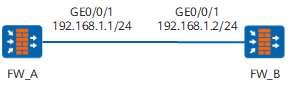
As shown in Figure 1, it is required to enable RIP and keychain authentication on all interfaces of FW_A and FW_B. The FWs are interconnected with each other using RIP-2.
Configuration Roadmap
The configuration roadmap is as follows:
Configure keychain basic functions.
Configure the application RIP on both the FWs to use keychain.
Data Planning
To complete the configuration, you need the following data:
keychain name
key-id
algorithm and key-string
send and receive time
receive tolerance
Procedure
- # Configure FW_A
Configuring Keychain Authentication
<FW> system-view
[FW] sysname FW_A
[FW_A] keychain huawei mode absolute
[FW_A-keychain-huawei] receive-tolerance 100
[FW_A-keychain-huawei] key-id 1
[FW_A-keychain-huawei-keyid-1] algorithm md5
[FW_A-keychain-huawei-keyid-1] key-string abcdef
[FW_A-keychain-huawei-keyid-1] send-time 14:30 2008-10-10 to 14:50 2008-10-10
[FW_A-keychain-huawei-keyid-1] receive-time 14:40 2008-10-10 to 14:50 2008-10-10
[FW_A-keychain-huawei-keyid-1] default send-key-id
[FW_A-keychain-huawei-keyid-1] quit
[FW_A-keychain-huawei] quit
Configuring the basic function of RIP
[FW_A] interface GigabitEthernet 0/0/1
[FW_A-GigabitEthernet0/0/1] ip address 192.168.1.1 24
[FW_A-GigabitEthernet0/0/1] rip authentication-mode md5 nonstandard keychain huawei
[FW_A-GigabitEthernet0/0/1] quit
- # Configure FW_B.
Configuring Keychain Authentication
<FW> system-view
[FW] sysname FW_B
[FW_B] keychain huawei mode absolute
[FW_B-keychain-huawei] receive-tolerance 100
[FW_B-keychain-huawei] key-id 1
[FW_B-keychain-huawei-keyid-1] algorithm md5
[FW_B-keychain-huawei-keyid-1] key-string abcdef
[FW_B-keychain-huawei-keyid-1] send-time 14:40 2008-10-10 to 14:50 2008-10-10
[FW_B-keychain-huawei-keyid-1] receive-time 14:30 2008-10-10 to 14:50 2008-10-10
[FW_B-keychain-huawei-keyid-1] default send-key-id
[FW_B-keychain-huawei-keyid-1] quit
[FW_B-keychain-huawei] quit
Configuring the basic function of RIP
[FW_B] interface GigabitEthernet 0/0/1
[FW_B-GigabitEthernet0/0/1] ip address 192.168.1.2 24
[FW_B-GigabitEthernet0/0/1] rip authentication-mode md5 nonstandard keychain huawei
[FW_B-GigabitEthernet0/0/1] quit
Configuration Scripts
# Configuration script of FW_A
#
sysname FW_A
#
interface GigabitEthernet0/0/1
 ip address 192.168.1.1 255.255.255.0
 rip authentication-mode md5 nonstandard keychain huawei
#
keychain huawei mode absolute
receive-tolerance 100
 key-id 1
  algorithm md5
  key-string cipher %#%#)b{br9\zi%X/Y@:Y>Lw(L\v##%#
  send-time 14:40 2008-10-10 to 14:50 2008-10-10
  receive-time 14:30 2008-10-10 to 14:50 2008-10-10
  default send-key-id
#
return
# Configuration script of FW_B
#
sysname FW_B
#
interface GigabitEthernet0/0/1
 ip address 192.168.1.2 255.255.255.0
 rip authentication-mode md5 nonstandard keychain huawei
#
keychain huawei mode absolute
receive-tolerance 100
 key-id 1
  algorithm md5
  key-string cipher %#%#)pN0Kq/k"J,0GRq/.mCkzPL%#%#
  send-time 14:40 2008-10-10 to 14:50 2008-10-10
  receive-time 14:30 2008-10-10 to 14:50 2008-10-10
  default send-key-id
#
return