Example for Configuring Keychain Authentication for TCP Application
This section provides an example for configuring keychain authentication for TCP application.
Networking Requirements
As shown in Figure 1, it is required to enable BGP and keychain authentication on all interfaces of FW_A and FW_B. The FWs are interconnected with each other using BGP.
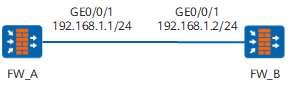
Configuration Roadmap
The configuration roadmap is as follows:
Configure keychain basic functions.
Configure the application BGP on both the FWs to use keychain. (Not shown here)
Data Planning
To complete the configuration, you need the following data:
keychain name
key-id
algorithm and key-string
send and receive time
receive tolerance
tcp-kind value and tcp-algorithm-id
Procedure
- # Configure FW_A.
Configuring Keychain
<FW> system-view
[FW] sysname FW_A
[FW_A] keychain huawei mode absolute
[FW_A-keychain-huawei] tcp-kind 182
[FW_A-keychain-huawei] tcp-algorithm-id md5 17
[FW_A-keychain-huawei] receive-tolerance 100
[FW_A-keychain-huawei] key-id 1
[FW_A-keychain-huawei-keyid-1] algorithm md5
[FW_A-keychain-huawei-keyid-1] key-string hello
[FW_A-keychain-huawei-keyid-1] send-time 14:30 2008-10-10 to 14:50 2008-10-10
[FW_A-keychain-huawei-keyid-1] receive-time 14:40 2008-10-10 to 14:50 2008-10-10
[FW_A-keychain-huawei-keyid-1] default send-key-id
[FW_A-keychain-huawei-keyid-1] quit
[FW_A-keychain-huawei] quit
Configuring Keychain Authentication
[FW_A] interface GigabitEthernet 0/0/1
[FW_A-GigabitEthernet0/0/1] ip address 192.168.1.1 24
[FW_A-GigabitEthernet0/0/1] quit
[FW_A] bgp 1
[FW_A-bgp] router-id 1.1.1.1
[FW_A-bgp] peer 192.168.1.2 as-number 1
[FW_A-bgp] peer 192.168.1.2 keychain huawei
[FW_A-bgp] quit
- # Configure FW_B.
Configuring Keychain
<FW> system-view
[FW] sysname FW_B
[FW_B] keychain huawei mode absolute
[FW_B-keychain-huawei] tcp-kind 182
[FW_B-keychain-huawei] tcp-algorithm-id md5 17
[FW_B-keychain-huawei] receive-tolerance 100
[FW_B-keychain-huawei] key-id 1
[FW_B-keychain-huawei-keyid-1] algorithm md5
[FW_B-keychain-huawei-keyid-1] key-string hello
[FW_B-keychain-huawei-keyid-1] send-time 14:40 2008-10-10 to 14:50 2008-10-10
[FW_B-keychain-huawei-keyid-1] receive-time 14:30 2008-10-10 to 14:50 2008-10-10
[FW_B-keychain-huawei-keyid-1] default send-key-id
[FW_B-keychain-huawei-keyid-1] quit
[FW_B-keychain-huawei] quit
Configuring Keychain Authentication
[FW_B] interface GigabitEthernet 0/0/1
[FW_B-GigabitEthernet0/0/1] ip address 192.168.1.2 24
[FW_B-GigabitEthernet0/0/1] quit
[FW_B] bgp 1
[FW_B-bgp] router-id 2.2.2.2
[FW_B-bgp] peer 192.168.1.1 as-number 1
[FW_B-bgp] peer 192.168.1.1 keychain huawei
[FW_B-bgp] quit
Configuration Scripts
# Configuration script of FW_A.
#
sysname FW_A
#
interface GigabitEthernet0/0/1
 ip address 192.168.1.1 255.255.255.0
#
bgp 1
 router-id 1.1.1.1
 peer 192.168.1.2 as-number 1
 peer 192.168.1.2 keychain huawei
#
keychain huawei mode absolute
tcp-kind 182
tcp-algorithm-id md5 17
receive-tolerance 100
 key-id 1
  algorithm md5
  key-string cipher %#%#^oU=Cq@/Syst`1#dOY&8bPzR%#%#
  send-time 14:40 2008-10-10 to 14:50 2008-10-10
  receive-time 14:30 2008-10-10 to 14:50 2008-10-10
  default send-key-id
#
return
# Configuration script of FW_B.
#
sysname FW_B
#
interface GigabitEthernet0/0/1
 ip address 192.168.1.2 255.255.255.0
#
bgp 1
 router-id 2.2.2.2
 peer 192.168.1.1 as-number 1
 peer 192.168.1.1 keychain huawei
#
keychain huawei mode absolute
tcp-kind 182
tcp-algorithm-id md5 17
receive-tolerance 100
 key-id 1
  algorithm md5
  key-string cipher %#%#Hb(c;\@iU'@X,k6.E\Z*.S#\%#%#
  send-time 14:40 2008-10-10 to 14:50 2008-10-10
  receive-time 14:30 2008-10-10 to 14:50 2008-10-10
  default send-key-id
#
return