Viewing License
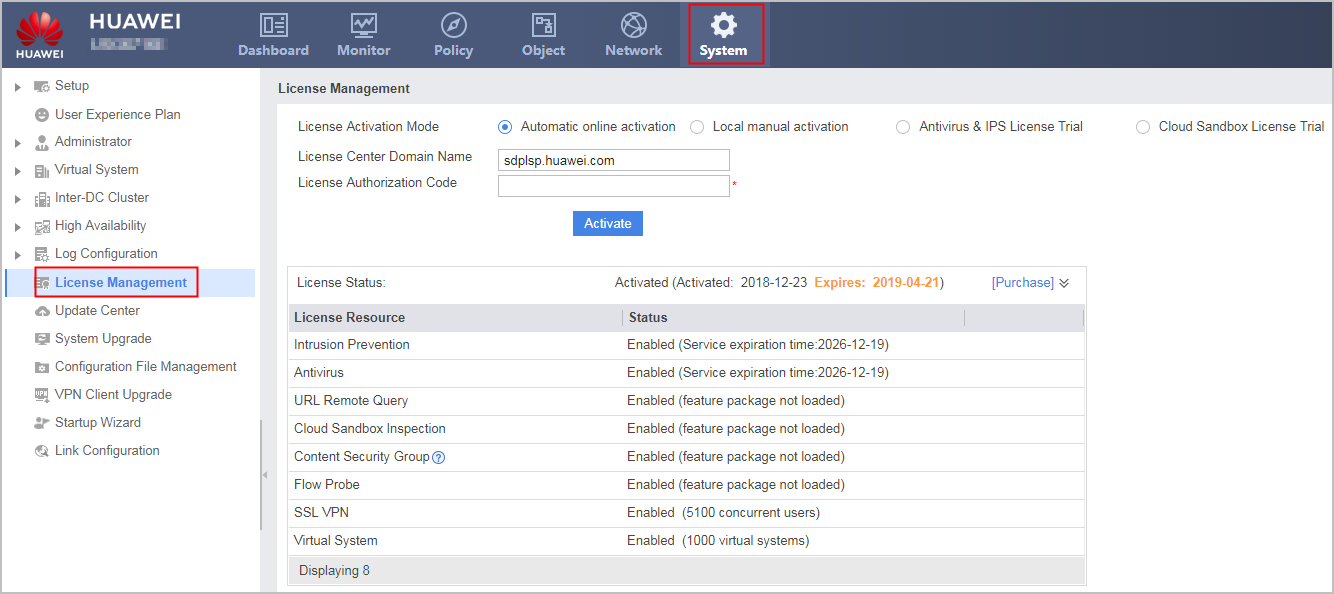
Viewing License File Information-Web
After the license is installed, you can log in to the web interface and choose to view the activation status and entitlement information of the license.

The supported license resources vary with models. The screenshot in this section is for reference only. License control items support details, please refer to theLicense Control Items.
Viewing License File Information-CLI
Run the display license command to view the details about the activated license file on the current system.
Item |
Description |
|---|---|
Device ESN is |
Equipment Serial Number (ESN) of the device. Each device has a unique serial number. |
License file ESN is |
ESN used to apply for the license file. |
The file activated is |
License file that is activated currently. |
The time when activated is |
Activation time. |
The time when expired is |
Time when the license file is expired. |
Virtual System |
Number of virtual systems. |
SSL VPN Concurrent User |
Maximum number of concurrent SSL VPN users supported by the license file. |
Content Security Group |
Content security group. |
IPS Update |
Whether IPS is supported. |
Anti Virus Update |
Whether antivirus is supported. |
URL Remote Query |
Whether URL remote query is supported. |
Cloud Sandbox Inspection |
Whether the cloud sandbox inspection service is supported. |