Log Host Reliability
This section describes measures to enhance the reliability of log output by the FW to the eLog.
When the firewall outputs logs to the eLog, due to network link failures and eLog collector failure, the logs may not be properly received and displayed. As a result, you may not properly learn and manage the network status. Therefore, measures to enhance the reliability of logs output by the firewall to the eLog shall be taken. For example, you configure multiple eLog collectors. If a collector is faulty, another collector can continue to receive the logs. In addition, the corresponding measures shall also be taken on the firewall to enable the firewall to cooperate with multiple collectors upon log output.
This section describes various measures for enhancing the log reliability. You can adopt the corresponding measures based on the actual networking.
This function is supported only when the USG6000E directly sends session logs, packet discard logs, service logs, and Port Range logs to the log host but not when it sends logs to the log host through the information center.
Multiple eLog Collectors Working in Load Balancing Mode
The eLog uses the distributed networking and is equipped with multiple collectors. The firewall interconnects with multiple collectors. Therefore, the reliability for log receiving is enhanced. As shown in Figure 1, three log hosts (distinguished by IDs) are configured on the firewall to interconnect with three collectors. By default, the firewall circularly sends logs to the collectors in polling mode. The collectors work in load balancing mode, which fully employs the processing performance of the collectors. However, if a collector is faulty, certain logs are discarded.
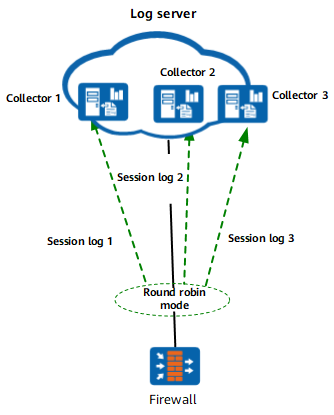
In addition, the firewall can output logs in concurrent mode. That is, the firewall outputs each log to three collectors simultaneously, as shown in Figure 2.
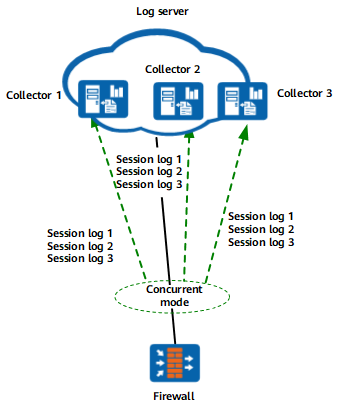
In this mode, each collector receives all log information. If a collector is faulty, the logs are not discarded. Therefore, the reliability of log receiving is improved. However, in this mode, the eLog system receives a large number of duplicated logs that occupy bandwidth resources and consume storage space and processing performance of the eLog. You shall configure the log output mode based on the actual situation.
Two groups of collectors working in redundancy mode
If higher reliability is required, you can deploy two groups of collectors at different geographic positions. The firewall interconnects with two groups of collectors and outputs logs to two groups of collectors simultaneously, as shown in Figure 3.
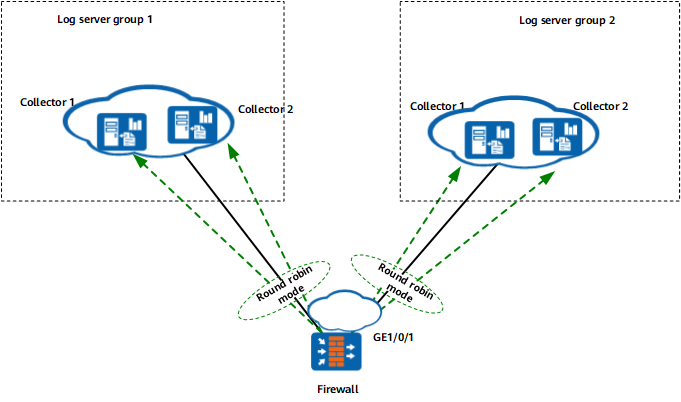
In this mode, the firewall sends logs to collectors in each group in polling mode, and the collectors in each group work in load balancing mode. Because the firewall sends each log to the collectors in two groups and two groups work in redundancy mode, the reliability for log receiving is greatly enhanced.
Detecting the link status using the IP-link function
Besides the reliability enhancement using multiple collectors, the firewall further supports the link reliability enhancement using the IP-link function.
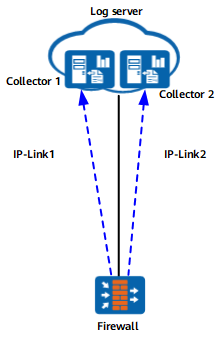
As shown in Figure 4, the firewall uses the IP-link function to detect the link status when interconnecting with the collector. The firewall sends the ICMP output requests to the collector. If the IP-link state in the response packet is UP, the firewall outputs logs to the collector; if the firewall does not receive any response packet from the collector, it considers that the IP-link status is DOWN and does not output logs to the collector.
Sending Heartbeat Detection Packets to the eLog Log Host to Detect the Heartbeat Status
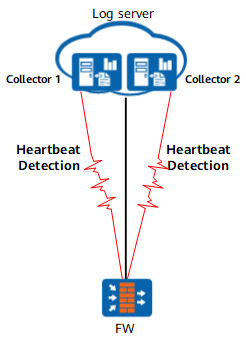
Through IP-link detection, you can check whether the communication between the FW and the log collector is normal, but cannot detect the exception of the log collector software. As a result, when the eLog collector software is abnormal, a large number of logs are discarded. In this case, the function that the FW sends heartbeat detection packets to the eLog log host to detect the heartbeat status can be used. As shown in Figure 5, the FW periodically sends heartbeat detection packets to the log host through heartbeat interface 32202 and monitors the collector status of the log host. When detecting that the log host does not respond for several consecutive times, the FW perceives that the connected eLog log host is unavailable. Then it immediately stops sending logs to the log host and continues to send logs to this log host again after receiving a heartbeat response packet within the specified period of time.

The FW can be enabled to send heartbeat detection packets to the eLog log host but not to a third-party log host.
This function is supported only when the FW directly sends session logs, packet discarding logs, and service logs to the eLog log host but not when it sends logs to the log host through the information center.