Configuring Log Host Reliability
You can set the FW to interwork with multiple eLog collectors and configure the IP-link function to detect the link status and improve the log output reliability.
Configuring Log Host Reliability
The eLog adopts the distributed networking and is equipped with multiple collectors. The FW is interworking with multiple collectors.
When the FW outputs session logs, packet discard logs, and service logs, you can use the following configurations to improve the reliability:
Run the firewall log host 1 ip-address port [ track ip-link link-name ] command to configure the log host with ID 1 in group 1.
track ip-link link-name indicates that the IP-link function can be used to detect the link status when you configure the log host. The firewall sends an ICMP echo request to the collectors. If the firewall receives response packets from the collectors and the IP-link state is UP, the firewall outputs logs to the collectors. If the firewall does not receive any response packet from the collectors and the IP-link state is DOWN, the firewall does not output logs to the collectors.
Run the firewall log host 2 ip-address port [ track ip-link link-name ] command to configure the log host with ID 2 in group 1.
Repeat this command to configure up to 16 log hosts.
Run the firewall log host 1 ip-address port secondary [ track ip-link link-name ] command to configure the log host with ID 1 in group 2.
Run the firewall log host 2 ip-address port secondary [ track ip-link link-name ] command to configure the log host with ID 2 in group 2.
Repeat this command to configure up to 16 log hosts.
After two groups of log hosts are configured, the firewall output logs to each collector in both groups. Both groups work in redundancy mode, which greatly increases the log output reliability.
(Optional) Run the firewall log session multi-host-mode concurrent command to configure the log concurrency function.
When multiple log hosts are configured, by default, the firewall circularly sends logs in sequence to the log hosts in two groups. After the function of concurrently sending logs to hosts is enabled, the firewall sends each log to all log hosts in two groups.
- Optional: Run the firewall log host heartbeat enable command to enable the function of sending heartbeat detection packets to a log host.
- Optional: Run the firewall log host heartbeat tx-internal internal-time max-time max-time command to set the interval for the FW to send heartbeat detection packets to the log host and the number of times the log host consecutively sends heartbeat packets to the log host.
When the firewall outputs Port Range logs, you can use the following configurations to improve the reliability:
Run the nat port-block syslog host host-address1 [ host-port ] source source-name source-address source-port command to configure log host 1 in group 1.
Run the nat port-block syslog host host-address2 [ host-port ] source source-name source-address source-port command to configure log host 2 in group 1.
Repeat this command to configure up to 16 log hosts.
(Optional) Run the nat port-block syslog multi-host-mode concurrent command to configure the log concurrency function.
When multiple log hosts are configured, by default, the firewall circularly sends logs in sequence to the log hosts in two groups. After the function of concurrently sending logs to hosts is enabled, the firewall sends each log to all log hosts in two groups.
Use the following configuration to enhance reliability when the FW outputs system logs or service logs to the eLog through the information center:
Use the following configuration to enhance reliability when the firewall outputs system logs or service logs to the LogCenter through the information center:
Run the info-center loghost ip-address command to configure the log host.
Repeat this command to configure up to eight log hosts. The firewall can send logs to multiple log hosts simultaneously, and therefore achieving mutual backup among the log hosts.
Configuration Example
As shown in the following figure, the FW is connected to multiple eLog collectors. To improve the reliability of the output session logs, you must divide the collectors to two groups on the FW. Within two groups, the FW sends the session logs to collectors in each group in polling mode. Between two groups, the FW sends each log to both groups. In addition, the FW can be enabled to periodically send heartbeat detection packets to the eLog log host. When detecting that the log host does not respond for several consecutive times, it perceives that the connected eLog log host is unavailable. Then it immediately stops sending logs to the log host.
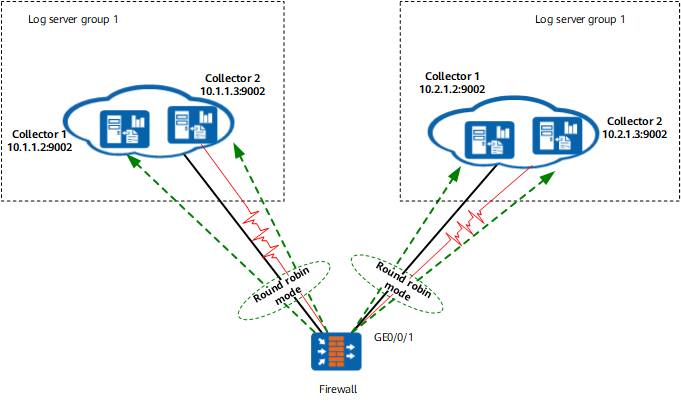
The specific configuration is as follows:
# Configure multiple log hosts with different IDs.
[FW] firewall log host 1 10.1.1.2 9002
[FW] firewall log host 2 10.1.1.3 9002
[FW] firewall log host 1 10.2.1.2 9002 secondary
[FW] firewall log host 2 10.2.1.3 9002 secondary
# Enable the log concurrency function.
[FW] firewall log session multi-host-mode concurrent
# Configure the FW to send heartbeat detection packets to the eLog log host
[FW] firewall log host heartbeat enable
[FW] firewall log host heartbeat tx-internal 1 3