Logs in Virtual System Environment
This section describes principles and implementation modes of log output in the virtual system deployed on the FW.
The virtual system is a technology that divides a physical firewall to multiple mutually-independent logical firewalls. Each virtual system has independent configurations and resource items. Therefore, hardware resources are effectively used.
You need to consider the following factors when configuring the log output in the virtual system environment:
Log output modes
You need to consider whether the virtual system can interconnect with the eLog, whether the virtual system directly outputs logs to the eLog, and whether the virtual system outputs logs to the eLog interconnected with the root system during actual deployment.
Types of output logs
The types of output logs supported by the virtual system are subject to the functions supported by the virtual system. For certain functions that are not virtualized, the functions cannot be configured in the virtual system, and the corresponding logs cannot be generated.
You can configure the log hosts for the root system and virtual system to interconnect with the eLog, so that the firewall can output logs based on virtual systems. In addition, the firewall can output certain logs of the virtual system to the eLog interconnected with the root system or output certain logs of the root system to the eLog interconnected with a specific virtual system. This section describes the principles and implementation modes of log output in the virtual systems deployed on the FWs in different product forms.
The virtual system outputting logs to the interconnected eLog
Similar to the root system, you can also configure an independent log host for each virtual system and configure each virtual system to interconnect with the eLog, so that the firewall outputs the logs of each virtual system to the respectively interconnected eLog. Note that the root system and each virtual system are interconnected with the eLog to facilitate information display. In the actual network environment, the logs of the root system and the virtual system can be output to the same eLog for centralized management.
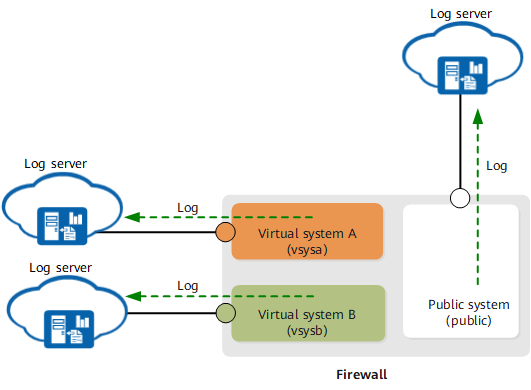
The following table describes the types of output logs supported by the virtual system.
Log Type |
Output Mode |
Description |
|---|---|---|
Session logs Including common session logs, IPv4 PAT and No-PAT session logs, NAT No-PAT session logs, IM session logs, URL session logs, and half-open session logs. |
Output to the interconnected eLog |
The parameters, such as syslog or netflow timestamps configured for the root system, are also effective in the virtual system. The virtual system outputs the corresponding log information based on the configurations of the root system. |
Packet discard logs Including the packet discard logs for the packets that hit security policies, packets that hit default packet filtering rules, and packets that do not hit sessions. |
Output to the interconnected eLog |
The parameters, such as timestamps configured for the root system, are also effective in the virtual system. The virtual system outputs the corresponding log information based on the configurations of the root system. |
Certain system logs Including the administrator login or logout logs and command line operation logs. |
Output to the interconnected eLog |
The parameters, such as timestamps configured for the root system, are also effective in the virtual system. The virtual system outputs the corresponding log information based on the configurations of the root system. |
Service logs Including traffic logs, threat logs, content logs, policy hit logs, mail filtering logs, and URL filtering logs. |
Output to the interconnected eLog |
The parameters, such as timestamps configured for the root system, are also effective in the virtual system. The virtual system outputs the corresponding log information based on the configurations of the root system. |
The virtual system outputting logs to the eLog interconnected with the root system
As shown in the following figure, the virtual system can also output certain logs to the eLog interconnected with the root system. The functions enabled in the root system or parameters configured for the root system are also effective in the virtual system. The virtual system outputs the corresponding log information based on the configurations of the root system.
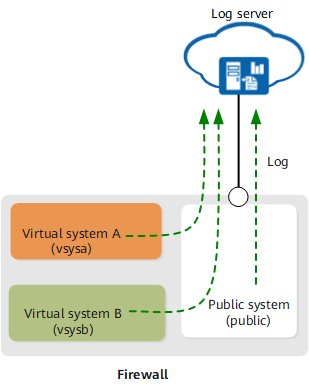
The following table describes the types of output logs supported by the virtual system.
Log Type |
Output Mode |
Description |
|---|---|---|
Session logs Including common session logs, IPv4 PAT and No-PAT session logs, NAT No-PAT session logs, IM session logs, URL session logs, and half-open session logs. |
You can manually configure the system to output the logs to the eLog interconnected with the root system. |
The session logs can be output to the log servers of the root system and virtual system simultaneously. |
Packet discard logs Including the packet discard logs for the packets that hit security policies, packets that hit default packet filtering rules, and packets that do not hit sessions. |
You can manually configure the system to output the logs to the eLog interconnected with the root system. |
The packet discard logs can be output to the log servers of the root system and virtual system simultaneously. The function of outputting the packet discard logs must be enabled in the root system. |
Certain system logs Including the administrator login or logout logs and command line operation logs. |
The logs can be output only to the eLog interconnected with the root system but not the eLog interconnected with the virtual system. |
- |
Port Range logs Including the port block allocation, release, and keepalive logs. |
The logs can be output only to the eLog interconnected with the root system but not the eLog interconnected with the virtual system. |
You need to configure the NAT address pool and NAT policies in the virtual system, enable the Port Range log generation function in the root system, and configure the log host. |
Service logs Including traffic logs, threat logs, content logs, policy hit logs, mail filtering logs, and URL filtering logs. |
You can manually configure the system to output the logs to the eLog interconnected with the root system. |
The service logs in dataflow format can be output to the log servers of the root system and virtual system simultaneously. The service logs in syslog format can be output to the log server of the root system. |
The root system outputting logs to the eLog interconnected with the virtual system
As shown in the following figure, in addition to outputting logs to the eLog interconnected with the root system, the root system can also output logs to the eLog interconnected with a specific virtual system.
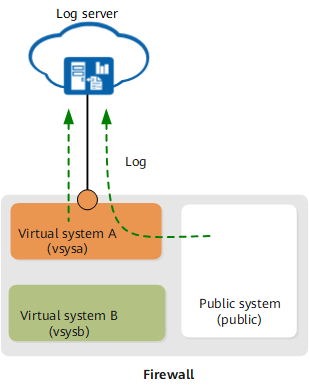
The following table describes the types of output logs supported by the root system.
Log Type |
Output Mode |
Description |
|---|---|---|
Session logs Including common session logs, IPv4 PAT and No-PAT session logs, NAT No-PAT session logs, IM session logs, URL session logs, half-open session logs, IPv6 NAT64 session logs, and IPv6 DS-Lite session logs. |
Output to the eLog interconnected with a specific virtual system |
When you configure the log host for the root system, the source address and source port shall inherit the configurations of the root system. |
Packet discard logs Including the packet discard logs for the packets that hit security policies, packets that hit default packet filtering rules, and packets that do not hit sessions. |
Output to the eLog interconnected with a specific virtual system |
When you configure the log host for the root system, the source address and source port shall inherit the configurations of the root system. |
System logs Including the administrator login or logout logs and command line operation logs. |
Output to the eLog interconnected with a specific virtual system |
When you configure the log host for the root system, the source address and source port shall inherit the configurations of the root system. |
Service logs Including traffic logs, threat logs, content logs, policy hit logs, mail filtering logs, and URL filtering logs. |
Output to the eLog interconnected with a specific virtual system |
When you configure the log host for the root system, the source address and source port shall inherit the configurations of the root system. |
A log generated by the root system or a virtual system contains a virtual system field, indicating that the log is generated by the root system or the virtual system. The following figure shows the system logs output by the root system and the virtual system. The VpnName field in the logs indicates whether the log is generated by the root system or the virtual system. When the value is VpnName=, the log is generated by the root system; when the value is VpnName=vsysa, the log is generated by virtual system vsysa.

