Configuring Log Output in the Virtual System Environment
This section describes how to configure log output for the FW in virtual systems.
During the configuration, check whether the eLog is interworking with the root system or the virtual system and how the logs of the virtual system are output.
This section describes the configuration processes on the FWs in different product forms.

This section focuses on the log host configuration and related configurations for log output from the virtual system. For details about the configurations for log generation, see the corresponding sections.
The virtual system outputting logs to the eLog interconnected with the root system
In this mode, configure the log host in the root system and configure specific services in the virtual system.
The virtual system outputs session logs, packet discard logs, and service logs in dataflow format to the eLog in the root system.
Operation
Configuration Command
Configured in the Root or Virtual System
Configuring a log host
- In the VSYS management view of the root system, run the session-log send-to-public log-type { all | nat | none } command to output the service logs in dataflow format, packet discard logs, and session logs in the virtual system to the eLog interconnected with the root system.
If the all parameter is configured, the service logs in dataflow format, session logs (experiencing NAT or not experiencing NAT), and packet discard logs (the function of generating packet discard logs is enabled in the root system) in the virtual system are output to the eLog in the root system. If the nat parameter is configured, the session logs that experience NAT can be output to the eLog in the root system. If the none parameter is configured, the service logs in dataflow format, session logs, and packet discard logs in the virtual system are not output to the eLog in the root system.
- In the root system, run the firewall log host host-id ip-address port [ secondary ][ track ip-link link-name ] command to configure the log host.
- In the root system, run the firewall log source ip-address port command to configure the source IP address and source port used by the firewall to output logs.
Root system
Configuring session logs
- Run the firewall log session log-type { netflow | binary | syslog } command to adjust the session log format.
- Run the firewall log netflow header command to modify the timestamp parameter in the log header of the session log in netflow format.
- Run the firewall log syslog header default timestamp { utc | local | none } or firewall log syslog content format mtn command to modify the syslog header format and timestamp.
Root system
Run the firewall log session new-session enable, firewall log session new-session enable, and firewall log session periodic enable commands to enable the function of recording new and periodic session logs.
Root and virtual systems, respectively
Run the session logging command to enable the function of recording session logs in the security policy. There is traffic matching the policy.
Root and virtual systems, respectively
Configuring packet discard logs
Run the firewall log packet-discard enable and firewall log packet-discard { session-miss | packet-filter | default-packet-filter | ip-mac | others } commands to enable the function of generating packet discard logs.
Root system
Configuring dataflow service logs
Run the dataflow enable command to enable the function of recording service logs in dataflow format.
Root system
- In the VSYS management view of the root system, run the session-log send-to-public log-type { all | nat | none } command to output the service logs in dataflow format, packet discard logs, and session logs in the virtual system to the eLog interconnected with the root system.
The virtual system outputting Port Range logs to the eLog interconnected with the root system
- In the virtual system, configure the NAT address pool and NAT policies with port pre-allocation and incremental allocation functions.
- In the root system, run the nat port-block { assigning | freeing } syslog enable command to enable the function of outputting port block allocation and release logs.
- In the root system, run the nat port-block keepalive syslog enable command to enable the function of outputting port block keepalive logs.
- In the root system, run the nat port-block syslog host host-address [ host-port ] source source-name source-address source-port command to configure the log host and the source IP address and source port used by the firewall to output Port Range logs.
- To adjust the timestamp of the log headers, in the root system, run the firewall log syslog header default timestamp { utc | local | none } command.
The virtual system outputting system logs and services logs in syslog format to the eLog interconnected with the root system
- In the root system, run the info-center loghost vsys-to-public enable command to output service logs and system logs of all virtual systems through the log host of the root system.
- In the root system, run the info-center loghost ip-address command to configure the log host.
You need to run the info-center enable command to enable the information center and run the undo dataflow enable command to enable the function of recording syslogs only in the root system. The sending on the virtual system will be implemented based on the setting in the root system.
The virtual system outputting logs to the interconnected eLog
In this mode, you can configure an independent log host for each virtual system.
In the virtual system, run the firewall log host host-id ip-address port [ secondary ] [ track ip-link link-name ] command to configure the log host.
- In the virtual system, run the firewall log source ip-address port command to configure the source IP address and source port used by the firewall to output logs.
- In a scenario where the packet discard logs or session logs are output in syslog format, to adjust the log header format, run the firewall log syslog header default timestamp { utc | local | none } command in the root system.
- In a scenario where the session logs are output in netflow format, to adjust the log header format, run the firewall log netflow header default timestamp { utc | local } command in the root system. By default, the timestamp in the log headers is set to the UTC time if the logs are output in netflow format.
Run the info-center loghost ip-address [ source-ip source-ip-address | local-time | port port ]* command to configure the log host.
The default timestamp of the headers of the logs sent from the FW to the log host is the UTC time. In the virtual system, the timestamp cannot be changed to the local time.
The root system outputting logs to the eLog interconnected with the virtual system
In this mode, configure the log host in the root system.
In the root system, run the firewall log host host-id ip-address port command to configure the log host.
- In the root system, run the firewall log source ip-address port command to configure the source IP address and source port used by the firewall to output logs.
ip-address must be the IP address of the log source configured on the log server.
In this mode, you must add the route from the root system to the virtual system log host to ensure that the source IP address in each log output from the firewall in the root system can communicate with the log host.
The root system outputting logs to the eLog interconnected with the vpn instance
In this mode, configure the log host in both the root system and the virtual system. Bind the vpn-instance parameter, that is, the name of the virtual system interconnected with the eLog, with the log host configured in the root system.
In the virtual system, run the firewall log host host-id ip-address port command to configure the log host.
In the root system, run the firewall log host host-id ip-address port vpn-instance vpn-instance-name command to configure the log host.
Running the info-center loghost command in the information center does not support sending service logs to the log host under the VPN instance.
Configuration Example
As shown in the figure, the FW has two virtual systems. The root system is interworking with the eLog. It is required that the logs of the root system and all virtual systems be output to the eLog.
The following part describes how the virtual system outputs session logs, packet discarding logs, and service logs in dataflow format to the eLog in the root system as an example.
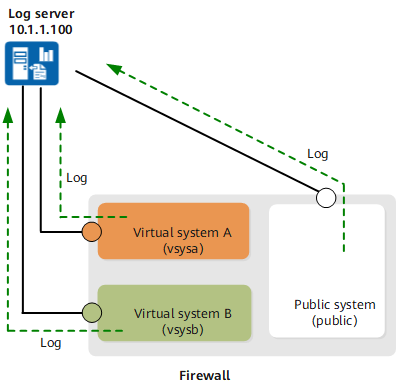
The log host is configured for the FW as follows:
# In the root system, configure the log host.
<FW> system-view
[FW] firewall log host 1 10.1.1.100 9002
[FW] firewall log source 10.1.1.1 6666
# In the VSYS management view of the root system, configure outputting the session logs of the virtual system to the eLog interconnected with the root system.
<FW> system-view
[FW-vsys1] vsys vsys1
[FW-vsys1] session-log send-to-public log-type all
<FW> system-view
[FW-vsys1] vsys vsys1
[FW-vsys1] firewall log session new-session enable
[FW] firewall log session new-session enable
<FW> system-view
[FW] vsys vsys1
[FW-vsys1]security-policy
[FW-vsys1-policy-security]rule name policy_sec
[FW-vsys1-policy-security-rule-policy_sec]session logging
<sysname>system-view
[sysname]security-policy
[sysname-policy-security]rule name policy_sec
[sysname-policy-security-rule-policy_sec]session logging
<FW> system-view
[FW] firewall log session log-type netflow
# Configure specific services in the root system and virtual system. Detailed configuration steps are not described here.